Microsoft 365 and Office | SharePoint | Development
The process of building custom applications and tools that interact with Microsoft SharePoint, including SharePoint Online in Microsoft 365.

This browser is no longer supported.
Upgrade to Microsoft Edge to take advantage of the latest features, security updates, and technical support.

Hello,
We are migrating SharePoint 2016 on-premises to SharePoint Online. SharePoint 2016 contains publishing pages and custom page layouts.
is there any way using PowerShell we can migrate and modernize the all the publishing pages and other classic pages to SharePoint Online modern pages?
Thanks,
The process of building custom applications and tools that interact with Microsoft SharePoint, including SharePoint Online in Microsoft 365.
A group of Microsoft Products and technologies used for sharing and managing content, knowledge, and applications.
Hi,
I tried migration pages from SharePoint 2016 to SharePoint Online using SPMT Powershell, but it gave me an error as "The SharePoint version '0' is not supported". It seems it does not support SharePoint 2016.
Also I have few publishing sites and custom page layout. Please advise if those will be migrated and converted to Modern pages?
Thanks,
Thanks for the above script.
Will it work with publishing site and publishing pages?
Thanks,
' cx='32' cy='32' r='32' /%3E%3Ctext x='50%25' y='55%25' dominant-baseline='middle' text-anchor='middle' fill='%23FFF' %3ETZ%3C/text%3E%3C/svg%3E)
Hi anonymous user,
According to my research and testing, you can install SharePoint Migration Tool to do the migration. And you can use the following PowerShell script to migrate pages from SharePoint 2016 to SharePoint Online:
$SourceSiteUrl = "http://sp/sites/xxx"
$OnPremUserName = "xxx\xxxx"
$OnPremPassword = ConvertTo-SecureString -String "<<PassWord>>" -AsPlainText -Force
$SPCredential = New-Object -TypeName System.Management.Automation.PSCredential -ArgumentList $OnPremUserName, $OnPremPassword
$SourceListName = "xxx"

#Define SharePoint target#
$SPOUrl = "https://xxxxx.sharepoint.com/sites/xxxx"
$UserName = "******@xxxxx.onmicrosoft.com"
$PassWord = ConvertTo-SecureString -String "<<PassWord>>" -AsPlainText -Force
$SPOCredential = New-Object -TypeName System.Management.Automation.PSCredential -ArgumentList $UserName, $PassWord

#Import SPMT Migration Module#
Import-Module Microsoft.SharePoint.MigrationTool.PowerShell

#Register the SPMT session with SharePoint credentials#
Register-SPMTMigration -SPOCredential $SPOCredential -Force

#Add two tasks into the session. One is SharePoint migration task, and another is File Share migration task.#
Add-SPMTTask -SharePointSourceCredential $SPCredential -SharePointSourceSiteUrl $SourceSiteUrl  -TargetSiteUrl $SPOUrl -MigrateAll


#Start Migration in the console. #
Start-SPMTMigration
My test results:
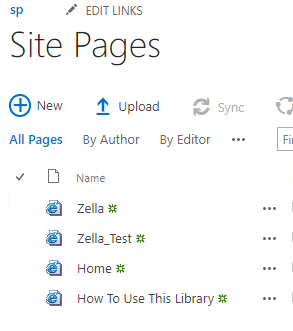
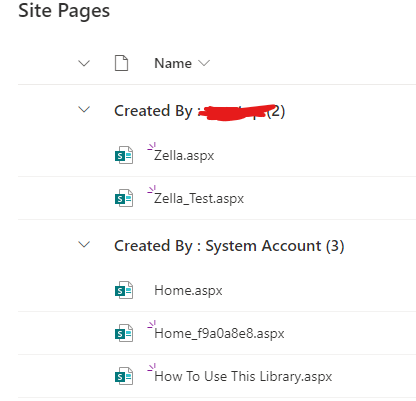
Use the following PowerShell script to convert all classic pages to modern pages:
#Set Parameters
$SiteURL="https://xxxxx.sharepoint.com/sites/xxxxx"

#Connect to Site
Connect-PnPOnline $SiteURL -Credentials (Get-Credential)  #-Interactive

#Get All Pages from "Site Pager" Library
$Pages = Get-PnPListItem -List SitePages -PageSize 500

ForEach($Page in $Pages)
{
    #Get the page name
    $PageName = $Page.FieldValues.FileLeafRef
    Write-host "Converting Page:"$PageName

    #Check if the page is classic
    If($Page.FieldValues["ClientSideApplicationId"] -eq "b6917cb1-93a0-4b97-a84d-7cf49975d4ec")
    {
        Write-host "`tPage is already Modern:"$PageName -f Yellow
    }
    Else
    {
        #Conver the classic page to modern page
        ConvertTo-PnPPage -Identity $PageName -Overwrite -TakeSourcePageName -AddPageAcceptBanner
        Write-host "`tPage Converted to Modern!" -f Green
    }
}
If the answer is helpful, please click "Accept Answer" and kindly upvote it. If you have extra questions about this answer, please click "Comment".
Note: Please follow the steps in our documentation to enable e-mail notifications if you want to receive the related email notification for this thread.
Thanks @sadomovalex . I tried it but getting error as "ConvertTo-PnPPage : could not find file PnP.Framework.resources"
I am not sure what is missing.
Thanks,

didn't try it by myself but there is PnP Page Transformation tool which you may try. Check the following post: Can I convert a Publishing page to the modern experience. And also MS document Transform classic pages to modern pages.