Share via

Hyper-V vSwitch for Windows server 2025 Datacenter Server is failing

Anonymous
2025-03-11T13:06:33+00:00

Hi Team,

We have setup new windows server 2025 Datacenter, and it's configured with the Nic teaming (4 adapters 2 NIC teams).

Also, we have configured the Hyper-V server in the physical server. When we try to configure the vSwitch from the Virtual switch manager we can't be able to select the NIC Team adapters from the list. As we are getting the below error message.
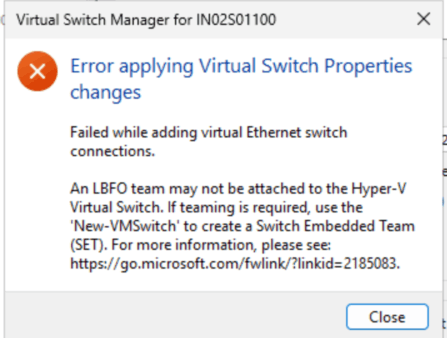
Then we tried to execute the below PS commands to add the vSwitch, but it doesn't work in the windows server 2025.

We can see this is working fine in the windows server 2022 and able to configure the vSwitch successfully from Blogs.

But it's not working as expected in the windows server 2025 Datacenter.

PS command.

New-VMSwitch -Name "Test-vSwitch" -NetAdapterName "VLAN 10" -AllowNetLBFOTEAMS $true -AllowManagementOS $true

&

New-VMSwitch -Name "Test-vSwitch" -NetAdapterName "VLAN 10" -EnableEmbeddedTeaming $true -AllowManagementOS $true

we also tried the SET command to configure the vSwitch but that also not working as expected.

Can you somebody help us to fix this issue?

Windows for home | Windows 11 | Install and upgrade

Locked Question. This question was migrated from the Microsoft Support Community. You can vote on whether it's helpful, but you can't add comments or replies or follow the question.

0 comments No comments

5 answers

Sort by: Most helpful
  1. Anonymous
    2025-05-22T02:43:28+00:00

    I have not found a solution yet. I finally had to create multiple switches with single NICs just to at least do manual load balancing. It would be great to figure this out. I cannot imagine others are not having the same issue.

    What brand server and NICs do you have?

    Was this answer helpful?

    1 person found this answer helpful.
    0 comments No comments
  2. Anonymous
    2025-05-21T23:01:58+00:00

    This exactly is the issue i face on windows server 2022 / 2025 std as well. With single NIC, this seems to be OK however adding 2 ports from same NIC, seems to be problematic.

    Is there a solution for this or a way to use teamed interfaced to be used on windows server 2022 even?

    Was this answer helpful?

    0 comments No comments
  3. Anonymous
    2025-04-24T18:39:42+00:00

    This work for me too on our new Windows Server 2025 Datacenter. However, I am seeing an odd behavior. I created a test VM on the host and assigned it to the virtual switch. When I try to access any site in the browser, there is a noticeable lag. Sometimes it takes so long that I get the site cannot be reached message. I created a second virtual switch with a single NIC and that one works without a glitch. I have not had this issue with previous versions of Windows Server Datacenter.

    Was this answer helpful?

    0 comments No comments
  4. Anonymous
    2025-04-23T12:24:22+00:00

    Remove Teams if you have already created them and then run the below on Server 2025.

    #Change the Adapter Names according to your NIC names if you not sure about your NIC Names below command will get them for you.

    Get-NetAdapter | Where-Object {$_.Status -eq "Up"} | Select Name, InterfaceDescription

    New-VMSwitch -Name "Team Switch" `

             -NetAdapterName "Integrated NIC 1 Port 1-1","Integrated NIC 1 Port 2-1" ` 
    
             -EnableEmbeddedTeaming $true ` 
    
             -AllowManagementOS $true
    

    Thats what worked for me.

    Thanks

    Was this answer helpful?

    0 comments No comments
  5. Anonymous
    2025-03-12T02:28:37+00:00

    Hi, Vishakh93

    Welcome to Microsoft Community.

    We understand that you are experiencing problems with Hyper-V vSwitch and I know exactly how you feel!  Allow me to explain that the Microsoft community we are currently part of focuses on solving problems with day-to-day use of Windows, such as disappearing mouse pointers, WiFi not connecting, Windows updates not installing, and so on.I wish very much that I could address your questions, but it needs to be explained that Hyper-V related issues are beyond the scope of Microsoft Community support and it has a corresponding forum (Microsoft Learn) and corresponding boards, as well as corresponding specialists who can provide you with more focused and specialized advice.The current forums initially had Windows Server and Windows Client for IT Pros sections, but both of these have recently migrated to Microsoft Learn, and as required by the community rules, I will direct you to the correct forum to post your question, you can do this by clicking on the link below, and then at the top of the page, click on “Ask a question” (below). Hyper-V - Microsoft Q&A 

    We hope that your question will be handled appropriately once you have contacted the correct department. Thank you for your understanding!

    Best Regards

    Nicholas.Z - MSFT | Microsoft Community Support Specialist

    Was this answer helpful?

    0 comments No comments
