Microsoft Teams | Microsoft Teams for business | Chats | Group chats
Conversations involving multiple participants, allowing collaboration and information sharing in Teams

This browser is no longer supported.
Upgrade to Microsoft Edge to take advantage of the latest features, security updates, and technical support.
' cx='32' cy='32' r='32' /%3E%3Ctext x='50%25' y='55%25' dominant-baseline='middle' text-anchor='middle' fill='%23FFF' %3EA%3C/text%3E%3C/svg%3E)
I just updated teams this morning per the apps recommendation (I was using Teams classic up until today).
I seem to be experiencing a number of issues that were not occurring with the Classic version of the app, but in this post I'm focusing on the Code snippet tool. We are a development team, so sharing code snippets within the app is commonplace.
[EDIT: I was going to post a screenshot her to illustrate what I am using, but I either end up with "not found" image when adding it here, or a confirmation that the image was inserted successfully despite it not showing in this window at all.]
Since updating however, the built in chat client's code snippet tool will NOT work properly. I'm able to add a snippet and send it:
[EDIT: again, I can't add an image here, but this was a screenshot showing the snippet tool in the box where i type messages to be sent in teams.]
The problem is, I've sent multiple snippets this morning (mostly for testing purposes) but my co-workers cannot see them:
[EDIT: again, I attempted to attach a screenshot here but am unable to do so, but it would have shown a chat message containing a snippet, but the snippet box shows "Code snippet failed to load, Click here to retry."]
Also note that on my own end I can sometimes view these snippets, but in some cases I also get the same "failed to load" error.
This is very problematic as it's a common use for us to do this.
PLEASE READ THE FOLLOWING BEFORE ASKING BASIC QUESTIONS (it already covers a lot of the basics most support inquiries start with):
You have Microsoft Teams version 23335.232.2637.4844.
You've got the latest version. It was last updated on 1/26/2024.
The client version is 49/23113028724.
Edition: Windows 10 Enterprise
Version: 22H2
OS build: 19045.3930
Conversations involving multiple participants, allowing collaboration and information sharing in Teams
Locked Question. This question was migrated from the Microsoft Support Community. You can vote on whether it's helpful, but you can't add comments or replies or follow the question.
Dear Bobby,
Good day! Thank you for posting to Microsoft Community. We are happy to assist you.
Based on your description, you are experiencing issues with the Code snippet tool in Microsoft Teams after updating to the new Teams version.
Please comprehend that new Teams is still under development and now some functions might not be very stable, since there are many users reported differet issues/bugs of new Teams, I think the issue for your Code snippet tool with Team is caued by new Teams limitation or bug. In this situation, I suggest you contact the new Teams support group for more professional support:
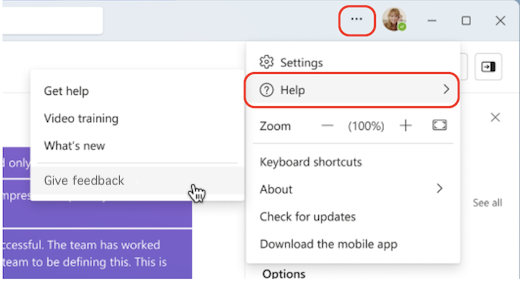
Help is moving! In the new Teams, you can access authoritative help and support articles, videos, and the latest on what's new by selectingSettings and more* next to your profile picture at the top of the new Teams, then select
  Help>Get help, Help>Video training, or Help>What's new.
  *
*
Your feedback is critical for improving the Teams experience. If you encounter a bug or have feedback when using the new Teams, select Help>Give feedbackand follow the prompts.
For your reference: Switch to the new Microsoft Teams - Microsoft Support
I hope the information helps! If there is any update or I misunderstand you, please feel free to let me know. I will continue to assist you. Your understanding and co-operation are highly appreciated.
Thanks for your precious time. Have a nice day.
Sincerely,
Sherry | Microsoft Community Moderator
Dear Bobby,
Thank you for posting to Microsoft Community. We are happy to assist you.
We are looking into your situation, we will update the thread shortly.
Appreciate your patience and understanding and thank you for your time and cooperation.
Sincerely,
Sherry | Microsoft Community Moderator