Developer technologies | Visual Studio | Debugging
A core feature of Visual Studio that allows developers to inspect, analyze, and troubleshoot code during execution.
This browser is no longer supported.
Upgrade to Microsoft Edge to take advantage of the latest features, security updates, and technical support.
' cx='32' cy='32' r='32' /%3E%3Ctext x='50%25' y='55%25' dominant-baseline='middle' text-anchor='middle' fill='%23FFF' %3EJ%3C/text%3E%3C/svg%3E)
My vs2017 theme color is dark, and the editor cursor color is also dark, which makes it difficult to see the cursor in coding clearly.
Like this:
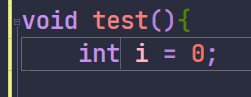
How to change the editor cursor color in Visual Studio 2017?
A core feature of Visual Studio that allows developers to inspect, analyze, and troubleshoot code during execution.
A family of Microsoft suites of integrated development tools for building applications for Windows, the web, mobile devices and many other platforms. Miscellaneous topics that do not fit into specific categories.
It took me 5 minutes to select the question tag.So bad!
Answer accepted by question author
' cx='32' cy='32' r='32' /%3E%3Ctext x='50%25' y='55%25' dominant-baseline='middle' text-anchor='middle' fill='%23FFF' %3EAX%3C/text%3E%3C/svg%3E)
Hi @Jidcoo ,
Welcome to Microsoft Q&A!
You can go to Tools > Options > Environment > Fonts and Colors > Show settings for: Text Editor > Display items: Plain Text > change the Item foreground:.
Sincerely,
Anna
*
If the answer is the right solution, please click "Accept Answer" and kindly upvote it. If you have extra questions about this answer, please click "Comment".
Note: Please follow the steps in our documentation to enable e-mail notifications if you want to receive the related email notification for this thread.
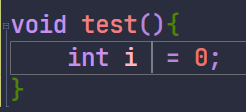
It looked better!
One more question is: can I make the cursor thicker? If so, what can I do?
Hello, you can change the width of the cursor through a system setting:
Control Panel > Ease of Access > Ease of Access Center > Make the computer easier to see > Set the thickness of the blinking cursor: