' cx='32' cy='32' r='32' /%3E%3Ctext x='50%25' y='55%25' dominant-baseline='middle' text-anchor='middle' fill='%23FFF' %3EA%3C/text%3E%3C/svg%3E)

Hi HelloFrom Anita,
For us to provide an accurate resolution for your concern, I would like to confirm if you're using Outlook.com or the Outlook application.
If you're using Outlook.com, you can find your existing groups/contact lists on the People page. Just select All contact lists in the left pane, or search for the contact list name. You can also follow these steps on how to create a group/contact list in Outlook.com:
- On the People page, on the toolbar, select the arrow next to New contact and then select
New contact list.
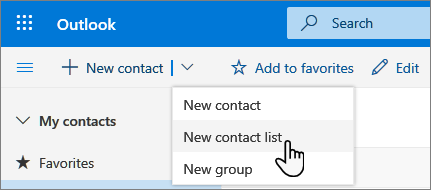
- Enter a name for the list, and then add names or email addresses.
- Select Create.
***Tip:***If you want to group contacts for other reasons than sending email, you can create a folder instead. Then add contacts to the folder.
Note:****By default, contact lists are created in the default Contacts folder, and you can also see them underAll contact lists*. If you want to save the contact list in a different folder, select the folder before you selectNew contact list.*
However, if you're pertaining to Outlook application, you can visit this article for steps on how to create a group.
Please respond to this thread to let me know how the issue progresses. Similarly, if you have more questions, please inform me by replying to this post.