An update: Outlook finally did prompt me for the password (after almost 24 hours). So email is now syncing between my laptop and online. I'm still having a problem syncing from the laptop to my phone, even after updating the password on the phone, but I suspect that's out your and this forum's area. If you do have any pointers or suggested sites to try to fix that situation, that would be great.
changing password on exchange account
I recently changed my login password via outlook.live. Now I need to change the password to the new one in Outlook 365, but I can't figure out how to do that. (I hope this explanation is making sense.)
When I go into the Account Settings for that account (I have a few), there doesn't seem to be a place to do that. I select that account and then click Change, but it takes me to a window that says "Exchange Account Settings." Below that is "Offline Settings" and" Download email for the past...." Clicking "More Settings" doesn't have a place to update the password either.
Outlook | Web | Outlook.com | Account management, security, and privacy
Locked Question. This question was migrated from the Microsoft Support Community. You can vote on whether it's helpful, but you can't add comments or replies or follow the question.
3 answers
Sort by: Most helpful
-
Anonymous
2020-03-23T17:54:26+00:00 -
Anonymous
2020-03-23T11:54:26+00:00 Thanks Darpan. I had hoped that password prompt would appear, but it hasn't, even after closing Outlook 365 nd re-opening it. The reason I put my question in this forum is that I have both that personal hotmail account as well as using 365 for business (through the university I work for) so emails to my hotmail address are received in my Outlook 365 along with mail from the university (in a different profile).
I tried to reset the online password back to the earlier one that had worked, but it won't let me because I have previously used that password. I thought that might resolve the issue.
How can I prompt Outlook to ask for the password? I think that's what's needed to fix this.
-
Anonymous
2020-03-23T10:06:27+00:00 Hi Greenbergman,
Thank you for the posting in our forum community.
Based on your description, generally if the password have changed for email account from online, then password window will automatically popup at the time of open Outlook for Microsoft Exchange account. Because, this password related thing is comes from the server side.
Further, we would like to suggest you that kindly clear your credential from window credential manager with associated Outlook accounts, after that try to identify the issue. Go to Control Panel > Select User Accounts > select Credential Manager > click on Windows credentials > Remove your Hotmail related credentials from windows credentials.
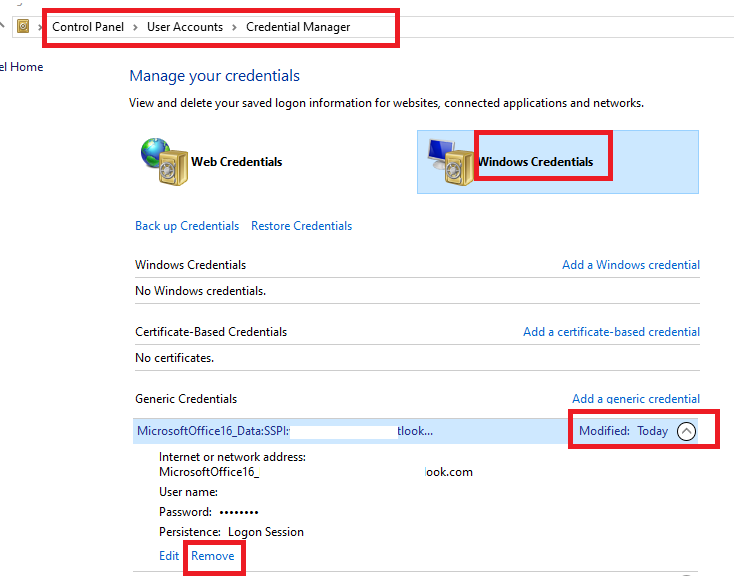
Since, you are using Hotmail account and we are focusing Office 365 for Business related issue. So for further better guidance, we will help you to move your thread in proper category for proper handling. We are truly appreciating your cooperation in our forum community.
Regards,
Darpan