Share via

Group by Date in Outlook 365

Anonymous
2021-03-23T11:18:40+00:00

I would like the view in Outlook 365 to look like I am used to in the desktop version, with Date: Today, Date: Last Week, Date: Two Weeks Ago etc etc.  How can I do this in Outlook 365?  

Outlook | Windows | Classic Outlook for Windows | For home

Locked Question. This question was migrated from the Microsoft Support Community. You can vote on whether it's helpful, but you can't add comments or replies or follow the question.

0 comments No comments

Answer accepted by question author

  1. Robert Sparnaaij [MVP] 18,296 Reputation points MVP Volunteer Moderator
    2021-03-23T14:50:46+00:00

    You can enable/disable the date headers in Outlook on the Web via;
    Settings-> View all Outlook settings-> Mail-> Layout-> Date headers (at the bottom of the list)

    Searching for "Date headers" in the Settings pane will also link directly to the option.

    Note that Outlook on the Web doesn't have the option to collapse the date groups itself like in your screenshot for Outlook Desktop.

    8 people found this answer helpful.
    0 comments No comments

3 additional answers

Sort by: Most helpful
  1. Anonymous
    2021-03-23T14:45:52+00:00

    Hi Sbond,

    Thanks for the screenshot. When you say "I would like the view in Outlook 365", do you mean Outlook 365 desktop client or Outlook Web App on Office 365?

    Regarding "I am used to in the desktop version", do you mean that Outlook 2016 desktop client version or else?

    I have checked on my side using Outlook 2016 can see the same as you posted screenshot group by Date (Date: Today, Date: Last Week, Date: Two Weeks Ago).
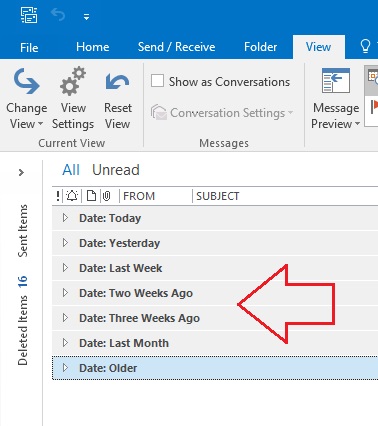
    However, using Outlook 365 desktopclient version 2102 Build 13801.20360 I can't do that group by Date (e.g. Date: Today), see screenshot below.
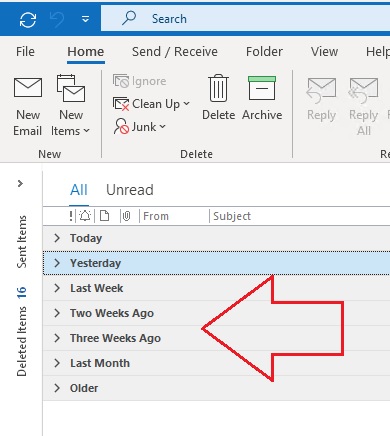
    Note: Also using Outlook Web App on Office 365, it's not feasible to do group by Date as you mentioned. 

    If I have misunderstood anything please correct me and provide us with detailed information screenshot about Outlook 365 version (see About Office: What version of Office am I using?) so that we can further assist you.

    Your patience is highly appreciated. Have a nice day and stay safe!

    Best regards,

    Shyamal

    1 person found this answer helpful.
    0 comments No comments
  2. Anonymous
    2021-03-23T11:29:37+00:00

    Apologies - snip here... 

    0 comments No comments
  3. Anonymous
    2021-03-23T11:20:59+00:00

    When you upload a screen shot, rather than a snipe its impossible to read, even if magnification increased.

    Within OL>View>Arrangement>Conversations

    0 comments No comments