Hello Ashley Yu,
Thank you for bringing this to our attention. We appreciate that you've taken the time to post your concern here in Microsoft Community Forum.
We understand that you need assistance in finding your calendar invitation and send a cancelation of invites to all members. Let’s check on this together and find ways to address this matter.
I did some test here on my end and I sent a calendar invite to several people. When sending a calendar invite the first thing you need to check is the sent item folder, this is to ensure that your calendar invitation go through successfully. In my case I was able to see it on my sent items folder and I've checked my Calendar in Outlook app and it's there showing all the details about the meeting.
Then I proceed in canceling the calendar invite directly from Outlook Calendar and I was able to do so. Please check your sent items folder if you sent the invite successfully.
I also found out that we cannot delete our own created calendar directly from the calendar section invite and it would only give you the option to cancel it unless if you're the invitee and that's the time that you can delete a calendar. But you still have the option to delete your own calendar and that's in the sent items folder.
In addition to that, when you delete a calendar it would not send any cancelation email to your recipients because sending a cancelation email it should be done manually.
Now in order for us to better assist you on this matter I need to ask:
- How do you send calendar invites? Is it from Outlook app or Outlook for web?
- If you're using an Outlook app, What versionand edition of Outlook you’re using? to check the version and edition of Office you’re using; please follow the link I have provided below.
About Office: What version of Office am I using? - Office Support (microsoft.com)You can also follow the screenshot I have provided below.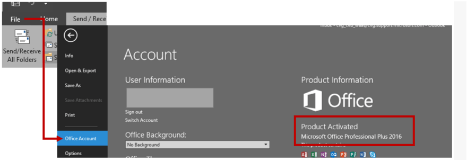
Please check all the support articles I have provided below and this might help you: --
>> Cancel a meeting - Outlook
>> Delete a calendar - Outlook
>> Cancel all future meetings in a series
Kindly provide us a detailed information of your concern so that we can provide the appropriate resolution.
We look forward to your response.
Sincerely,Juhn Jac,Consumer M365 Forum Moderator
' cx='32' cy='32' r='32' /%3E%3Ctext x='50%25' y='55%25' dominant-baseline='middle' text-anchor='middle' fill='%23FFF' %3EA%3C/text%3E%3C/svg%3E)
