Share via

I get this error when I am trying to open outlook on my school email.

Anonymous
2021-08-23T07:01:23+00:00

I keep getting this error when I try to use my school accounts(this acc) outlook. Any ideas of how to fix this? I am needing to check my school emails.

UTC Date: 2021-08-23T06:59:17.980Z
BootResult: configuration
Client Id: F765EA4302A140E19133692C1D9FA0BB
Session Id: e39e73d7-ab57-4905-b9f3-2b1ddb8d6f5b
Client Version: 20210815002.04
Native Host Version:undefined
err: Microsoft.Exchange.Clients.Owa2.Server.Core.OwaUserHasNoMailboxAndNoLicenseAssignedException
esrc: StartupData
et: ServerError
estack: Error: 500
    at i (https://outlook.office.com/mail/?native:379:139048)
    at https://outlook.office.com/mail/?native:379:70240
st: 500
ehk: X-OWA-Error
efe: BY3PR10CA0021
ebe: BY5PR05MB6930
emsg: UserHasNoMailboxAndNoLicenseAssignedError
Outlook | Web | Outlook.com | Account management, security, and privacy

Locked Question. This question was migrated from the Microsoft Support Community. You can vote on whether it's helpful, but you can't add comments or replies or follow the question.

0 comments No comments

11 answers

Sort by: Most helpful
  1. Anonymous
    2021-08-23T07:36:20+00:00

    Hi 

    My name is Daniel. I am an Independent Advisor.

    The error message "UserHasNoMailboxAndNoLicenseAssignedError" indicates that this is a license issue. It could be the admin has not assigned an Exchange online license yet to your account or in some cases it could be your admin has made a change lately in license settings. If this is a new account it takes some time to be propagated. Since this is license a related issue, unfortunately, the only way to go about this issue is by reaching out to your admin. 

    Please ask your admin to refer to this article: https://answers.microsoft.com/en-us/msoffice/fo...

    Disclaimer:

    This is a peer-to-peer support forum. I'm Non-Microsoft Staff. Mostly everyone here are users, helping other users.

    Kind Regards

    20+ people found this answer helpful.
    0 comments No comments
  2. Anonymous
    2021-08-27T14:04:35+00:00

    Hi,

    I have the same issue.
    I am the Exchange administrator, and the account created 2 months ago has always had a valid license.
    This issue has suddently appeared, without any reason.
    In the Exchange settings, the OWA access for the account is enable, as usual.

    I have no solution for the moment.
    I'll try to open a case at Microsoft, not sure to get someone to listen..

    10+ people found this answer helpful.
    0 comments No comments
  3. Anonymous
    2021-08-27T21:00:41+00:00

    Seems to be a new bug, I have a user reporting the same thing - no problem in full outlook, just gets this message when logging into Outlook Web:

    Something went wrong.
    Please try again later.
    Fewer Details

    UTC Date: 2021-08-27T20:29:58.350Z
    BootResult: configuration
    Client Id: 40D92D19CBD94D41BAE1D55ACCE70621
    Session Id: 9ca7a1d5-30b5-4f5e-a550-3ac48d1fab6e
    Client Version: 20210823004.04
    Native Host Version:undefined
    err: Microsoft.Exchange.Clients.Owa2.Server.Core.OwaUserHasNoMailboxAndNoLicenseAssignedException
    esrc: StartupData
    et: ServerError
    estack: i@https://outlook.office.com/mail/:379:139216
    278/t.a</</<@https://outlook.office.com/mail/:379:70151st: 500
    ehk: X-OWA-Error
    efe: SJ0PR03CA0286, MWHPR04CA0044
    ebe: PH0PR13MB5379
    emsg: UserHasNoMailboxAndNoLicenseAssignedError

    7 people found this answer helpful.
    0 comments No comments
  4. Anonymous
    2021-09-01T18:15:17+00:00

    I am an admin at a college and I am seeing this issue occur with a subset of new students. I saw there was an advisory for this on the MS Service Health site X280059, Exchange Online, Last updated: August 23, 2021 4:59 AM. As of now, that advisory is no longer posted but I am seeing this issue still affected some of our students. As far as I know they can log in via the iPhone mail app but not via OWA.

    UTC Date: 2021-09-01T17:43:27.142Z
    BootResult: configuration
    Client Id: 037DBC1AB30A445897F4076AA7BE4591
    Session Id: 4f422406-8f58-4eb2-af5a-8c7771d228be
    Client Version: 20210823004.07
    Native Host Version:undefined
    err: Microsoft.Exchange.Clients.Owa2.Server.Core.OwaUserHasNoMailboxAndNoLicenseAssignedException
    esrc: StartupData
    et: ServerError
    estack: Error: 500
        at i (https://outlook.office.com/mail/******@student.csn.edu/:379:139216)
        at https://outlook.office.com/mail/******@student.csn.edu/:379:70151
    st: 500
    ehk: X-OWA-Error
    efe: SJ0PR03CA0325
    ebe: BY3PR05MB7972
    emsg: UserHasNoMailboxAndNoLicenseAssignedError
    
    5 people found this answer helpful.
    0 comments No comments
  5. Anonymous
    2021-09-16T03:01:30+00:00

    Hello everyone, I faced the same error code when logging in the web browser and I found a solution. My problem was with my work email that uses my workplace's server. Since the original poster mentions "school account", I assume their email uses the school's server, so the solution is probably the same.

    First of all, these were where logging in did NOT work for me. I got them all from googling "outlook login":

    1. https://outlook.live.com
    2. https://outlook.office.com › mail
    3. https://outlook.office365.com › mail › inbox

    Below, I'll explain:

    • Where it worked (without image guide)
    • Where it worked (with image guide)
    • The bug I faced while using this method and how to fix it

    Where it worked (without image):

    1. Open the Outlook application on a computer. Phone won't work, regardless through the app or the web;
    2. Click on the tab 'File';
    3. Under 'Account Information', choose the exchange account that you want to access. It should be anything other than your [email]@outlook.com account;
    4. Under 'Account Settings', there is a link to 'Access this account on the web.' The link should look like this https://exserver.[servername].com/owa/
    5. Click the link and a login page will load on the web. You should be able to login just fine.

    Where it worked (with image):

    1. Open the Outlook application on a computer. Phone won't work, regardless through the app or the web;
    2. Click on the tab 'File';

    Image

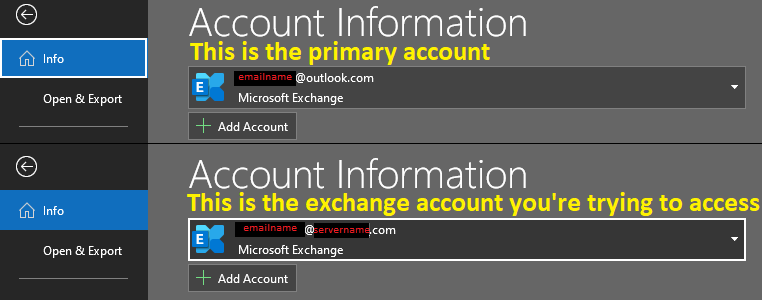
    1. Under 'Account Information', choose the exchange account that you want to access;
    Image

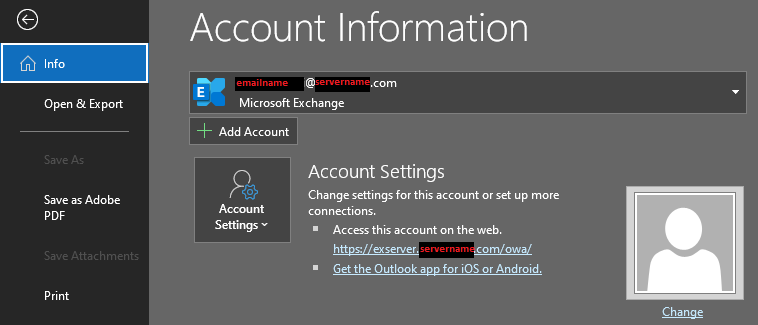
    1. Under 'Account Settings', there is a link to 'Access this account on the web.' The link should look like this https://exserver.[servername].com/owa/
    Image

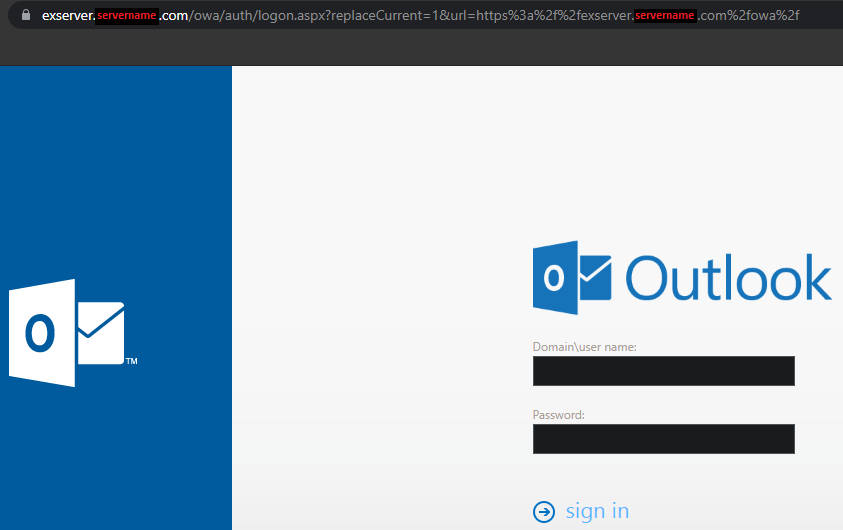
    1. Click the link and this page should load on the web. You should be able to login just fine.
    Image


    The BUG I faced:

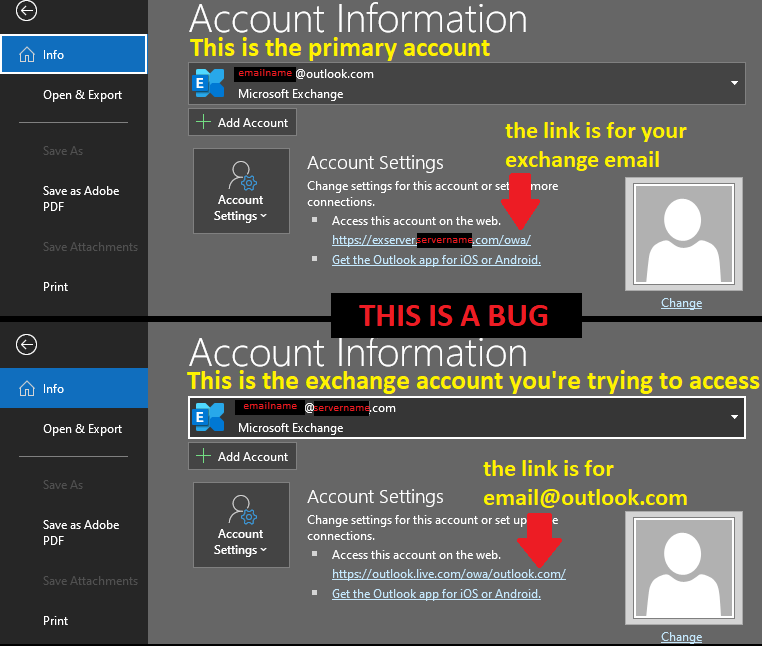
    If your primary account ([youremail]@outlook.com) is not set as the default account, the link that appears under 'Access this account on the web.' might be switched with your exchange account's link. The outlook account will show this link https://exserver.[servername].com/owa/ while the exchange account will show this link https://outlook.live.com/owa/outlook.com . You can simply change this through 'Account Settings'. You don't have to though, because the link that will work to open your exchange account is still the one that contains your server name, even though it is now under the primary outlook account. For better illustration, refer to these pictures:

    1. This is the situation that causes the bug
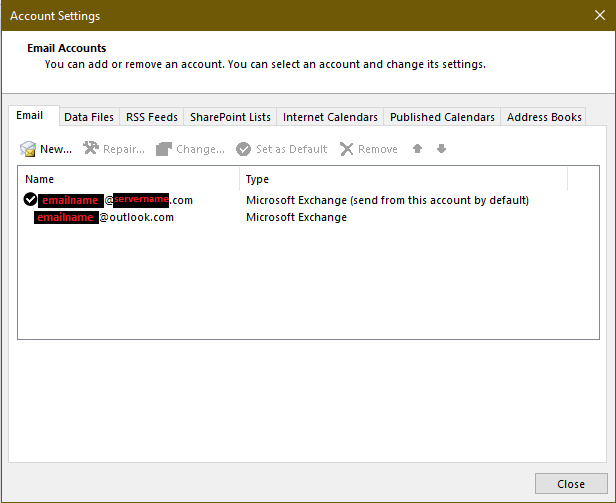
    Image

    1. This is how the bug looks like

    Image

    4 people found this answer helpful.
    0 comments No comments