Share via

How to give access to Multiple sub-folders at once

Anonymous
2021-11-09T00:54:22+00:00

Hi,

I need to give access to Multiple sub-folders to another user. The issue is that the primary folder (e.g. inbox) has multiple subfolders (e.g. admin etc) and that sub-folder also has sub-folders nested within and this goes on for about 5 layers.

It's not possible to give access to each mini subfolder (there's so many!) - is there any way to give the access all at once given the access level will remain the same across all of them?

I was told Microsoft removed this ability from end-users when I called IT but I can't figure out why an email provider would do something that makes using the service so inconvenient.

Please Help.

Thank you,

Tasmia

Outlook | Windows | Classic Outlook for Windows | For home

Locked Question. This question was migrated from the Microsoft Support Community. You can vote on whether it's helpful, but you can't add comments or replies or follow the question.

0 comments No comments

9 answers

Sort by: Most helpful
  1. Anonymous
    2021-11-09T21:53:37+00:00

    Hi Kerry

    I've tried in the OWA but the permission is not replicating. For e.g. I've given access to Inbox, but Inbox has several subfolders, each with own subfolders, and the permission is not automatically duplicating to the subfolders. Is there any way to automatically give the same access to all subfolders at once?

    Thank you

    Tasmia

    2 people found this answer helpful.
    0 comments No comments
  2. Anonymous
    2021-11-28T22:45:36+00:00

    Hi Kerry

    I've been able to add my email into the Add Shared Folder place, as you can see below, but still no luck :(

    Any other methods to try?

    Thanks again

    Tasmia

    1 person found this answer helpful.
    0 comments No comments
  3. Anonymous
    2021-11-15T01:05:07+00:00

    Hi Kerri

    Unfortunately, this does not work as:

    1. There is no option to create shared folder

    1. I need to give access to existing folders

    Any other ways to try please? Thank you for the help.

    Cheers

    Tasmia

    1 person found this answer helpful.
    0 comments No comments
  4. Anonymous
    2021-11-10T23:50:07+00:00

    Hi Kerry,

    So this is what I've tried with giving the Default publishing editor and folder visible and the New User (Tasmia) Owner access. I'm not sure that I am doing wrong as the rest of the subfolders are not having Tasmia automatically permitted to access the subfolders :(

    I've done this on the OWA as well.

    Thank you for the help,

    Cheers

    Tasmia

    1 person found this answer helpful.
    0 comments No comments
  5. Anonymous
    2021-11-09T08:20:25+00:00

    Dear Tasmia M,

    According to your problem:

    Please try following method:

    In the folder list, right-click on the name of the folder you wish to share and choose Properties. On the Permissions tab of the new window, click Add. Type the name the UW employee that you wish to receive access to your shared folder. Once the correct individual appears in the search results, make sure their name is highlighted and click Add. Their name should now appear in the field at the bottom. Then click on the Permission Level dropdown box to choose the level of sharing privileges you wish to. (Publishing Editor gives them full access to read the contents, add new emails, delete emails, and create new subfolders. )

    Please be aware that any new subfolders you create will inherit the existing permissions of their parent folder by default.
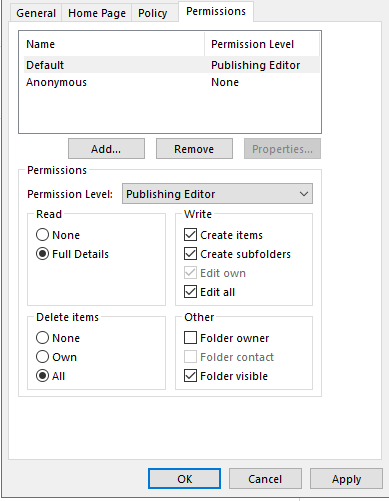
    Please try on the OWA, maybe you should wait in outlook.

    0 comments No comments