Hi Lynn,
As per Microsoft's Account Activity Policy, to keep your Microsoft account active you must sign in to the account at least once every two years.
As stated in Microsoft's Account Activity Policy it says "...you must sign in to your Microsoft account at least once in a two-year period to keep your account active. If you don’t sign in during this time, Microsoft will consider your account to be inactive. Any account that has been locked for more than two years will also be considered "inactive" and will be closed."
The Account Activity Policy can be seen here: https://support.microsoft.com/en-us/topic/micro....
So any emails that have remained inactive for two years without being signed into will be closed automatically.
However, if you want to talk to someone about a current Microsoft Account, sign into your account here: https://outlook.live.com/
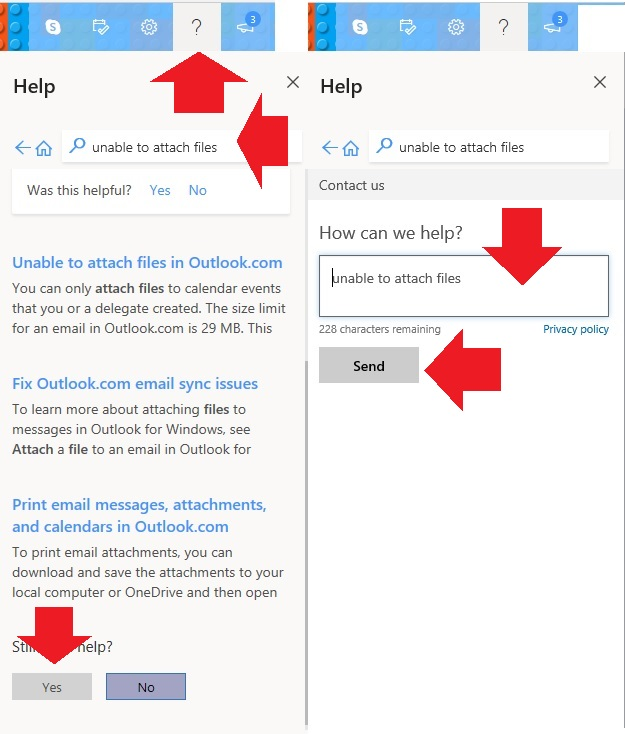
Click on the ? Help icon on the Outlook toolbar.
Search help for your issue by typing in the help search box and pressing Enter on your keyboard.
If none of the provided answers work for you, scroll to the bottom and it will say "Still need help?". Click "Yes" here.
It will then say "Choose a support option" and one of them should be "Provide your email address and a support agent will contact you". Click on this.
You can then write a description of your problem and enter your email address and someone from Outlook Support will contact you by email.
See pic below for the steps you need to follow.
Let me know if you have any more questions.
Kindest regards,
Neil
' cx='32' cy='32' r='32' /%3E%3Ctext x='50%25' y='55%25' dominant-baseline='middle' text-anchor='middle' fill='%23FFF' %3EA%3C/text%3E%3C/svg%3E)
