Share via

password recovery code

Anonymous
2022-07-06T23:25:32+00:00

My old laptop crashed and i need to reset my password to use on a new computer. I can't reset my password on my Iphone and i have requested a recovery code be sent to my email multiple multiple times but nothing was ever received. I was eventually sent a 4 digit code but the recovery/reset page wants a 7 digit code. Can someone at microsoft please help?

Outlook | Windows | Classic Outlook for Windows | For business

Locked Question. This question was migrated from the Microsoft Support Community. You can vote on whether it's helpful, but you can't add comments or replies or follow the question.

0 comments No comments

7 answers

Sort by: Most helpful
  1. Anonymous
    2022-07-08T16:23:53+00:00

    It tells me that to chat with support i have to sign in to the account first. If I could sign in to the account I wouldn't need support! So again... laptop crashed, I don't remember password, i'm still signed in to the account on my iphone but it won't allow me to reset the password via my phone and I still have never gotten a 7 digit code after multiple requests. Please help. Why can't microsoft just send the 7 digit code to the email that i'm trying to recover/reset since i have access on my phone?! or send it to the phone number associated with that account?!

    4 people found this answer helpful.
    0 comments No comments
  2. Anonymous
    2022-07-08T05:03:57+00:00

    In addition, if you still cannot receive the verification code after trying the above methods, we also recommend that you contact the online human customer service to solve your verification code acceptance problem. The specific steps are as follows:

    Contact Us - Microsoft Support on this site

    Click Get support in the browser instead.

    Enter the keyword Microsoft account verification code >> Click the red box:

    Scroll to the bottom >> contact support >> select the corresponding category:

    Then select Chat with a support agent in your web browser

    0 comments No comments
  3. Anonymous
    2022-07-08T04:57:19+00:00

    Hi Mark Rider

    Thanks for the clarification.

    According to the screenshot you provided, the current four-digit code seems to be the verification code you received when you enabled the passwordless account. And according to what you said " still accessible on the phone ", Could you please confirm that you have visited the website of account.live.com . The following is the verification code interface I received when I opened the passwordless account, it is indeed four digits:

    If you are currently unable to receive your seven-digit code, please try the following official instructions from Microsoft to operate, as well as instructions on how to reset your Microsoft account password , please refer to the steps for not receiving the verification code, as shown in the figure :

    If anything updates, feel free to contact us.

    0 comments No comments
  4. Anonymous
    2022-07-07T15:25:12+00:00

    Below is the screen shot of what i received. I really just want the code sent to my outlook email - the one that i'm locked out of on my new laptop, but which I still have access to on my phone. This code actually was sent to my work account.

    0 comments No comments
  5. Anonymous
    2022-07-07T08:07:58+00:00

    Hi Mark Rider

    Thank you for choosing Microsoft Community.

    Based on your description, don't worry, we can work together to get closer to the answer.

    From the Outlook for Windows category you posted, we know your problem is "Need to reset your Outlook account password, but received a 4-digit code". Please feel free to correct me if my understanding is wrong. I know that sometimes troubleshooting can take a while and the fact that the problem has not been resolved can be frustrating.

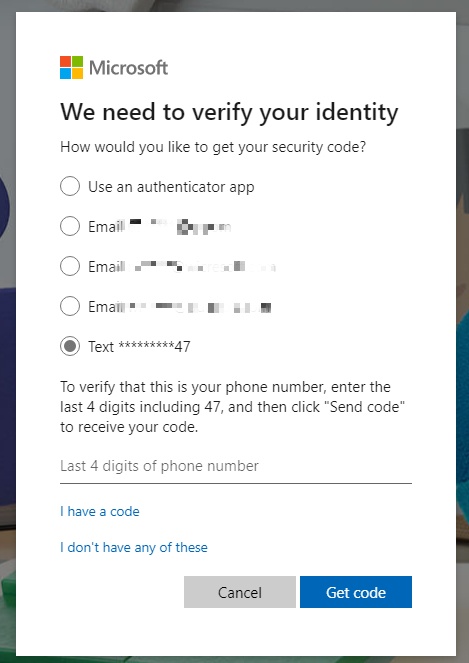
    We can fully understand how you feel. Due to the limited information and many reasons for the problem, we may need you to provide more detailed information, Could you please confirm that the current four-digit code is the verification your phone on the login interface, the four-digit code should only confirm your mobile phone number, as the picture shows:
    If the interface doesn't match your description, could you please share a screenshot of the four-digit code you received. My test result here is that I received a seven-digit code, and everything seems to be working fine:
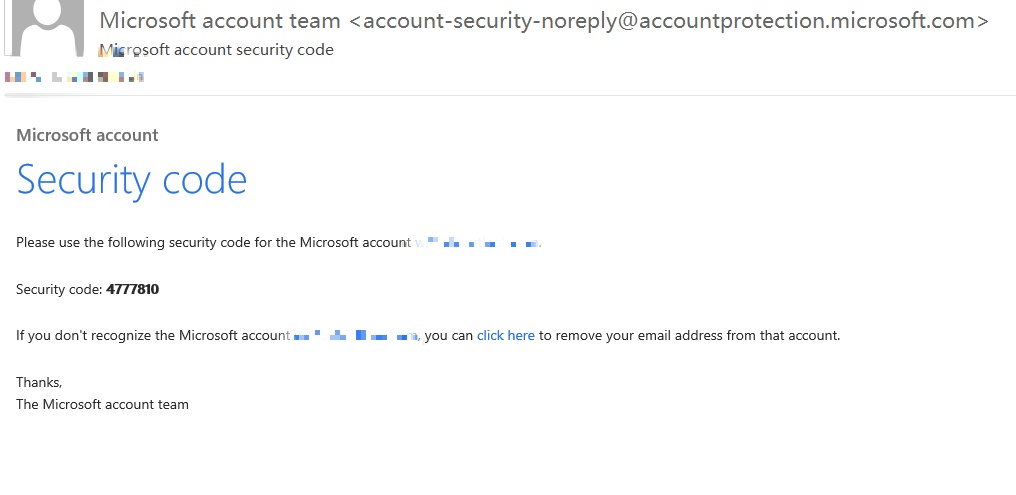
    Generally speaking, the number code required by Microsoft to verify your identity is seven digits, also there are other options. If the email cannot receive your verification code, please also try to use your mobile phone number or Microsoft Authenticator to verify your identity.

    If there is any update, please feel free to contact us.

    Chandy | Microsoft Community Support Specialist


    * Beware of scammers posting fake support numbers here.

    0 comments No comments