Share via

Upgrade from Office Enterprise 2007 to Office Professional Plus 2021

Anonymous
2022-12-03T03:53:45+00:00

Greetings!

Currently using Microsoft Office Enterprise 2007 for Word, Outlook, Excell, and Publisher & just purchased Microsoft Office Professional Plus for Windows 2021. I'm a Windows 10 Home low tech humanoid with sweaty palms going into this & need a little hand holding.

Questions:

  1. I have a product key. How soon do I need to use it?
  2. Do I need to download Office Installer first?
  3. Do I need to uninstall 2007 before downloading and installing 2021?
  4. Since WIN 2007 is 32bit do I stick with 32bit for WIN 2021? Even though I'm using a 64bit system I'm inclined to remain Office 32bit, correct?
  5. EMAIL: I'm using Microsoft Outlook 2007 to access my POP3 Comcast internet account. Will all my inbox folders, etc. be there in the 2021 version or will I lose them?
  6. WORD: Will all my 2007 Word documents be accessible with 2021?

Anything else I need to know critical to this upgrade?

Thanks in advance.

Outlook | Windows | Classic Outlook for Windows | For business

Locked Question. This question was migrated from the Microsoft Support Community. You can vote on whether it's helpful, but you can't add comments or replies or follow the question.

0 comments No comments

6 answers

Sort by: Most helpful
  1. Anonymous
    2022-12-03T04:36:05+00:00

    Hello Jon! My name is Abdullah and I assist you today.

    I don't think there is a need to uninstall Office 2007 first, you can give a try to download and install Office 2021 first. Please check the details below:

    1. Difference between Office 2021 32-bit vs 64-bit:

    https://support.microsoft.com/en-us/office/choo...

    1. To download and install Office 2021 on your PC, please follow the below article:

    https://support.microsoft.com/en-us/office/down...

    For the Outlook migration from Office 2007 to 2021, please refer to the thread below, 2019 and 2021 shouldn't be different in process:

    https://learn.microsoft.com/en-us/answers/quest...

    Useful articles for migration to Office 2021:

    1. https://support.microsoft.com/en-us/office/expo...
    2. https://support.microsoft.com/en-us/office/add-...
    3. https://support.microsoft.com/en-us/topic/impor...

    Once you are confirmed that everything is working fine on Office 2021, you consider uninstalling the Office 2007 from your PC.

    Please let me know if the above information helped you. Thank you.

    Best,

    Abdullah

    Give back to the Community. Help the next person who has this issue by indicating if this reply solved your problem. Click Yes or No below.

    2 people found this answer helpful.
    0 comments No comments
  2. Karl Timmermans 3,685 Reputation points Volunteer Moderator
    2022-12-03T05:13:36+00:00

    Questions:

    1. I have a product key. How soon do I need to use it?
    2. Do I need to download Office Installer first?
    3. Do I need to uninstall 2007 before downloading and installing 2021?
    4. Since WIN 2007 is 32bit do I stick with 32bit for WIN 2021? Even though I'm using a 64bit system I'm inclined to remain Office 32bit, correct?
    5. EMAIL: I'm using Microsoft Outlook 2007 to access my POP3 Comcast internet account. Will all my inbox folders, etc. be there in the 2021 version or will I lose them?
    6. WORD: Will all my 2007 Word documents be accessible with 2021?

    Anything else I need to know critical to this upgrade?

    Thanks in advance.

    Before I get to your questions, a general comment

    If you are installing '2021 on the same machine as '2007, there is nothing special you need to do. Outlook will continue on from where '2007 left off.

    In response to your questions

    #1 - Product Keys do not expire

    #2a - You will need to redeem the product key using a Microsoft Account as per the instructions contained in

    Where to enter your Office product key - Microsoft Support

    #2b - Once you have redeemed the product key, it is permanently associated with the Microsoft Account used to redeem it and Office can then be downloaded / installed from the Microsoft Account using this link

    Microsoft account | Services & subscriptions

    #3 - You do not <have to> uninstall '2007 before installing '2021 but unless you have some pressing reason to keep it, uninstalling '2007 before installing '2021 would be recommended.

    *** uninstall '2007 normally via Control Panel <Programs>. This does not remove existing Outlook profiles which '2021 will use to create the Outlook profile for use with '2021. If you uninstall Office using the Microsoft SARA Uninstall tool, Outlook profiles will also be removed and you will have to configure your email accounts again

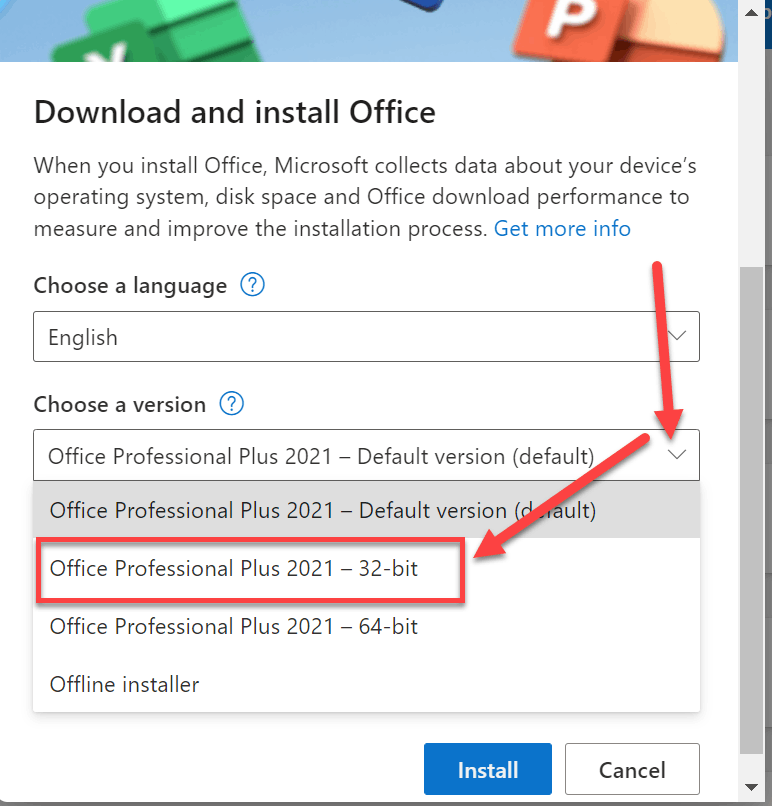
    #4 - You can certainly install 32-bit Office 2021 but be aware that the <default> is 64-bit so you will have to make sure to select 32-bit when downloading / installing '2021. If for some reason you opt to keep Office '2007 on your system, you will only be able to install 32-bit '2021

    #5 - Short answer: Yes as described at the start of this response. As a FYI, if '2021 was being installed on a new machine, the answer would still be: Yes but you would need to take a few extra steps which I can provide which would not involve anything to do with import/export

    #6: Re: Word docs - answer: Yes

    >>

    Anything else I need to know critical to this upgrade?

    If this is being done on the same machine, you will find this to be a very seamless, painless process - no sweaty palms required 😊

    If you have any questions - ask away. I'm a firm believer in the "Measure twice - cut once" philosophy so if there is anything you're not sure about, just ask before you do something

    1 person found this answer helpful.
    0 comments No comments
  3. Anonymous
    2022-12-08T20:23:07+00:00

    Hello Karl,

    I’m sorry for the delay in replying to you after having taken your valuable time.

    We have been attempting to redeem our product license code with negative results. The online place we ordered the code from has yet to respond to our request for replacement or refund. Apparently, this perfectly fits your described of “… a sale on an "edition" of Pro Plus at a <very competitive> price for consumer purchase from 3rd party resellers.” Buyer beware.

    I’ll be back to let you know how this turns out.

    Thank you for all your help.

    0 comments No comments
  4. Karl Timmermans 3,685 Reputation points Volunteer Moderator
    2022-12-04T00:27:07+00:00

    To clarify, this upgrade from 2007 to 2021 is being done on a single home computer, i.e., I am not transferring anything from one computer to another. By far the most important element of the Office programs is the Microsoft Office Outlook email portion which we utilize as a POP3 front end to our Comcast email account. I use this Outlook IMAP account as an alternative on our home computer and on my mobile device, but all our critical email is POP3 from Comcast. The second most important element of the Office programs to us is Word, and the third is Publisher, fourth Excel.

    Then this would be what I call a "brain-dead" seamless upgrade. Nothing changes in how you work. It's about as easy as you can get

      1. and 2a. Good. I thought it was only good for 30 days. Also, I have been hesitant to do anything with it since purchase because I thought that once I presented it to Microsoft, I would immediately need to download 2021, and as you can see, I’m a little hesitant to do that until I have some questions answered. So, I can present it to Microsoft without having to download 2021 immediately?


    Once you redeem the key, you can decide to download / install it whenever you want. It will appear on your account under "Services & Sybscriptions"

    Microsoft account | Services & subscriptions

    Now I'm going to throw out a wrinkle into all of this which may or may not apply.

    Typically, "Office Professional Plus" is an edition that is (was) only available as part of a Microsoft Corporate Volume License agreement. A variety of online resellers provide license keys hat are not legitimate consumer keys. The key may activate the first time but down the road you may find that you can no longer use it if you need to move Office to another computer.

    I call this a "wrinkle" since Microsoft muddied the waters a while back by providing a sale on an "edition" of Pro Plus at a <very competitive> price for consumer purchase from 3rd party resellers. I don't know if this edition is still available but if your product key is accepted using the steps in the link to redeem the key as described in the following - you should be golden. Don't ask me how to otherwise identify it because I have no idea. Also don't recall if Publisher was included in this special promo.

    Where to enter your Office product key - Microsoft Support

    1. I’m good with uninstalling 2007 first as long as I’m confident that should I run into problems with 2021 I can quickly/easily reinstall 2007 and be up and running again. Am I correct in thinking that all the programs, files, etc. associated with 2007 Outlook, Word, etc., will continue to reside on this computer and can readily be recognized by the 2007 programs if/when it is reinstalled? Best to uninstall Office 2007 via the Control Panel?


    What would be the advantage of leaving 2007 installed vs. uninstalling? I would think there might be a conflict with both Outlook programs trying to read the same folders, and/or connecting to Comcast, yes?


    a) important part to this in regard to reinstalling '2007 is that you have the '2007 install media and product key (should you need it)

    b) advantage of keeping '2007 installed? None IMHO if you don't plan on using it (see comment below about Publisher below

    1. I understand that the default for 2021 is 64bit, and this computer is 64bit, but from what I have read so far leads me to believe that remaining 32bit would be the most seamless in the transfer of programs, folders, etc. from 2007 to 2021. Also, we have no great need for large files of any type, thus 32bit should be adequate? I’m asking because I don’t have a clue and wish to do this as seamlessly as possible.


    I probably shouldn't admit this but I still use 32bit Office. That was a requirement for me while involved with previous endeavors which are no longer applicable but just never got around to changing from 32 to 64bit - have no pressing personal need to do that. However, the bit version has no impact on data files, those work in either bit version.

    When you go to install '2021, just be sure to explicitly select it as per the screenshot
    1. Yes, both 2007 and upgrade to 2021 will all on take place on the same machine. So, in this case 2021 Outlook would recognize all the pst/ost files from 2007? Contacts too? If so, WONDERFUL!

    a) Contacts are stored in the PST file so you are golden if the PST file is set as the <default data file?

    b) the only reason you would have an OST file in '2007 is if you have an Exchange based account and that is the case, everything (email, contacts, calendar) is sync'd with the server (for that account) so you would never lose anything

    *** just as a FYI, an IMAP account configured in '2021 also uses an OST file where email folders are sync'd with the server but if the OST file is set as the <default data file> you will also have contact / calendar folders with the words "This Computer Only" in the folder description. You do NOT want to maintain any contact / calendar data in "This Computer Only" folders but won't get into that unless it's something that applies to you.

    1. 2007 Publisher .pub files would be recognized by 2021 Publisher too?  


    Publisher is not my area of expertise so have no idea what features may have changed between '2007 and '2021 (assuming you have it in your copy of '2021 Pro Plus (it us generally.

    However, there is an easy way to get the best of all worlds until you are siure you can do everything you want using '2021 Publisher using your old Pub files

    • The '2007 uninstall process allows you to selectively pick which Office apps you want to uninstall so if this were me, I would keep Publisher '2007 installed (which by definition also means that you would only be able to install 32-bit '2021
    • The install / uninstall process of all Office versions '2013 and later is "all or nothing". In other words, you can't pick and choose what apps you want to install /uninstall

    Your turn for any other questions if you have any 😊

    0 comments No comments
  5. Anonymous
    2022-12-03T23:10:37+00:00

    Hello Karl Timmermans,

    Thank you for your prompt reply to my call for help. It is much appreciated.

    To clarify, this upgrade from 2007 to 2021 is being done on a single home computer, i.e., I am not transferring anything from one computer to another. By far the most important element of the Office programs is the Microsoft Office Outlook email portion which we utilize as a POP3 front end to our Comcast email account. I use this Outlook IMAP account as an alternative on our home computer and on my mobile device, but all our critical email is POP3 from Comcast. The second most important element of the Office programs to us is Word, and the third is Publisher, fourth Excel.

      1. and 2a. Good. I thought it was only good for 30 days. Also, I have been hesitant to do anything with it since purchase because I thought that once I presented it to Microsoft, I would immediately need to download 2021, and as you can see, I’m a little hesitant to do that until I have some questions answered. So, I can present it to Microsoft without having to download 2021 immediately?
    1. I’m good with uninstalling 2007 first as long as I’m confident that should I run into problems with 2021 I can quickly/easily reinstall 2007 and be up and running again. Am I correct in thinking that all the programs, files, etc. associated with 2007 Outlook, Word, etc., will continue to reside on this computer and can readily be recognized by the 2007 programs if/when it is reinstalled? Best to uninstall Office 2007 via the Control Panel?

    What would be the advantage of leaving 2007 installed vs. uninstalling? I would think there might be a conflict with both Outlook programs trying to read the same folders, and/or connecting to Comcast, yes?

    1. I understand that the default for 2021 is 64bit, and this computer is 64bit, but from what I have read so far leads me to believe that remaining 32bit would be the most seamless in the transfer of programs, folders, etc. from 2007 to 2021. Also, we have no great need for large files of any type, thus 32bit should be adequate? I’m asking because I don’t have a clue and wish to do this as seamlessly as possible.
    2. Yes, both 2007 and upgrade to 2021 will all on take place on the same machine. So, in this case 2021 Outlook would recognize all the pst/ost files from 2007? Contacts too? If so, WONDERFUL!
    3. Excellent
    4. 2007 Publisher .pub files would be recognized by 2021 Publisher too?  

    Sorry for all the questions. I’m a lot better at hardware than software and have been lost in the software weeds on Outlook before and shudder to do it again with so much dependent on having internet with a viable email program these days.

    I know Microsoft has many links for info but conversing with a knowledgeable human being in plain English works best for me. Thanks again for your help.

    Jon Helberg

    0 comments No comments