Share via

Mailbox is 100% full.

Anonymous
2023-01-08T21:26:49+00:00

Hello There.

I Hope you will be fine, We are now troubling to send and receive emails due to mailbox is 100% full.

Please help us by advising that how we can increase our mailbox storage and have more space to send and receive emails.

We have already moved our emails to archive and deleted email from deleted Item, Sent item and Inbox.

Your quick respond to this matter with solution would be highly appreciated.

Awaiting your,

Thanks

Regards.

Outlook | Windows | Classic Outlook for Windows | For home

Locked Question. This question was migrated from the Microsoft Support Community. You can vote on whether it's helpful, but you can't add comments or replies or follow the question.

0 comments No comments

4 answers

Sort by: Most helpful
  1. Stefan Blom 338.5K Reputation points MVP Volunteer Moderator
    2023-01-16T20:16:36+00:00

    No - I don't have a Business subscription. I have 2 other business mail boxes but I have used MS office for most of my life so I bought the MS 365 and have those other emails populate into Outlook 365.

    Barbara

    Barbara,

    Please post in your thread at https://answers.microsoft.com/en-us/outlook_com/forum/all/e-mail-space/5784333d-da76-45a8-8357-9309aebc3d9e.

    0 comments No comments
  2. Anonymous
    2023-01-16T20:01:14+00:00

    No - I don't have a Business subscription. I have 2 other business mail boxes but I have used MS office for most of my life so I bought the MS 365 and have those other emails populate into Outlook 365.

    Barbara

    *** Email address is removed for privacy ***

    0 comments No comments
  3. Deleted

    This answer has been deleted due to a violation of our Code of Conduct. The answer was manually reported or identified through automated detection before action was taken. Please refer to our Code of Conduct for more information.


    Comments have been turned off. Learn more

  4. Anonymous
    2023-01-09T01:11:48+00:00

    Dear Bulbous Accounting,

    Good day! Thanks for posting to Microsoft Community. I am glad to assist you.

    Based on your description, may l know if you are using Microsoft 365 for business subscription?

    If so, you can enable online archiving service which includes 50 GB additional archive space. Exchange Online Archiving service description - Service Descriptions | Microsoft Learn.

    Note: Only admin can enable Online Archiving service ; if you are not, please kindly contact your admin.

    After enabling it, you will see a new folder named Online-Archive in your Outlook Manage email storage with online archive mailboxes - Microsoft Support. Move the old emails to that folder manually or create a retention policy for it which can move old email to online archive folder automatically.

    Create a Retention Policy in Exchange Online | Microsoft Learn
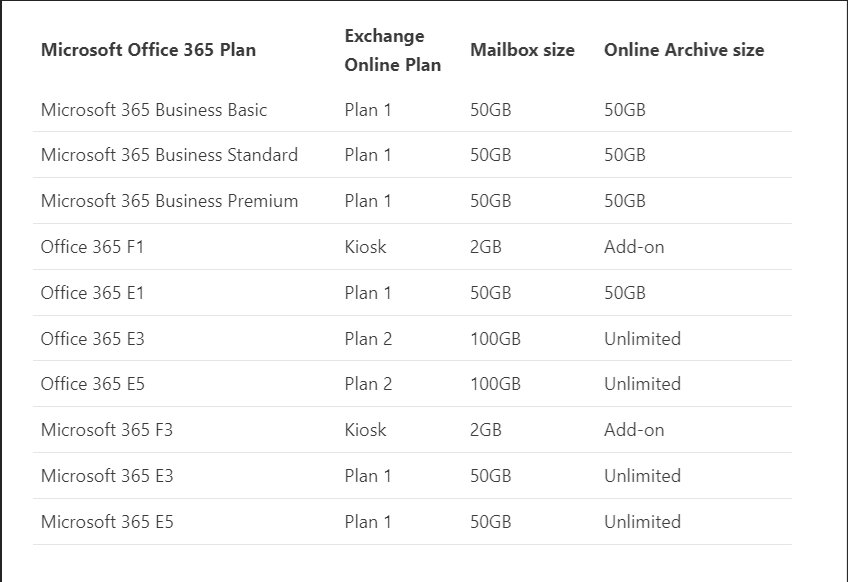
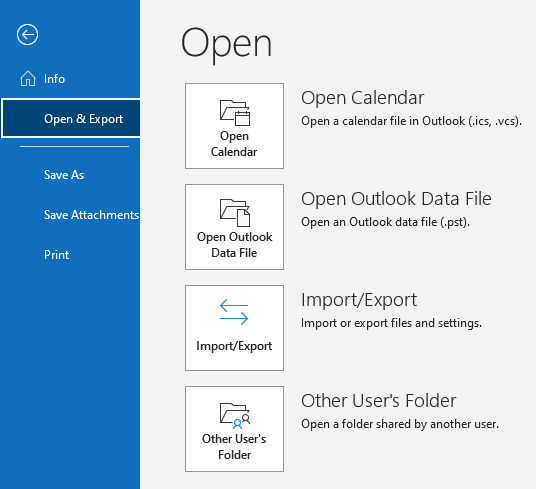
    If you have already used Online-archive mailbox up, you can choose to export old email from your primary mailbox. Export or backup email, contacts, and calendar to an Outlook .pst file - Microsoft Support
    For any other questions about above method, please do not hesitate to contact us. Thank you so much.

    Sincerely,

    Tammy | Microsoft Community Moderator.

    0 comments No comments