Hello Yogesh Bedekar,
Good day! Thanks for posting in Microsoft Community. We are happy to assist you.
I understand you would want to continue using the future to scan business cards when adding new contacts in Outlook for mobile.
To help us narrow down this issue kindly confirm if you are using Outlook for Android or iOS and the version of Outlook you have? To check for version, click on the profile > select Settings > Help & Feedback. > Scroll to the bottom of the page. The version number appears there.
I have tested on my side if this feature is completely gone, and I still have it. I am using Outlook for Android version 4.2304.2(42304815). To find this feature as shown in the screenshot I clicked on feed > create > Tap Scan business card.
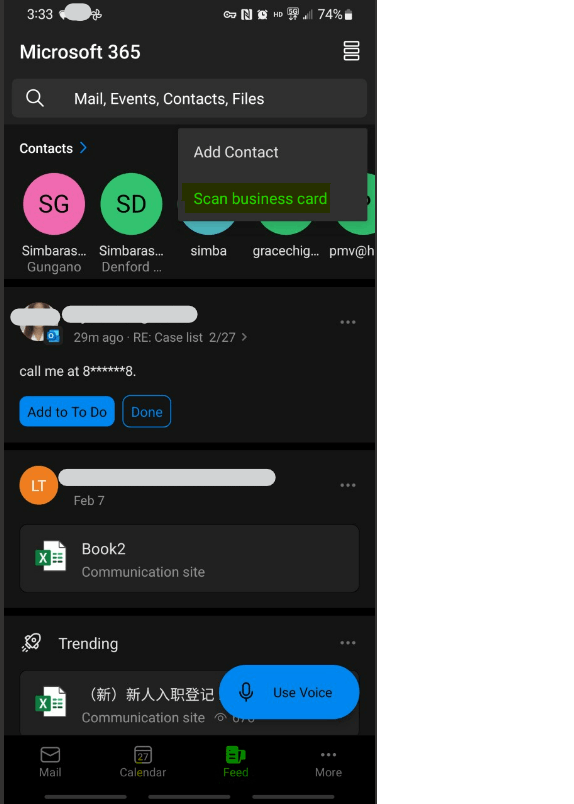
In the meantime, kindly reset/refresh the client/app: Open our app > Settings > Select the email account > Reset Account. How do I clear the cache or locally reset/refresh the client/app? (microsoft.com)
We look forward to hearing from you; Please understand that our initial reply may not always immediately resolve the issue. However, with your help and more detailed information, we can work together to find a solution. Thank you for your cooperation.
Sincerely,
Simbarashe | Microsoft Community Moderator
' cx='32' cy='32' r='32' /%3E%3Ctext x='50%25' y='55%25' dominant-baseline='middle' text-anchor='middle' fill='%23FFF' %3EA%3C/text%3E%3C/svg%3E)
