Share via

My Outlook view changed and I am not sure how to bring it to default

Anonymous
2023-04-20T17:14:59+00:00

The inbox now is currently only one line, small font and smaller. I would like to bring it to default. Please advise me.

Outlook | Windows | Classic Outlook for Windows | For home

Locked Question. This question was migrated from the Microsoft Support Community. You can vote on whether it's helpful, but you can't add comments or replies or follow the question.

0 comments No comments
Answer accepted by question author
  1. Anonymous
    2023-08-31T12:36:59+00:00

    Hi, I just had the same issue. I was able to fix it. Chose the compact view like suggested above. Then change the reading pane. To do this, View --> Layout-->reading pane-->right. This should fix it, and bring you back to the normal layout. Hope this helps!

    3900+ people found this answer helpful.
    0 comments No comments
Answer accepted by question author
  1. Anonymous
    2023-04-20T18:47:00+00:00

    Hello Marat Guysin,

    Good day!

    Thank you for posting to Microsoft Community. We are happy to help you.

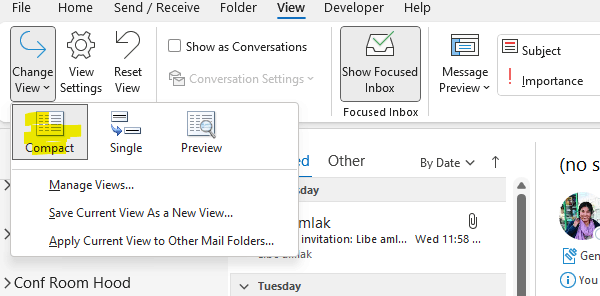
    Basically to change the view in outlook to the your default. Click View > Change View > compact.
    Reference: Create, change, or customize a view - Microsoft Support

    If you are still facing the issue please screenshot your change view part as the above picture and share with us.

    Please get back to us with necessary information, we’ll be glad to assist you further.

    Appreciate your patience and understanding and thank you for your time and cooperation.

    Sincerely,

    Eben Ezer Tres | Microsoft Community Moderator

    100+ people found this answer helpful.
    0 comments No comments

109 additional answers

Sort by: Most helpful
  1. Anonymous
    2023-10-31T14:17:23+00:00

    I had the same issue. When you're in your Inbox, go the Current View-->View Settings-->Other Settings...-->Ensure "Use compact layout in widths smaller than 125 characters" is checked. That reverted it back to where the sender name is larger.

    1100+ people found this answer helpful.
    0 comments No comments
  2. Anonymous
    2023-04-21T14:47:53+00:00

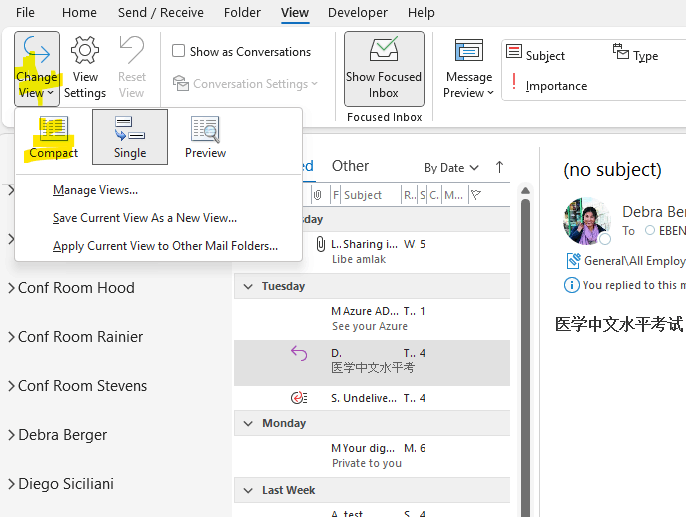
    Thank you for your reply. When I do that the issue is still not fixed. I get the result that is shown in the attached screenshot. Please let me know how this could be fixed.


    Thank you

    90+ people found this answer helpful.
    0 comments No comments
  3. Anonymous
    2023-10-13T13:58:05+00:00

    I was going crazyyyy! Thank you for the extra step, it worked! :)

    60+ people found this answer helpful.
    0 comments No comments