
Simbarashe,
I concure with Jonathan Harmon2, the instructions you provided do not work the the up to date version of Mictrosoft Outlook Version to repeat, those menu's don't exist.
Are there more alternatives you can offer?
Cheers,
Leland
This browser is no longer supported.
Upgrade to Microsoft Edge to take advantage of the latest features, security updates, and technical support.
' cx='32' cy='32' r='32' /%3E%3Ctext x='50%25' y='55%25' dominant-baseline='middle' text-anchor='middle' fill='%23FFF' %3EA%3C/text%3E%3C/svg%3E)
I would like to remove the RSS Feeds folder from Outlook. I'm using Outlook for Mac version 16. This also applies to removing the folder when viewing outlook email via broswer as well.
Interesting there is delete button I can click if I right click the folder. The RSS Feeds folder dissapears momentarily, and returns.
Locked Question. This question was migrated from the Microsoft Support Community. You can vote on whether it's helpful, but you can't add comments or replies or follow the question.
Simbarashe,
I concure with Jonathan Harmon2, the instructions you provided do not work the the up to date version of Mictrosoft Outlook Version to repeat, those menu's don't exist.
Are there more alternatives you can offer?
Cheers,
Leland
Hello Simbarashe,
I have the same issue. The instructions you provided above do not work with Microsoft Outlook for Mac Version 16.78.1 (23101305) as the menus as described simply do not exist.
How can I hide or remove the RSS Feeds folder without receiving continuous sync errors which occur when simply deleting the folder?
Thanks
Jonathan
Good morning Simbarashe, thank you for your response, please see my resopnses to your response below:
Version 16 (previously stated)
Unsubscribe from RSS Feeds:
Hide the RSS Feeds Folder:
Question remains about online version as well, maybe I'll post this question separatly.
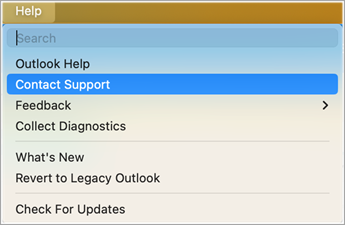
Help > Contact Support isn’t an option (see screenshot), other ideas?
Hello Leland359,
Thank you for the detailed response. 16 is not the full version it should be something like 16.76 (23081101) which is the latest, as they are multiple versions which start with 16.
There could be multiple reasons why you don’t see the Contact Support option under the Outlook Help menu.
To manage connected services, open Outlook and select Outlook on the Dock.
Select Preferences and then select Privacy. **Note:**If you are running macOS Ventura or higher, select Settings. This will open Account Privacy where you can manage your privacy options. For more information, see Overview of optional connected experiences in Office. 3. If you or your Admin have disabled Optional Diagnostics Data, you won’t see Contact Support under the Help Menu in the Outlook for Mac. Follow these steps to check if this is the case and to manage this setting.
Open Outlook and select Outlook on the Dock. Select Preferences and then select Privacy. This will open Account Privacy where you can manage your privacy options.
Enabling Send Additional diagnostics and usage data to Microsoft will help enabling the Contact Support feature under Help Menu.
If you don’t see this option under Privacy, speak to your Admin. 4. The free version of Outlook doesn’t have the Contact Support option available under the Help Menu.
If you have an M365 subscription or have access to an Office perpetual license, select Outlook and Purchase Microsoft 365. This will take you through the process of assigning a license to your Office and once the license is assigned, the Contact Support option will be available under the Help menu.
We look forward to hearing from you. Thank you for your cooperation.
Sincerely,
Simbarashe | Microsoft Community Moderator
Hello Leland359,
Good day! Thanks for posting in Microsoft Community. We are happy to help you.
May I know the full version of Outlook do you have? What version of Outlook do I have? - Microsoft Support
To help us narrow down the issue that you are facing may I know what steps you are following to remove the RSS Feeds,
Unsubscribe from RSS Feeds:
Hide the RSS Feeds Folder:
If you've unsubscribed from all RSS feeds and you want to hide the "RSS Feeds" folder completely, you can customize the folder list:
If the issue does not resolve kindly reach out to the dedicated support for Outlook for Mac go to Help > Contact Support. Contact support within Outlook for Mac - Microsoft Support. This would be the most efficient way to handle this case.
We look forward to hearing from you; Please understand that our initial reply may not always immediately resolve the issue. However, with your help and more detailed information, we can work together to find a solution. Thank you for your cooperation.
Sincerely,
Simbarashe | Microsoft Community Moderator