Outlook | Windows | New Outlook for Windows | For home
Using New Outlook on Windows for personal email, calendar, and contact management

This browser is no longer supported.
Upgrade to Microsoft Edge to take advantage of the latest features, security updates, and technical support.
' cx='32' cy='32' r='32' /%3E%3Ctext x='50%25' y='55%25' dominant-baseline='middle' text-anchor='middle' fill='%23FFF' %3EA%3C/text%3E%3C/svg%3E)
I deleted some signatures I had saved in outlook, but they're still all showing up in the dropdown when I click the signatures icon dropdown. How can I remove these old signatures from still showing even though they're technically deleted signatures.
Using New Outlook on Windows for personal email, calendar, and contact management
Locked Question. This question was migrated from the Microsoft Support Community. You can vote on whether it's helpful, but you can't add comments or replies or follow the question.
Answer accepted by question author
I had the same issue.
When you go in to the signature section, if you select the 'Email Account' option it will show your email and also a second option 'signatures on this device'. When I selected that option, the signatures I had deleted were still there. Deleted them from that box and it appears to have resolved the issue.
Sherry Chen from Microsoft posted elsewhere:
Note: Three files, HTML, Rich text, and text, need to be deleted from the Signatures folder. A folder may also need to be deleted.
The signature I wanted to keep had a folder with the signature's name, but the resurrected signature did not have this folder.
Deleting these files worked for me.
I have done this but still showing even tho it has been deleted... any other reason this may be please?
Brilliant! That worked for me too. Thank you.
Dear Brice Subko,
Example:
 4. Select the signature you wish to delete and click Delete.
Example:
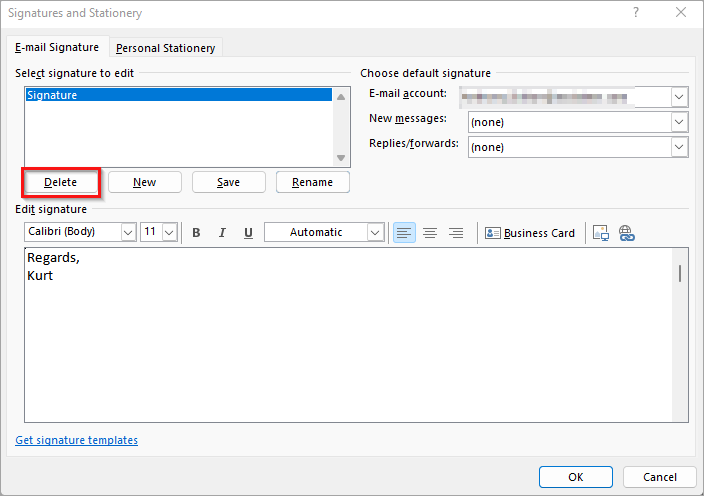 5. Click Yes to confirm.