Share via

Can Microsoft Office Professional Plus 2019's Outlook Today be made to look similar to my Outlook 2016's & will it run on my PC?

Anonymous
2024-01-16T07:15:44+00:00

I ask this since I have an opportunity to upgrade to Outlook 2019 that's in Microsoft Office Professional Plus 2019 and I first want to make sure that this view is available on it. 

Microsoft kept wanting me to try out the alternative New Outlook Today on my 2016. I tried it and I didn't like it, so I had to figure out how to switch back. I had to figure out how to switch back to Classic View just because of that New Outlook Today that I hated. As you know, Outlook still has a little icon in the upper right of Outlook Today that's trying to get me to switch to the New Outlook Today junk.

While I'm asking about this Office 2019 & its Outlook 2019, as long as my HP EliteDesk 800G1 desktop computer has updated Windows 10, are there any hardware limitations that I should look into before I buy it?

I'm not techie enough to find & read hardware requirements and see if my PC meets them. I say that since I'm asking for help on that too. 

I've read that Office 2023 needs some newer Windows than my Windows 10, which is the highest Windows that my PC can use, so that's why I'm considering upgrading only to Office 2019. 

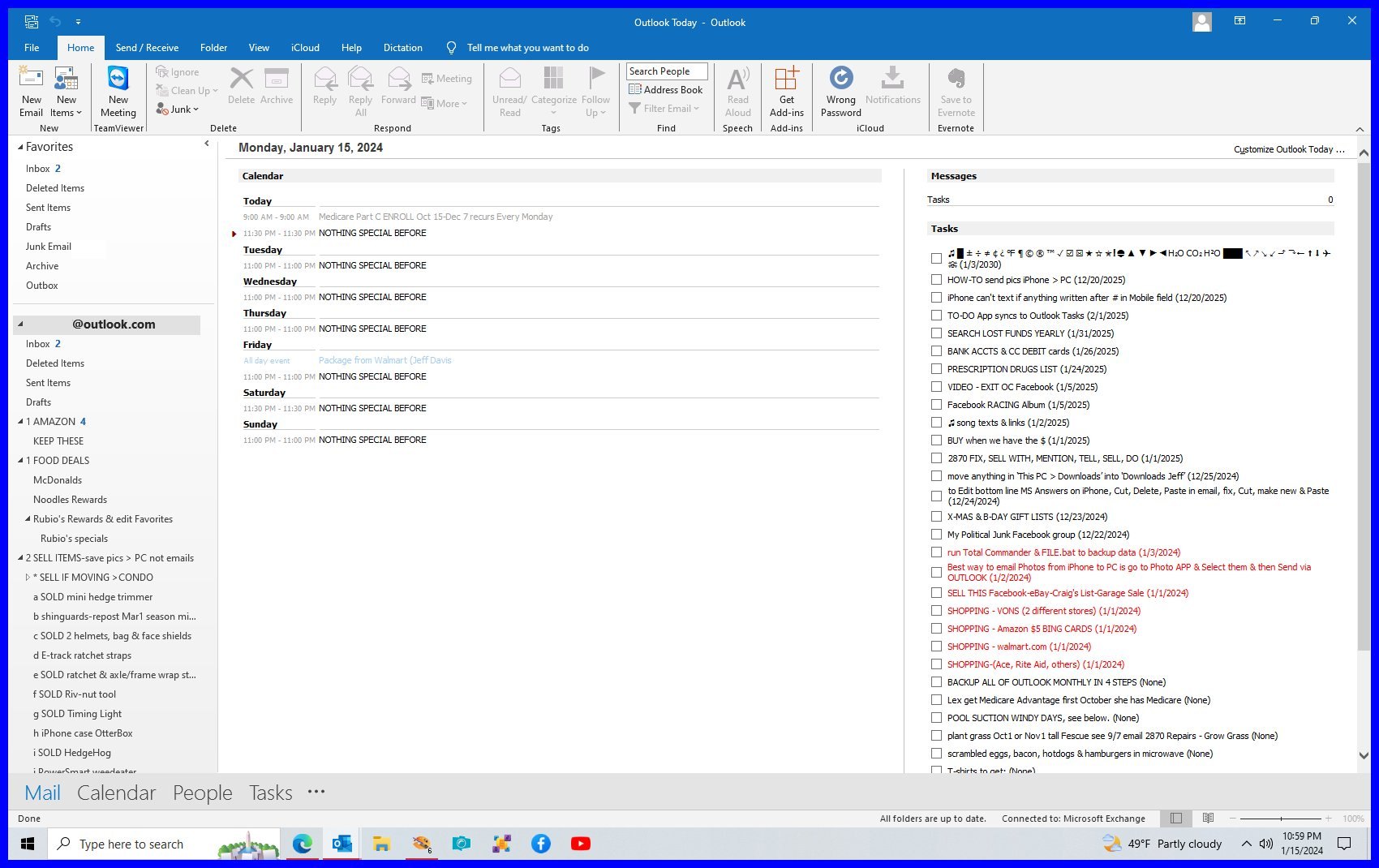
Here's the Classic View of my Outlook 2016's Outlook Today that I hope to mimic with Outlook 2019. If I can't, I'll just stick with my 2016
Outlook | Windows | Classic Outlook for Windows | For business

Locked Question. This question was migrated from the Microsoft Support Community. You can vote on whether it's helpful, but you can't add comments or replies or follow the question.

0 comments No comments

32 answers

Sort by: Most helpful
  1. Anonymous
    2024-01-26T16:16:00+00:00

    Sorry about my ignorance. I really appreciate your help.

    As is obvious by my last few PrintScreens, I've only been exploring this on my iPhone. It's probably easier on a PC.

    I had discovered the Install link after tapping the tiny 3 ... to the right of Office 2016, which is the only software that listed there. That brought a drop-down that offers Copy Key & Install.

    .

    0 comments No comments
  2. Diane Poremsky MVP 17,331 Reputation points MVP Volunteer Moderator
    2024-01-26T06:57:31+00:00

    Yes, there should be an install button beside it.

    https://account.microsoft.com/services 

    0 comments No comments
  3. Anonymous
    2024-01-26T05:04:03+00:00

    I guess I found where Office 2019 will show up after I register the Product Key after I tap the My Microsoft Account link up on Microsoft Answers.

    Will I be able to just click it there on my computer to Install it?

    .

    0 comments No comments
  4. Anonymous
    2024-01-26T04:38:00+00:00

    I see a My Microsoft Account link here in the upper right after I tap my Profile image.

    I still don't know where that Office 2019 will show up that I can hopefully download from there. Where?

    i

    -

    0 comments No comments
  5. Anonymous
    2024-01-26T04:01:43+00:00
    1. It's not going to work once the new one is installed - so its just about time.

    Uninstalling - using Windows Settings > apps > uninstall - will not remove any of the office settings. It just removes the software in the programs files folder.

    Is your key redeemed in your Microsoft account? If it is, its good.


    1. I'm not sure what you mean when you say "it's just about time". Can you explain please? TOO COOL that you told me that uninstalling won't remove the Office Settings. That tells me to uninstall. Heck, why not since it will even save HD space?

    When you say "Is your key redeemed in your Microsoft account? If it is, its good.", I'd assume that you mean after I go thru the steps that you'd told me to do with the Product Key, right?

    I know nothing about "my Microsoft account", like how to get there or where to look for this software. I'm such an amateur. 🙄 I'm sure I've been there and even personalized it.

    0 comments No comments