Share via

Change IMAP settings in New Outlook

Anonymous
2023-11-29T21:32:49+00:00

I've started to use New Outlook and I have added my private IMAP account, in addition to my company account. In classic outlook things were working fine switching between these accounts when sending emails. When setting up the account I had problems chosing the right port and secure connection settings. The system would not accept the settings specified from my host. I ended up with a setup where I am unable to send emails (wrong SMTP port/protocol). Receiving works fine. My issue now is how to change the SMTP settings. When I go to Accounts there seem to be no possibility to edit the IMAP/SMTP settings after the account is added. I have tried to remove the account and install again, but the problems with chosing the right port/protocol is still there, and with no access to modify afterwards. Anyone experienced this?

Outlook | Windows | New Outlook for Windows | For home

Locked Question. This question was migrated from the Microsoft Support Community. You can vote on whether it's helpful, but you can't add comments or replies or follow the question.

0 comments No comments

27 answers

Sort by: Most helpful
  1. Anonymous
    2023-12-12T11:59:30+00:00

    "in development" ??????????

    So microsoft have updated a product that was working perfectly well and REMOVED functionality that has been there for 20 years and now it's "in development"

    Remind me why I pay every month for this software that is "always up to date" ????????

    Yet another reason to buy software and install it once and not have this ridiculous situation. If i had Office 2016 on my laptop, this would still be working.

    How can you roll out a new version that has removed functionality from the previous version. If that functionality is "in development" it means it's NOTE READY FOR RELEASE!!!!!!!

    80+ people found this answer helpful.
    0 comments No comments
  2. Anonymous
    2024-01-10T03:54:16+00:00

    So after being encouraged by microsoft to update windows mail, (being informed it was to be deactivated) to outlook and after "updating" to an unfinished product what do I do now??

    I cannot send any emails from account but could in windows mail

    NOT GOOD ENOUGH

    So how do I now reverse the debacle of new outlook app back to windows mail?

    will I lose all folders set up in new outlook? or will i lose emails in the new outlook app? as cannot find a location of files or .pst file for new app.

    Is there no way to change IMAP/SMTP settings?

    I have important files i do not want to lose in these email folders

    Please supply instructions on how to reverse what Damage Microsoft has done

    very below par actions from Microsoft on this one.

    Scott

    10+ people found this answer helpful.
    0 comments No comments
  3. Anonymous
    2024-01-07T15:53:18+00:00

    Go to Thunderbird - that's what I did. Everything works great there.

    This behavior from Microsoft is absurd and should not be rewarded. They lost a customer for life with this move, and I hope they lose others too.

    Windows Mail > Outlook. Who woulda thunk? 🤣

    10+ people found this answer helpful.
    0 comments No comments
  4. Anonymous
    2024-01-10T07:29:50+00:00

    Thanks all for your input and support. I went back to the old desktop Outlook. All settings still there, and things working. Sometimes the old car is the better one.

    9 people found this answer helpful.
    0 comments No comments
  5. Anonymous
    2023-11-30T02:14:26+00:00

    Dear LarsE._47,

    Good day! Thank you for posting to Microsoft Community. We are happy to assist you.

    Based on your description, you are having issue changing the SMTP settings for your IMAP account in New Outlook.

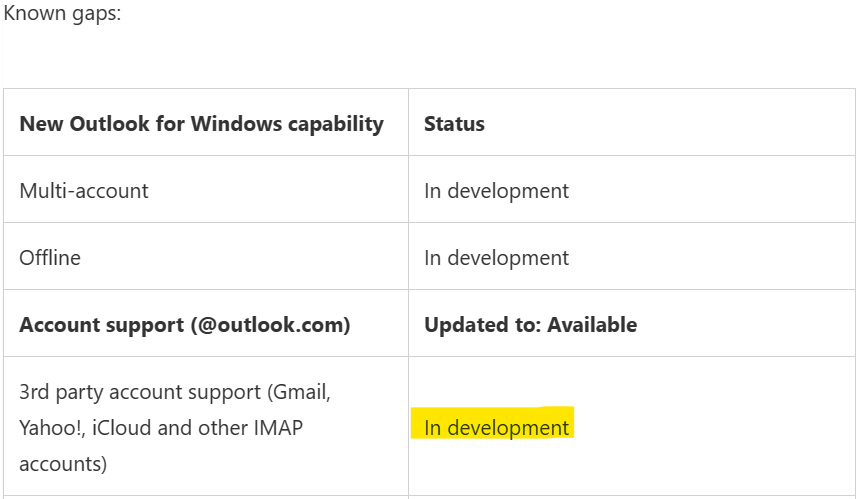
    After thorough research, testing on my side, and consulting, it was concluded that it is currently not feasible to set up IMAP in new Outlook. This feature is now in development.
    .

    Reference: New Outlook for Windows (microsoft.com).

    We apologize if we are unable to meet your needs; However, thank you for bringing this to our attention, we will certainly raise your concerns to our product team and hope that this can be included in future updates. In the meantime, would please vote on this information that will help other customers in our community who are trying to set up IMAP account in new perspectives. Thanks in advance! For other concerns, don't hesitate to add your post on the Microsoft Community Team. Thank you for choosing Microsoft as your business partner.

    If there is any update or I misunderstand you, please feel free to let me know. I will continue to assist you. Your understanding and co-operation are highly appreciated.

    Thanks for your precious time. Have a nice day.

    Sincerely,

    Sherry | Microsoft Community Moderator

    8 people found this answer helpful.
    0 comments No comments