Share via

How to create/save .ics file in New Outlook for Windows

Anonymous
2024-01-29T09:18:31+00:00

I'm using New Outlook for Windows, but can't find a way to save the .ics file from my meeting (event).

How can I do that? or it's not support to do so. Kindly advise.

Outlook | Windows | New Outlook for Windows | For home

Locked Question. This question was migrated from the Microsoft Support Community. You can vote on whether it's helpful, but you can't add comments or replies or follow the question.

0 comments No comments

66 answers

Sort by: Most helpful
  1. Anonymous
    2024-02-05T11:27:50+00:00

    Hi,

    We are using the .ics files, when we don't want invitees to see the contact information of other invitees unless they attend the meeting (due to data protection regulations in EU area).

    And also forwarding option appears in the context menu only on the meetings that were created by others, and it creates an .ics file, when sent to an external email address; thus, we can't have an .ics file for the meetings we create.

    So, not having a Save As .ics option feels like a downgrade from the old Outlook. It can be simply placed to the context menu of the meetings/events.

    100+ people found this answer helpful.
    0 comments No comments
  2. Anonymous
    2024-02-12T16:53:00+00:00

    Hi Poom Ritthirungrat1,

    Good day.

    Thank you for posting to the Microsoft Community. We are glad to assist.

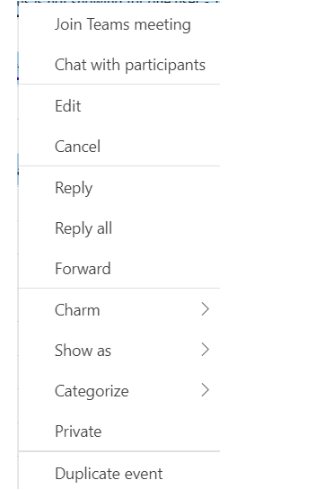
    Right click on the event Then Forward Then write the needed email .

    This pearson will receive invitation with ICS file attached .
    Image

    I hope this helps let me know if this is contrary to what you need, I would still be helpful to answer more of your questions .

    Best Regards

    Microsoft Community Moderator

    This is not helpful. I need to be able to save the .ics file so that I can manually add an "Add to Calendar" link on meeting invitation emails. This feature should not have been removed from the new outlook. It's an incredibly important piece of my day to day business.

    80+ people found this answer helpful.
    0 comments No comments
  3. Anonymous
    2024-02-09T19:50:53+00:00

    I second this issue. It's crazy that we seem to have lost this feature. I had to switch to old Outlook just to get a .ics file for a meeting I created. This is not a long-term solution as the old Outlook will eventually be unavailable.

    60+ people found this answer helpful.
    0 comments No comments
  4. Anonymous
    2024-04-23T20:24:43+00:00

    Hi Poom Ritthirungrat1,

    Good day.

    Thank you for posting to the Microsoft Community. We are glad to assist.

    Right click on the event Then Forward Then write the needed email .

    This pearson will receive invitation with ICS file attached .

    Image

    I hope this helps let me know if this is contrary to what you need, I would still be helpful to answer more of your questions .

    Best Regards

    Microsoft Community Moderator

    Hey everyone, I figured out what they were trying to explain.

    In order to get the .ics file, you need to forward the meeting invitation to another person first. Keep in mind I'm talking about a meeting invitation and not an appointment. These are the steps I followed:

    1. Create the event and fill out all the information.
    2. Invite somebody to the event. This will change the event from "appointment" to "meeting".

    DO NOT INVITE YOURSELF (do not use the same email creating the event).

    Any email should work.

    1. Once the meeting is created, the option to forward the email will be available in the right-click menu (as shown in the image above).

    Forward the event to another email that can be accessed outside of Outlook, such as Gmail.

    1. Go to the forwarded invitation on your Gmail account. The .ics file should be attached to the email.

    I know this might be too troublesome for many, and I hope the Microsoft team will solve this issue soon.

    C'mon, it was so easy before

    40+ people found this answer helpful.
    0 comments No comments
  5. Anonymous
    2024-02-19T20:29:24+00:00

    I dont have the option to reply, reply all, or forward in the new outlook.

    30+ people found this answer helpful.
    0 comments No comments