Developer technologies | Transact-SQL
A Microsoft extension to the ANSI SQL language that includes procedural programming, local variables, and various support functions.
This browser is no longer supported.
Upgrade to Microsoft Edge to take advantage of the latest features, security updates, and technical support.
' cx='32' cy='32' r='32' /%3E%3Ctext x='50%25' y='55%25' dominant-baseline='middle' text-anchor='middle' fill='%23FFF' %3ENY%3C/text%3E%3C/svg%3E)
HI Team
I have an view where it would be pulling multiple columns from few tables and union into the different set of queries ,
here we are passing Nulls as column names for the couple of column in the table, and trying to update the data view , it is getting failed
select
Null as name
Null as id
Null as batch
from table
union all
select
Null as name
Null as id
Null as batch
from table
like this the query is made,i have getting the fllow error,while i execute the view,but the view is updating fine,while retriving the data from the view we were getting this error
i was really tried to get soluction out of this,can some one please help me on this topic.
"Error converting data type nvarchar to numeric."
I have made check the data types and meta data,all looks identical, i obeseve one thing here, i pass some value like '0' its is getting executed,but i supposed to insert null values into this fields.
please provide some insist on this
A Microsoft extension to the ANSI SQL language that includes procedural programming, local variables, and various support functions.
Additional SQL Server features and topics not covered by specific categories
' cx='32' cy='32' r='32' /%3E%3Ctext x='50%25' y='55%25' dominant-baseline='middle' text-anchor='middle' fill='%23FFF' %3ESH%3C/text%3E%3C/svg%3E)
Please post a concise and complete example. Include table DDL and sample data INSERT statements as single, runnable T-SQL script.
The first query in a UNION defines the data types per column. Any subsequent query must return the same data type for each column or a data type which is implicit castable.
The error message tells you, the one column in one subsequent query is of type NVARCHAR, which cannot be converted implicitly.
' cx='32' cy='32' r='32' /%3E%3Ctext x='50%25' y='55%25' dominant-baseline='middle' text-anchor='middle' fill='%23FFF' %3EEM%3C/text%3E%3C/svg%3E)
Hi @Naresh y ,
Hi @Naresh y ,
As Tom said,you need to convert the data type of null to the data type of the corresponding column.
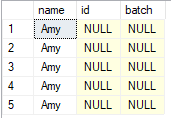
I did a test and found that it can be executed successfully after changing the data type of null, please refer to:
    create TABLE #orders
    (QtyOrdered VARCHAR(50))
    INSERT #orders
    SELECT '19'
    UNION ALL SELECT 'Why?'
    UNION ALL SELECT '1.84736378483933'
    UNION ALL SELECT '1e3'
    UNION ALL SELECT '$1.40'

select NULL as name,
Null as id,
Null as batch into test from #orders

update test
set name='Amy'

DROP TABLE test
select CAST(NULL AS VARCHAR(15)) as name,
Null as id,
Null as batch into test from #orders

update test
set name='Amy'

select * from test
Best Regards
Echo
If the answer is helpful, please click "Accept Answer" and upvote it.
Note: Please follow the steps in our documentation to enable e-mail notifications if you want to receive the related email notification for this thread.
' cx='32' cy='32' r='32' /%3E%3Ctext x='50%25' y='55%25' dominant-baseline='middle' text-anchor='middle' fill='%23FFF' %3ETP%3C/text%3E%3C/svg%3E)
Since you did not cast your NULL to a data type, SQL Server guesses based on the first values it finds.
You need to use CAST to get the correct data types for the NULL.
select
CAST(Null AS VARCHAR(100)) as name,
CAST(Null AS INT) as id,
CAST(Null AS VARCHAR(100)) as batch,
from table
union all
select
Null as name,
Null as id,
Null as batch,
from table
' cx='32' cy='32' r='32' /%3E%3Ctext x='50%25' y='55%25' dominant-baseline='middle' text-anchor='middle' fill='%23FFF' %3EUD%3C/text%3E%3C/svg%3E)
You cannot posted sample data
create TABLE #orders
(
QtyOrdered VARCHAR(50)
)
INSERT #orders
SELECT '19'
UNION ALL SELECT 'Why?'
UNION ALL SELECT '1.84736378483933'
UNION ALL SELECT '1e3'
UNION ALL SELECT '$1.40'
SELECT CASE WHEN ISNUMERIC(QtyOrdered)=1 AND QtyOrdered NOT LIKE '%[^0-9.]%'
THEN CAST(QtyOrdered AS DECIMAL(19,6))
ELSE 0.0
END AS Qty
FROM #orders