Share via

not able to print files with sensitivity label, it shows error "Sensitivity labels and encryption can't be applied to a file created using print to file" I using Microsoft print to PDF.

Anonymous
2024-04-04T02:42:51+00:00

Please advice what can i fix this issue

Currently unable to print to pdf at outlook desktop app via using Microsoft print to pdf when using sensitivity label.

the sensitivity label is set (External) unprotected.

And the sensitivity label policy has "requires users to apply a label to their emails and documents" and is required for the company

the issue happened after this office version January 04 Version 2312 (Build 17126.20126)

Current office version March 29 Version 2403 (Build 17425.20146)

Outlook | Windows | Classic Outlook for Windows | For home

Locked Question. This question was migrated from the Microsoft Support Community. You can vote on whether it's helpful, but you can't add comments or replies or follow the question.

0 comments No comments

9 answers

Sort by: Most helpful
  1. Anonymous
    2024-04-24T15:21:41+00:00

    I think what Adrian is saying is that it's not an option to remove mandatory labeling for organisations that require sensitivity labels to be applied! This is a showstopper for my organisation - we can't deploy sensitivity labels if users are unable export to PDF. Why is export to PDF not an option? This seems like a fundamental error and should be fixed!

    2 people found this answer helpful.
    0 comments No comments
  2. Anonymous
    2024-04-11T08:14:36+00:00

    Hi, Simbarashe,

    Thanks for the update.

    As for the workaround it works but the organization required the Mandatory Labeling is enabled, for their security purpose.

    Thank you,

    Adrian

    1 person found this answer helpful.
    0 comments No comments
  3. Anonymous
    2024-04-10T13:35:30+00:00

    Hello adriankoh1,

    Microsoft released a workaround for this ongoing issue last week. Print to PDF is blocked if Mandatory Labeling is enabled - Microsoft Support

    ISSUE

    Outlook Desktop blocks printing to PDF if Mandatory Labeling is enabled. This change is in all M365 channels beginning in January 2024. 

    When you attempt to print to PDF the following Microsoft Information Protection errors are displayed: 

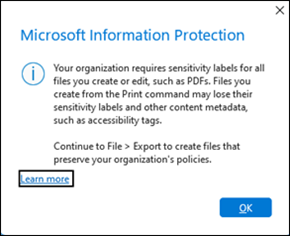
    Your organization requires sensitivity labels for all files you create or edit, such as PDFs. Files you create from the Print command may lose their sensitivity labels and other content metadata, such as accessibility tags.

    Continue to File-> Export to create files that preserve your organization’s policies.“  **Note:**This error occurs when a label is applied to the email. Outlook mandatory label error
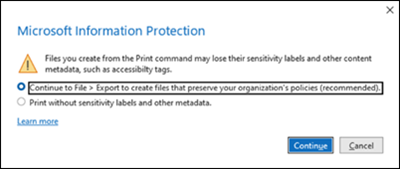
    Files you create from the Print command may lose their sensitivity labels and other content metadata, such as accessibility tags.”  **Note:**This error occurs if the label applies encryption. Outlook mandatory label encryption error
    Important:

    • This error can be misleading since Outlook Desktop does not support exporting files to PDF. This misleading error issue has been escalated to the Outlook Team to request a better error message long term.
    • The other Office applications such as Word do not provide the capability to print to PDF either. However, those applications do have the capability to export.

    STATUS: WORKAROUND

    The functionality to print to PDF has been blocked by Outlook Desktop because it violates the label policy. Outlook Desktop cannot print PDF files with the label applied. The label is not preserved when the email is printed to PDF.  

    Since Outlook Desktop does not have print-to-PDF with Mandatory Labeling, consider the following option. 

    • Disable Mandatory Labeling: If you disable Mandatory Labeling you can print to PDF, but you may be prompted for further information or justification to do so.

    I hope this shared information helps you to provide the required information for your query. You can also give a Vote on it. It helps other users who are searching for this same information on community sites. Your vote helps other users to find that topic easily. At this point, your cooperation and valuable time will be greatly appreciated.

    Thank you for your time and cooperation.

    Sincerely

    Simbarashe | Community Moderator

    1 person found this answer helpful.
    0 comments No comments
  4. Anonymous
    2024-04-05T03:59:21+00:00

    Hi Simbarashe,

    Good day to you,

    To help us narrow the issue you are facing kindly provide the following information for further troubleshooting:

    1. Do you have the same issue in Outlook on the web? No. it only happened on the outlook desktop app.
    2. Does it it happen with all sensitivity label or just a specific sensivity label? it happened to a specific sensitivity label and is (External) unprotected,
    3. Is the user getting this error an external or internal user? both internal and external.

    Yes i have open service request in the Microsoft 365 admin center. the ticket is still open for 2 month and no solution was provided.

    Do advice.

    Thank you,

    Adrian

    1 person found this answer helpful.
    0 comments No comments
  5. Anonymous
    2024-04-04T05:17:26+00:00

    Dear adriankoh1,

    Good day.

    Thank you for posting to the Microsoft Community.

    We've received your query, and you can expect to receive a response from one of our community moderators accordingly.

    At this point, we appreciate your patience and cooperation. Thank you.

    Sincerely
    Microsoft Community Moderator

    0 comments No comments