Hello Insiya.,
Good morning!
Thank you for publishing in Microsoft Community. We are happy to help you.
Please are you using the new version of classic Outlook or you are using the new Outlook?
If you are using the new version of classic Outlook there are two ways to view your calendar horizontally
To view your calendars horizontally in the new version of Outlook, you can click on the "View" tab in the ribbon at the top of the screen. Then, click on "Change View" and select "Calendar" from the drop-down menu. From there, you can choose how to display your calendars side-by-side.
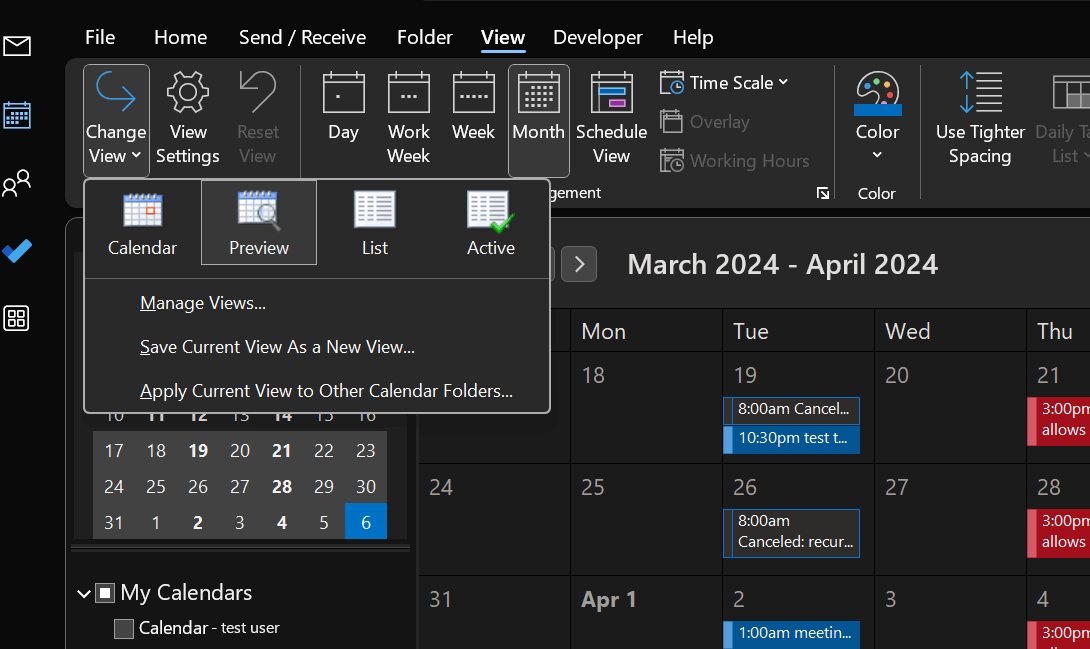
we have Schedule view, select your calendar and click on Schedule view.
this is one of the favorite layouts/views for users with multiple calendars. If you also have multiple calendars, the calendar view will be of great help to you. This is simply a horizontal view of the calendar, or times, to be more precise. When you select multiple calendars to display, in Calendar view, all of these calendars will be displayed horizontally, stacked on top of each other. This especially helps to detect overlapping appointments simultaneously and allows you to adjust your schedule accordingly.
Regarding selecting a whole group of calendars, as a workaround you can try right-clicking on the group name in the calendar list and clicking "Show All Calendars" to view all the calendars in that group at once.
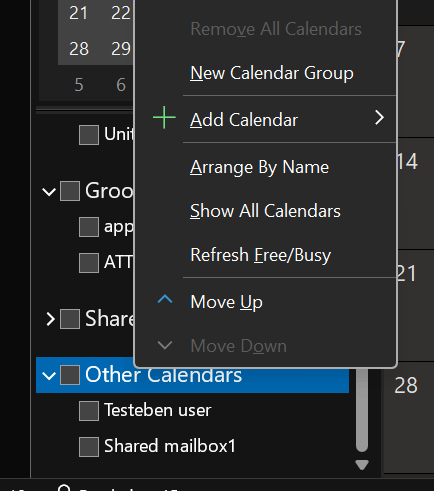
However, if you are using a new outlook it is not currently feasible to select a whole group at the time now and show the calendar horizontally.
We apologize if we are not able to meet your requirements; however, thank you for bringing this to our attention, we will surely raise your concerns to our Product Team and hopefully this can be included in future updates.
In the meantime, please feel free to post this in our Feedback community by visiting Outlook · Community (microsoft.com) as it is a community monitored by our Product team to help improve user experience with Outlook, via feedback given by our valuable customers
For other concerns, please do not hesitate to add your post in the Microsoft Community Team.
Thank you for choosing Microsoft as your partner in business.
Sincerely
Eben Ezer Tres | Microsoft Community Moderator
' cx='32' cy='32' r='32' /%3E%3Ctext x='50%25' y='55%25' dominant-baseline='middle' text-anchor='middle' fill='%23FFF' %3EA%3C/text%3E%3C/svg%3E)
