Hello GW_459,
Greetings!
Thank you for posting on Microsoft Community!
For your query, I conducted some tests in my environment and also consulted a lot of Microsoft internal knowledge articles.
Firstly, could you please kindly go to File->Account Settings->Account Settings->Select your email->choose Change->More Settings->Choose Advanced->Then make sure that Turn Onshared calendar Improvement is disabled. Then check if you can add your Google calendar to Outlook.
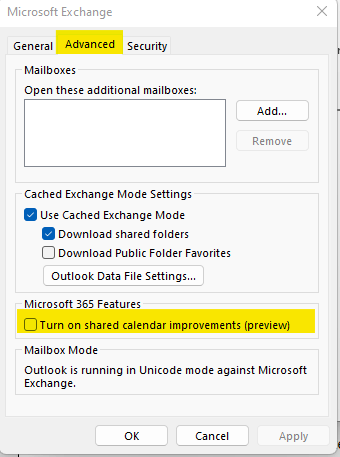
This is also a known issue that Microsoft published before, detailed information can be found on: You can't add an Internet calendar in Outlook 2019, Outlook 2016, and Outlook for Microsoft 365
As a workaround, you can either export Google Calendar as .ics files and import it to Outlook or use Outlook Web App (OWA) to add the calendar:
- To import Google Calendar .ics files into Outlook, you may follow the steps in See your Google Calendar in Outlook. (Detailed instructions can be referred to the section "Import a calendar from Google Calendar")
- To use OWA to add the calendar, follow these steps:
To use OWA to add the calendar, follow these steps:
- Sign in to the Outlook Web App.
- Switch to the Calendar module.
- Select the Add Calendar menu.
- Select the From Internet option.
- Provide the URL and an optional calendar name.
- Select Save.
If the above-mentioned instructions cannot address your concern, feel free to reply and provide more information to us. We will continue to support you.
Thank you for your time and cooperation. Wish you have a nice day!
Sincerely,
Eleni | Microsoft Community Moderator
' cx='32' cy='32' r='32' /%3E%3Ctext x='50%25' y='55%25' dominant-baseline='middle' text-anchor='middle' fill='%23FFF' %3EA%3C/text%3E%3C/svg%3E)
