Thank you for your response.
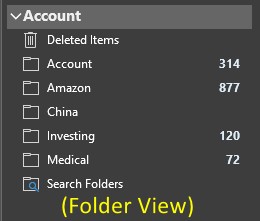
The PST file is a local file I created to file e-mails. The PST file name is "Account.pst"
A screen shot of the folder view follows:
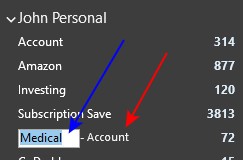
In the shortcuts view, the sub-folder names are all included, however, for the directory "Medical", it also includes the name of the PST file (red arrow). If I try to rename the shortcut, it only allows me to change the first part (blue arrow)
The content of each folder is exactly the same - filed e-mails. I created each folder the same way, and copied the e-mails to it the same way. As far as I can tell, the folders and content are essentially the same (different names and different e-mails filed in them of course)
Any idea the reason why only the one shortcuts would include the PST filename? I also have several other PST files I use for different projects with similar shortcut file name issues.
' cx='32' cy='32' r='32' /%3E%3Ctext x='50%25' y='55%25' dominant-baseline='middle' text-anchor='middle' fill='%23FFF' %3EA%3C/text%3E%3C/svg%3E)
