Share via

Issue with Outlook profile creation

Anonymous
2024-05-15T09:40:49+00:00

Hi there,

The organisation I work for has recently started having an issue with creating MS Outlook mail profiles. A lot of users need multiple Outlook profiles for signing into shared mailboxes directly to carry out tasks like mail merges. Creating these profiles is normally simple; go into Control Panel, open the Mail32 app go to profiles, click new, remove your email address, add the shared mailbox email address, when the MS exchange sign in is triggered, swap the shared mailbox email address for the user's UPN and it signs into the shared mailbox as the user and allows the profile to be added. This allows the user to start the Outlook client as the shared mailbox account - very straightforward.

However, we've noticed lately that we can do this for one mail32 session, after the session is closed and reopened the prompt to sign into the exchange, where we can swap the mailbox address for the users UPN does not show up anymore. There is a brief flash, but the sign-in box never manifests:
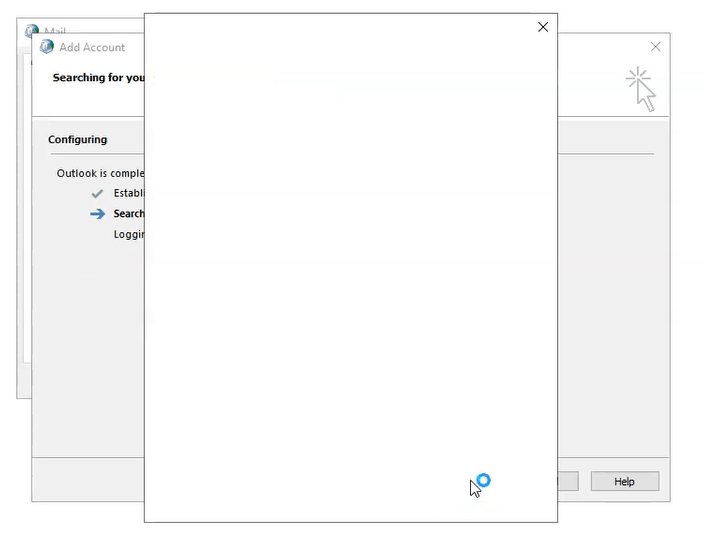
Clearing all cached credentials and signing out of all MSO stuff and even forcing sign-outs via AAD doesn't help. The issue seems to persist until a Windows profile reset is done. After the Windows profile reset is done, we get one session to add the mailbox profiles we need, After that session is closed, no more mailbox profiles can be created until another Windows profile reset is done.

I previously raised a Microsoft ticket about this but they were unable to help. I haven't seen this issue reported anywhere else. It appears to be organisation-wide and is affecting Windows 10 and 11 assets, both Azure and domain-joined, running MSO 365 using the classic Outlook client. MSO is up to date. manually deleting the *Computer\HKEY_USERS\SID*\SOFTWARE\Microsoft\Office\16.0\Outlook\Profiles key does not help either. Fully deleting all profile data held in:

C:\Users\*User ID*\AppData\Roaming\Microsoft\Outlook

C:\Users\*User ID*\AppData\Local\Microsoft\Outlook

C:\Users\*User ID\ExchangeArchive

Also didn't help. Neither did deleting data held in:

C:\Users\*User ID*\AppData\Roaming\Microsoft\Office\16.0\

C:\Users\*User ID*\AppData\Local\Microsoft\Office\16.0

C:\Users\*User ID*\AppData\Local\Microsoft\Windows\INetCache

Also didn't help. To be honest I've probably lost track of the total amount of things I've tried. I've checked with our Systems team and they're not aware of any changes.

It must be something local to the user's profile once changes are made in mail32 and Apply then OK is pressed:
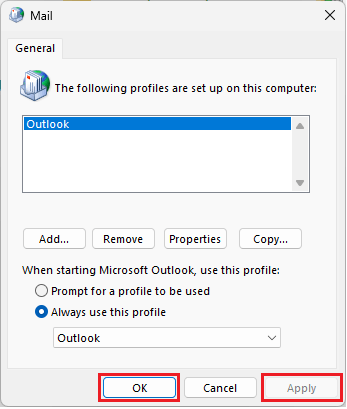
As up until that point, you are free to create as many shared mailbox Outlook profiles as you want, but after pressing Apply then OK, no more can be created until a Windows profile reset is done.

Does anyone recognise this issue? Anyone have any idea what it could be and how to fix it?

Cheers in advance.

Outlook | Windows | Classic Outlook for Windows | For home

Locked Question. This question was migrated from the Microsoft Support Community. You can vote on whether it's helpful, but you can't add comments or replies or follow the question.

0 comments No comments

12 answers

Sort by: Most helpful
  1. Anonymous
    2024-05-15T21:24:19+00:00

    The next time you create an Outlook profile use the Profile Picker to create it, (hold down the Shift key when starting Outlook), Create an Outlook profile - Microsoft Support. The reason to use this path is that the Mail Applet in the Control Panel does not support Modern Authentication. We just updated the main Outlook Profile topics to use this path instead of the Mail Applet. It's possible that you were hitting this limitation.

    Overview of Outlook email profiles - Microsoft Support

    Create an Outlook profile - Microsoft Support

    9 people found this answer helpful.
    0 comments No comments
  2. Anonymous
    2024-10-11T20:30:30+00:00

    This sounds like the issue I'm now having. Except it's not a shared mailbox, but it's another user's mailbox. For years, I was able to use this PowerShell command to grant a compliance manager's access to another user's mailbox:

    Add-MailboxPermission -Identity <user's mailbox> -User <compliance manager> -AccessRight FullAccess -InheritanceType All -Automapping $False

    Then I used the Mail (Microsoft Outlook) applet in Control Panel to add a new profile for that user so that our Compliance Manager can access that user's mailbox. I find myself recently no longer being able to do that via the Mail applet. It must've been a new change, and I can see that the change is also affecting you as well. After a few struggling with the new way of doing this via Shift+Outlook, I managed to get it working. It does have an odd problem that I have not been able to resolve, but I got it to work nonetheless. These are the steps I did:

    Start Outlook while holding down the Shift key.
    Outlook (Microsoft 365) starts, and the Choose Profile box pops up.

    Clicked on Options

    Clicked on New

    Entered a new Profile Name; OK

    It then prompted me for the Email Address

    I entered the other user's email address, and clicked Connect

    Something quickly flashed and disappeared

    It says Adding <user's email> with a racing circle going around and around forever (that's the odd problem I mentioned)

    At this point, I had to right-click from the task bar the Outlook and close that window. By then, the profile has already been created. The next steps are what finally made it to work:

    Start Outlook normally

    Choose the newly-created profile

    It then prompts for email address again; enter the other user's email address you wanted to access

    It then prompts for credentials; I used my own credentials (BTW, it works fine with Duo MFA)

    It completes the setup and opens normally.

    I had no issues switching back to my profile, and switching again to the newly-added profile.

    I posted this just in case someone else is having the same issue. I didn't see a resolution, so I gave one. I actually came up with this resolution just now, after trying some things posted herewithin. Thanks for posting the original issue! I hope you have long since resolved your issue!

    1 person found this answer helpful.
    0 comments No comments
  3. Anonymous
    2024-05-16T16:58:19+00:00

    Hi, thank you for your reply. Our users use mail merges, these have to send as the mailbox that is signed in, so our users create separate Outlook profiles, so that they can sign in as the mailbox, but authenticate using their own credentials. It's an old practice, but they still use it. So these users will topically have an "Outlook" profile for their own mailbox and one or more shared mailbox profiles for logging in as those mailboxes.

    As I say, it still works, profiles can still be created in this way, it just only works the one time.

    Cheers,

    Vihaan.

    1 person found this answer helpful.
    0 comments No comments
  4. Anonymous
    2024-05-15T16:26:13+00:00

    Hi Vihaan Reyansh,

    Good day!

    Thank you for posting to the Microsoft Community. We are glad to assist.

    Based on the detailed information in your post, I noticed something I believe could be causing this issue. When creating a new Outlook profile you should use user mailbox addresses not shared mailbox. After creating an Outlook profile using the user account then you can access your shared mailbox by following the steps in the attached documents and can also add a shared mailbox as an account by following the steps there. Open and use a shared mailbox in Outlook - Microsoft Support, Open and use a shared mailbox in Outlook on the web - Microsoft Support.

    We are looking forward to your response! Thanks for your precious time. Have a nice day!

    Sincerely,

    Eleni | Microsoft Community Moderator

    0 comments No comments
  5. Anonymous
    2024-05-15T14:22:37+00:00

    Hello,

    Good day.

    Thank you for posting in the community.

    We've received your query and you can expect to receive a response from one of our community moderators accordingly.

    At this point, we appreciate your patience and cooperation. Thank you.

    Sincerely,

    Community moderator

    0 comments No comments