' cx='32' cy='32' r='32' /%3E%3Ctext x='50%25' y='55%25' dominant-baseline='middle' text-anchor='middle' fill='%23FFF' %3EA%3C/text%3E%3C/svg%3E)

Hi, Mr.Kiran Varekar
Good day!
Thanks for posting into our community. We're glad to assist you.
According to your description, I understand that you are having trouble viewing the total mail count in your inbox on the new Outlook.
I apologize for any inconvenience this may have caused. The new Outlook for Windows does not currently have a feature that displays the total mail count in the inbox. However, you can give an attempt as following and see if it can be a workaround for you.
In new Outlook for Windows, by default most folders in Outlook display the number of unread messages after the name of the folder.
When you hover over a folder
Shows the total number of messages in the folder, followed by unread messages in parentheses.
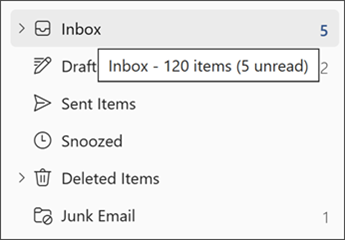
When you right-click a folder
The first item on the menu shows the number of messages, followed by unread items in parentheses.
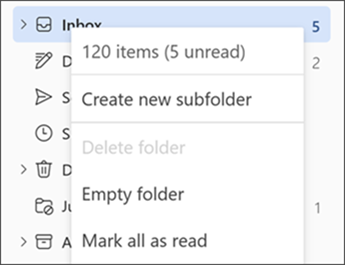
The steps above also apply to folders under Favorites, and with Searchand Archivefolders. However, the folder display option isn't available with Groups.
Drafts, Notes, and Junkfolders each display the total number of messages by default.
Thanks for your precious time and your understnading would be highly appreciated.
Hope you all the best!
Microsoft Community Moderator.