Share via

The new version of Outlook requires me to log in again every time I open it.

Anonymous
2024-08-05T03:29:59+00:00

I close Outlook after I have joined my mailbox account and finished using it, but when I reopen it, it still prompts me to re-join the mailbox screen, and the records that I originally joined will not be saved, what's wrong with that?

Outlook | Windows | New Outlook for Windows | For business

Locked Question. This question was migrated from the Microsoft Support Community. You can vote on whether it's helpful, but you can't add comments or replies or follow the question.

0 comments No comments

5 answers

Sort by: Most helpful
  1. Anonymous
    2025-02-09T02:23:46+00:00

    Same here. I am about to go back to the old Outlook. I have 5 email accounts and only one IMAP AOL account and it is the only one that I have to sign in all the time and it is with the app generated password. Who is going to remember that????? If this doesn't get fixed, I'm back to the old email which always worked.

    7 people found this answer helpful.
    0 comments No comments
  2. Anonymous
    2025-01-11T21:23:12+00:00

    Hello there,

    Any help from MS? And please do not provide advices like restart, repair etc. I have the same problem even on my new laptop. This is really anoying. Could you please fix the app?

    Thanks

    1 person found this answer helpful.
    0 comments No comments
  3. Anonymous
    2024-11-24T08:24:09+00:00

    I have the same problem.

    I only have an IMAP account.

    Is it related to not having a Microsoft account at all?

    1 person found this answer helpful.
    0 comments No comments
  4. Anonymous
    2024-10-13T18:20:07+00:00

    I have the same problem with Outlook (new). I tried repair, but it didn't help, whenever I start PC I have to give password for my gmx account (gmx is german biggest free email). Every single time.

    1 person found this answer helpful.
    0 comments No comments
  5. Anonymous
    2024-08-05T06:02:00+00:00

    Dear Anna Fitzhardinge,

    Thanks for reporting this issue in Microsoft Community.

    I’m sorry that you have to login every time you start New Outlook, and I totally understand how annoying it could be. I am glad to offer you some solutions to get rid of it.

    First, check if you can have no problem with https://outlook.live.com

    In case that it works, you can proceed as follows:

    1. Go to Windows Settings>>Accounts>>Email & accounts, you should be able to see all the Microsoft accounts you have logged into locally, I recommend that you delete them all and try logging in again to see if it works.
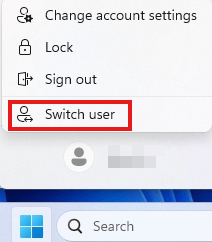
    2. Try switching local accounts and logging again.
    3. Conduct repair: As for New Outlook, go to Windows Settings>>Apps>>Installed Apps>>Outlook (new)>>Advanced options, scroll down to find Repair to perform a repair. Re-enter the new Outlook and check if the folder is back to normal.
      As for Classic Outlook, go to Windows Settings>>Apps>>Installed Apps>>Microsoft Office and run as above.
    4. Trying a clean bootwhich starts Windows with a minimal set of drivers and startup programs. It can be used to determine whether a background service or program is interfering or causing a problem.
      These steps of "clean boot" might look complicated at first glance. However, to avoid any trouble for you, please follow them in order and step-by-step.
      Disclaimer: Must select Hide all Microsoft services, before you select Disable all or your Windows may crash.
    5. You can also go back to using the old Mail app, go to Settings>>General>>About Outlook and click Open Mail Now and see if the problem still exists.

    I hope my suggestion has been helpful to you.

    If you have any questions, please let me know and I will work with you until this issue is solved.

    Best Regards,

    Stan - MSFT | Microsoft Community Support Specialist

    1 person found this answer helpful.
    0 comments No comments