Share via

In New Outlook, can I organize my emails by conversation in my Inbox but individually/date and time in my Sent folder?

Anonymous
2024-03-17T22:37:49+00:00

In the old Outlook, my emails were grouped my conversations in my inbox but individually/date and time in my sent folder. When I go to settings to make this adjustment, there is no option to change the setting by folder. This is super inconvenient when I need to track back to emails by a specific timeframe or for companies that require you to track your hours.

Outlook | Windows | New Outlook for Windows | For home

Locked Question. This question was migrated from the Microsoft Support Community. You can vote on whether it's helpful, but you can't add comments or replies or follow the question.

0 comments No comments

8 answers

Sort by: Most helpful
  1. Anonymous
    2024-05-28T11:16:35+00:00

    I can group my emails but unable to group emails in an inbox that has been shared with me. I could do this with the old Outlook. I have checked the conversations tab and it has group by conversation has been selected but this only works in my inbox and not the inbox of others.

    10+ people found this answer helpful.
    0 comments No comments
  2. Anonymous
    2024-08-22T19:03:49+00:00

    Can I group my inbox but not my sent folder though?

    3 people found this answer helpful.
    0 comments No comments
  3. Anonymous
    2024-08-22T17:29:21+00:00

    How can a shared inbox be grouped as well?

    2 people found this answer helpful.
    0 comments No comments
  4. Anonymous
    2024-03-18T07:15:07+00:00

    Hello Nikki_P_18,

    Thank you for posting this case in Microsoft Community!

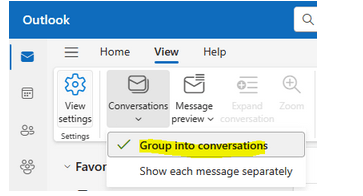
    Based on your description: In New Outlook, can I organize my emails by conversation in my Inbox but individually/date and time in my Sent folder? I would like to cooperate with you working on this case. To clarify this case, currently it is supported to group your all emails into conversations in New Outlook. You may go to View>Conversation and select Group into conversations options. Once you enable this, it means that any folders in New Outlook will be dislayed as Group into conversations.
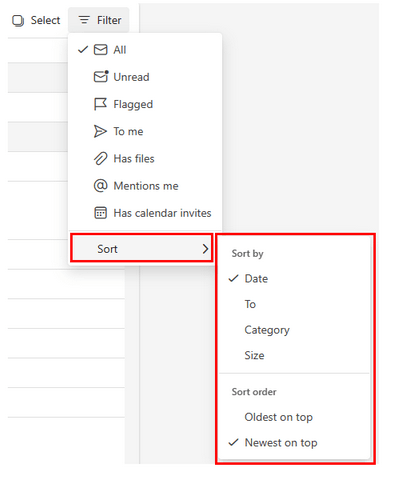
    For folder level, you may use Filter feature which could sort your all emails under Sent Items such as Date, To, Category, Size and so on.
    I understand your concerns here but, please note Microsoft is constantly working on improving this product and adding more new features and the new Outlook for windows (Preview) version is still under active development. Therefore, I suggest keeping an eye on the Microsoft Outlook blog or the Microsoft 365 Roadmap | Microsoft 365 for any updates on this feature. In the meantime, I do apologize for the inconvenience this may cause, if you heavily rely on this feature, you may consider Toggling out of the new Outlook for Windows preview - Microsoft Support for now. I will also update here once I get additional information and the specific timeline for the feature will be added.

    At this point, it is also recommended that click Help>Feedback or Contact support and provide feedback within the new Outlook for Windows and add your concern as an idea through the new Outlook in-app support Feedback site. Microsoft will keep monitoring customers feedback and valuable ideas there to consider/include in the future product update.

    Your understanding and patience will be appreciated.

    Thank you!

    1 person found this answer helpful.
    0 comments No comments
  5. Anonymous
    2024-03-18T00:21:35+00:00

    Hello

    Good day.

    Thank for posting in the community.

    We've received your query and you can expect to receive response from one of our community moderator accordingly. At this point, we appreciate your patience and cooperation. Thank you.

    Sincerely,

    Community moderator

    1 person found this answer helpful.
    0 comments No comments