Dear Karl Starmer
Thanks for using Microsoft products and posting in the community.
When you accidentally delete an email message in Outlook, you can recover the message if it's still in your Deleted Items folder. In some cases, you can even recover items after the Deleted Items folder is emptied.
You can also recover a deleted folder (with all of its messages) if it's still in your Deleted Items folder. Unfortunately, you can't recover a folder that's been permanently deleted. But you can use the steps in this topic to recover messages that were in a folder when it was permanently deleted.
When you delete an email message, a contact, a calendar item, or a task, it's moved to the Deleted Items folder. If you don't see a message in the Deleted Items folder, check the Junk Email folder. Contents of deleted folders are only visible once you expand the Deleted Items folder.
In the left pane, select the Deleted Items folder or the Junk Email folder.
Do one of the following:
Deleted Items folder: Select the message you want to recover and select Restore.
Notes: You can't restore messages that have been deleted from your Deleted Items folder.
Messages that were in a deleted folder can only be restored by selecting Move to and choosing a folder that's not been deleted.
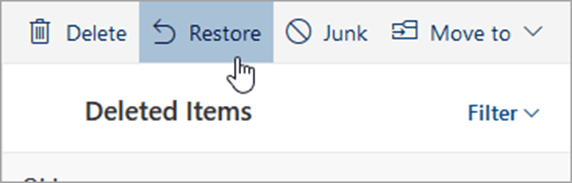
For New Outlook for Windows, right-click the message you want to recover and select Restore.
Junk Email folder: Select the message you want to recover and select Not junk.
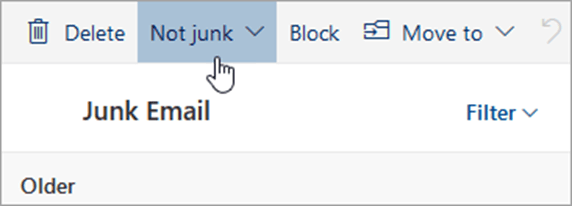
For New Outlook for Windows, select the message you want to recover and select It's not junk.
If you can't find an item in the Deleted Items folder, the next place to look is the Recoverable Items folder.
In the left pane, select the Deleted Items folder.
At the top of the message list, select Recover items deleted from this folder.
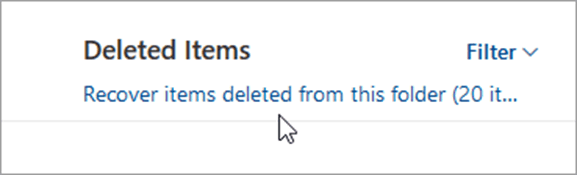
Select the items you want to recover and select Restore.
The items you select to recover will be restored to their original folders when possible. If an original folder no longer exists, items will be restored as follows:
Messages go to your inbox.
Calendar items go to your calendar.
Contacts go to your contacts folder.
Tasks go to your tasks folder.
I hope the above information can help you.
Looking forward to your reply.
Best wishes
Clark | Microsoft Community Support Specialist
' cx='32' cy='32' r='32' /%3E%3Ctext x='50%25' y='55%25' dominant-baseline='middle' text-anchor='middle' fill='%23FFF' %3EA%3C/text%3E%3C/svg%3E)
