The same happens to me. The "turn on sending from aliases" is ticked, I can select the alias in the From field, but the email arrives as being sent from the primary email, not the alias. If I select the alias to send From, the idea is for it to arrive as being sent from it, not the other other one. Otherwise, what is the point of selecting an alias to send From?
Send emails from alias in Outlook 365 Web
I am trying to send emails from one of my aliases, using Outlook 365 Web. I have multiple aliases associated to my account.
I followed the instructions described in https://answers.microsoft.com/en-us/outlook\_com/forum/all/send-from-alias-in-outlook-365-web/e56753e2-5031-4956-87f2-0614a87b6183
I was able to turn on the SendFromAliasEnabled option using PowerShell.
In the Settings > Compose and reply section in Outlook, I see the Address to send from section, but it only displays two checkboxes, both with my primary email address, and they are both disabled. None of my aliases show up there.
Can you help me with this issue?
Outlook | Web | Outlook on the web for business | Email
Locked Question. This question was migrated from the Microsoft Support Community. You can vote on whether it's helpful, but you can't add comments or replies or follow the question.
32 answers
Sort by: Most helpful
-
Anonymous
2024-08-01T13:42:50+00:00 -
Anonymous
2025-01-08T13:44:24+00:00 Go to Settings on https://outlook.office.com an check every Alias you want to send from.
Sending from Alias should be enable in general, as shown in earlier replies.
Then you can simply use the "From:" button:
-
Anonymous
2024-04-14T03:14:32+00:00 Dear Angelo
Good day! Thank you for posting in the Microsoft Community. We'll be happy to help!
First of all, we regret for the inconvenience caused to your work. Based on your description, I have a general understanding of your question, about how to send emails from alias, please kindly ask your admin within your organization for help:
- Open the Exchange Admin Center
- Click Settings> Mail flow
- Enable Turn on sending from aliases
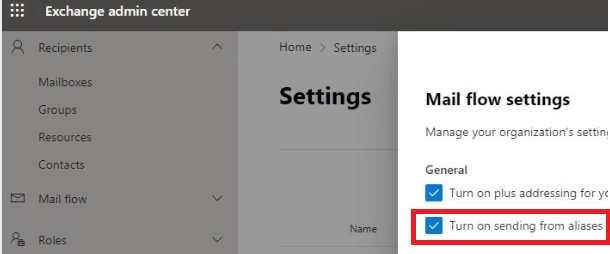
.
Meanwhile, if you still need further help or I misunderstood your meaning, please kindly correct me and share more information with me so that I can do more research and tests, thanks.
Thank you in advance for your understanding. Your patience and cooperation will be greatly appreciated. I hope for all the best!
Sincerely
Kerry Chen | Community Moderator
-
Anonymous
2024-04-16T17:00:12+00:00 I already had "Turn on sending from aliases" in the Exchange Admin Center.
I checked the settings in Outlook again, and now the "Addresses to send from" list of checkboxes contains also the aliases that I had associated with my account. It probably took a while for the information to propagate. I am able to send emails from those aliases now.
There are other problems though:
- I tried sending an email to one of these aliases. I successfully receive the email, but in Outlook it shows up as "To: <my first name> <my last name>". It doesn't show the alias email address that it was actually sent to. If I go to View > View message details, the "Received:" section does show the alias that the email was sent to. That is problematic. The alias that it was sent to should show up in the UI. Surprisingly enough, if I click on Reply, the alias that it was sent to is auto-selected as the address that I'm replying with.
- I tried sending an email from one of these aliases. I successfully receive the email, but it shows up as "<my first name> <my last name> <my alias address>". That is problematic. I want to use aliases specifically to not disclose personal information about the actual users behind the aliases. If I send an email from my "@companyName.com" alias, I am expecting that the recipient sees it as "CompanyName Support (@companyName.com)". That is the behavior if you use aliases in Google Workspace. In Google Workspace, you are able to associate these names to the aliases. How can I do the same in Outlook?
-
Anonymous
2024-08-27T16:09:50+00:00 FWIW Seeing the exact sam issue here.
@Microsoft support: would you mind at minima acknowledge the problem ?