Share via

New Outlook - Couldn't Reach the Email Server

Anonymous
2024-02-18T23:26:05+00:00

Hi everyone!

I would like to add my Exchange mail to New outlook desktop version ( Microsoft Outlook Version 1.2024.131.300 (Production). My computer system is Windows 11 Pro.

My Exchange Mail dose not work with it. Every time I try to add the account, it alwasys shows with: 'Couldn't Reach the Email Server.'

But the Exchange account works find with the old Outlook desktop version. The gmail and other mail sever wotks find with the New outlook desktop version.

I have no idae how to fix this. Any suggestions? Many thanks!

Outlook | Windows | New Outlook for Windows | For education

Locked Question. This question was migrated from the Microsoft Support Community. You can vote on whether it's helpful, but you can't add comments or replies or follow the question.

0 comments No comments

13 answers

Sort by: Most helpful
  1. Anonymous
    2024-08-13T10:33:56+00:00

    I was actually able to figure this out in my organization at least.  I found this article,https://learn.microsoft.com/en-us/exchange/clients-and-mobile-in-exchange-online/outlook-on-the-web/..., and determined that OneWinNativeOutlookEnabled has to be set to $true.  If it is set to $false or blank for a user then they cannot connect.

    As soon as I changed it from blank to $true, and waited about 15 minutes for it to propagate, for my colleague and I the issue went away

    3 people found this answer helpful.
    0 comments No comments
  2. Anonymous
    2024-07-04T21:02:33+00:00

    I am also experiencing the same issue.
    Its my work email address Office 365 one that fails to add.

    All this started when I changed my Office 365 password. After changing the password, I decided to remove my account and add it again because it didnt prompt me for a new password.

    My other laptop- did not experience this issue, that laptop is connected to Entra ID - Azure Active Directory [Work or school account].

    But the main computer from where I work is a personal one.
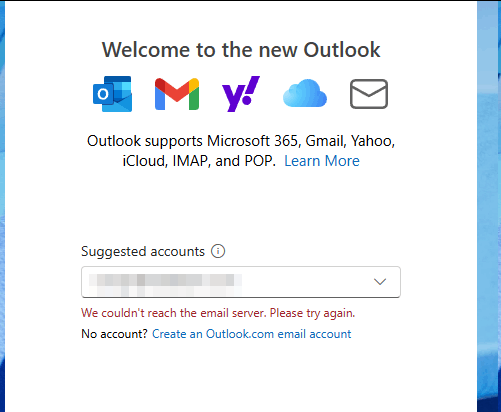
    Image

    To fix this issue, I have also tried adding the email by using Advanced options IMAP SMTP way but it didnt help. I still get the same error.
    I went to app settings- performed Reset, Repair and also Uninstall. Reinstalled it back but its the same.
    Restarted computer several times, still the same.

    I really dont wish to create a brand new user account. Usually Microsoft Store apps like these work fine on a separate windows user account.
    Of that im sure creating a new account will let me setup the email.

    Also- is there a way to clear AppData for store related apps? any specific way to remove registry or clear any history---for the cache created by this app?
    Im going to try revo Uninstaller - to see if it can help me delete the registry records and app data for this Outlook New app.

    3 people found this answer helpful.
    0 comments No comments
  3. Anonymous
    2024-08-13T10:33:33+00:00

    I was actually able to figure this out in my organization at least.  I found this article,https://learn.microsoft.com/en-us/exchange/clients-and-mobile-in-exchange-online/outlook-on-the-web/..., and determined that OneWinNativeOutlookEnabled has to be set to $true.  If it is set to $false or blank for a user then they cannot connect.

    As soon as I changed it from blank to $true, and waited about 15 minutes for it to propagate, for my colleague and I the issue went away

    2 people found this answer helpful.
    0 comments No comments
  4. Anonymous
    2024-02-19T07:14:34+00:00

    Hello Michael Yuan_,

    Thank you for posting this case in the Microsoft Community!

    Based on your description: Your Exchange Mail does not work in New Outlook. Whenever you try to add the account, it always shows with: 'Couldn't Reach the Email Server.'. I would like to cooperate with you to work on this case. First, may I know if your are on Exchange server or Exchange online/Microsoft 365.

    For my suggestion, please kindly try the following workaround to fix this case if possible:

    1. Firstly, please try to switch back to your Classic Outlook. You may check if your exchange account could be synced after switching back to New Outlook. If needed, you may Import settings to the new Outlook for Windows. If not working, please try to delete the current exchange account profile in Classic Outlook and Create an Outlook profile - Microsoft Support. Then you may try to switch back to New Outlook if your Exchange account could be synced normally.
    2. If the above workaround not working, you may check this Microsoft article Troubleshoot Outlook email setup and Troubleshoot Outlook for Windows issues which you need to perform all the steps finally.

    If this case persists, please contact the New Outlook for Windows Support Team by clicking Help>Contact Supportor Contact Support and provide feedback within the new Outlook for Windows. The support team over there has higher permission than us, they can remotely help you and collect logs at your convenience. They can also involve more resources to investigate the issue from the backend side. This would be the most efficient way to handle this case for you.

    Hope the above workaround will be helpful. If you need further assistance, please feel free to let me know, and I will keep assisting you.

    Your understanding and patience will be appreciated.

    Please understand that our initial response may not always resolve the issue immediately. However, with your help and more detailed information, we can work together to find a solution.

    Sincerely,

    Microsoft Community Moderator

    2 people found this answer helpful.
    0 comments No comments
  5. Anonymous
    2024-08-05T13:06:28+00:00

    Hi Eleni,

    I am facing the same issue, even tried to perform all the steps in this article but the error persists. When I use the old Outlook, I have no problem, but in the new one, all my accounts sync perfectly, the only one is this, my work mail, and Office365 account.

    Another interesting thing is, at home on my other PC it works perfectly, in this device (Surface Pro9), it doesn't.

    Please, how can I get some support?

    1 person found this answer helpful.
    0 comments No comments