I have received two messages from Microsoft saying security info is pending replacement (see figure1 and figure 2).
----------- (received 6/13/2024 3:05 AM)
Security info replacement
Your security info for [my email address]***** is pending replacement with [hacker’s email address] on 6/29/2024 1:04 AM (GMT).
If this was you, click the button below to bypass the waiting period by using your existing security info.
If this wasn't you, someone else might be trying to take over [my email address]*****. Click here and we'll help you protect this account.
Previously I received a similar email from Microsoft
---------- (received 5/30/2024 3:04am)
Security info replacement
Someone started a process to replace all of the security info for the Microsoft account [my email address]***** with the following info: [same hacker’s email address]
If this was you, click the button below to bypass the waiting period by using your existing security info.
If this wasn't you, someone else might be trying to take over [my email address]*****. Click here and we'll help you protect this account.
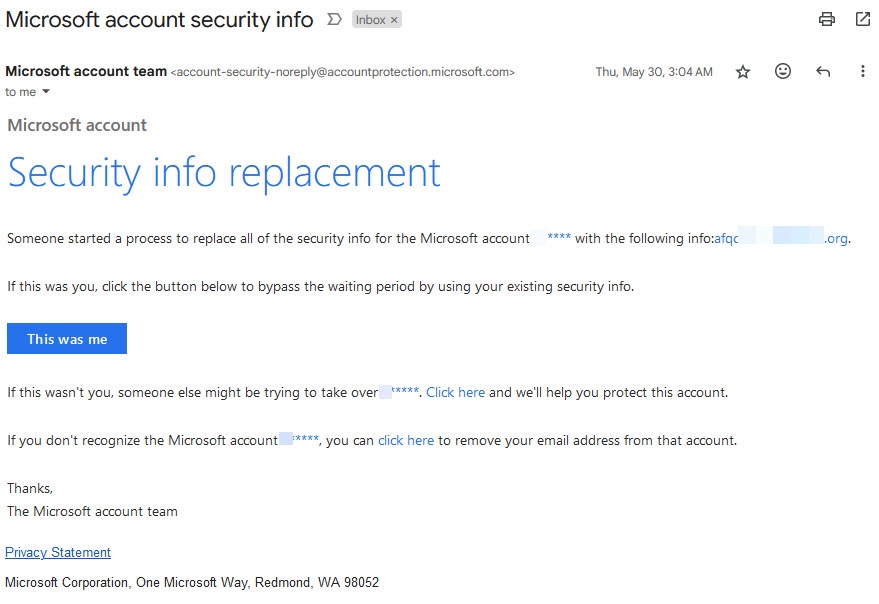
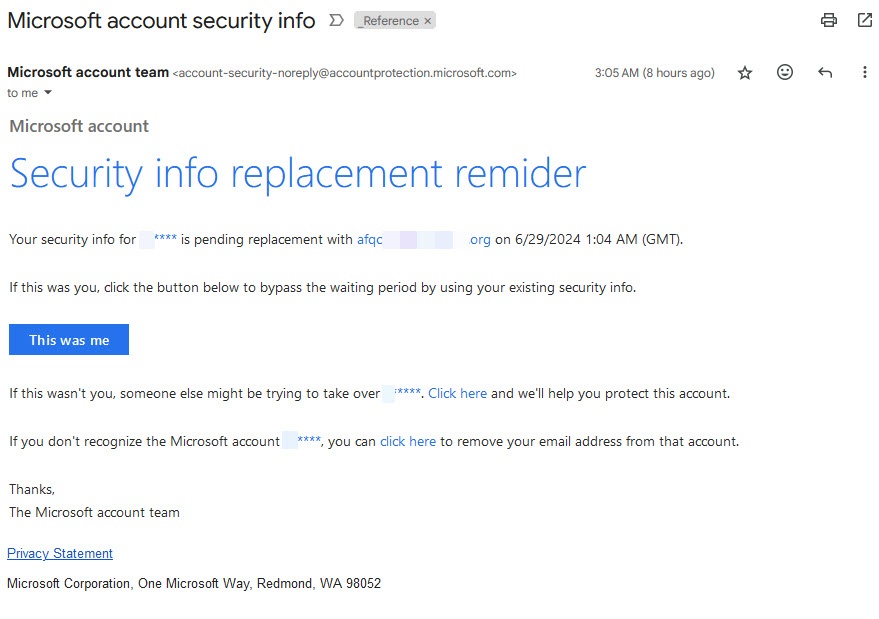
The hacker’s email address is the same in both emails. The Microsoft link [Click Here] does take me to my security page of my account. But there is no option to cancel a ‘security info replacement’ request, as implied by the two emails.
- How can I cancel a ‘security info replacement’ that wasn’t initiated by me?
It’s apparent that the hacker is trying to challenge the ownership of my account by initiating some type of ‘security info replacement’ request to replace my email with his/her email address or replace other security info. And it’s apparent that Microsoft is reminding me of the hacker’s request and given me a deadline of 6/29/2024.
Neither Microsoft email presents me with an option to CANCEL the pending security replacement request initiated by the hacker.
Yes, I have changed my password each time to a complex password. Yes, I use two factor authentication with an authenticator app. I have verified my device is legitimate and the only device recognized with my account. I have used the feature “Sign out everywhere”. I have generated recover codes, have a valid phone number, and valid email on the account.
While changing password and two factor authentication are good, they are NOT a method to cancel a pending security info replacement request. How can I cancel a ‘security info replacement’ that wasn’t initiated by me?
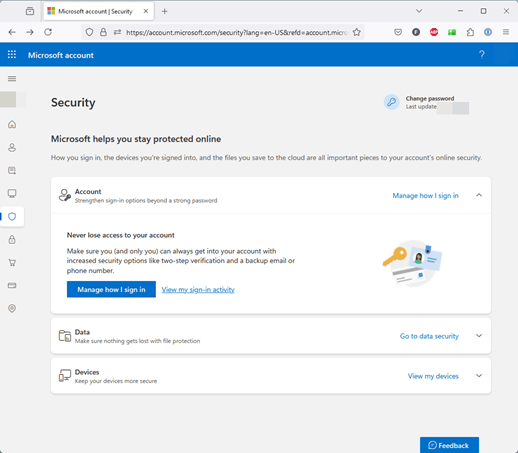
When I go to account.microsoft.com/security/ there is no notice of a pending “process to replace all of the security info” (see Figure 3) nor is there a button to cancel any such request. When I click [Manage How I sign in] I don’t see any option for canceling the pending “process to replace all of the security info”.
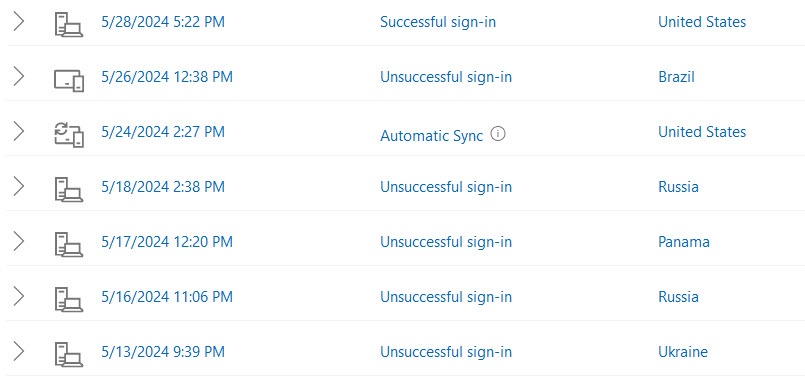
When I click from the Security page [View my sign-in activity] then [View more account activity] I see several unsuccessful sign-in attempts from Ukraine, Russia, Panama, and Brazil (See figure 4). I have checked the successful sign-ins and they are all from me and legitimate. I can’t find any record of a request to change security information to the hacker’s email or a way to cancel the request.
- How can I cancel a ‘security info replacement’ that wasn’t initiated by me?
Feature request of Microsoft:
Change the email notification to make it easy to cancel such false requests.
Change the security web page to make it easy to cancel such false requests.
PS. MS Edge and Mozilla on Windows 11 give me a "File(s) failed to upload" when I attempt to "insert image". I had to use Chrome browser to successful insert images into this pots.
***moved from Microsoft 365 and Office / Subscription, account, billing / For home / Windows ***
' cx='32' cy='32' r='32' /%3E%3Ctext x='50%25' y='55%25' dominant-baseline='middle' text-anchor='middle' fill='%23FFF' %3EA%3C/text%3E%3C/svg%3E)
