Hello Mr Cheese,
Thank you for posting this case in the Microsoft Community!
Based on your description: Outlook - How to disable "Artificial Intelligence (AI) Host"? I would like to cooperate with you to work on this case. To narrow down your issue, please kindly help to collect the following information for further investigation:
- Are you using Microsoft 365 or Business Account with Microsoft 365 Copilot license assigned?
- How about your Outlook version? Please kindly provide us with your Outlook version with product details by going to Outlook > File > Office Account and sharing that entire page screenshot with hidden personal information. What version of Outlook do I have?
To clarify this case, this is related to the Microsoft 365 Copilot upgrade that an unknown Microsoft 365 update added “Artificial Intelligence (AI) Host” to Windows 11 and 10, in addition to an AI manager. This host is inside the Microsoft Office installation folder in the system drive. Go to the Program Files>Microsoft Office>Office16and look inside root\vfs\ProgramFilesCommonX64\Microsoft Shared\OFFICE16. You’ll notice a new executable called “ai.exe”.
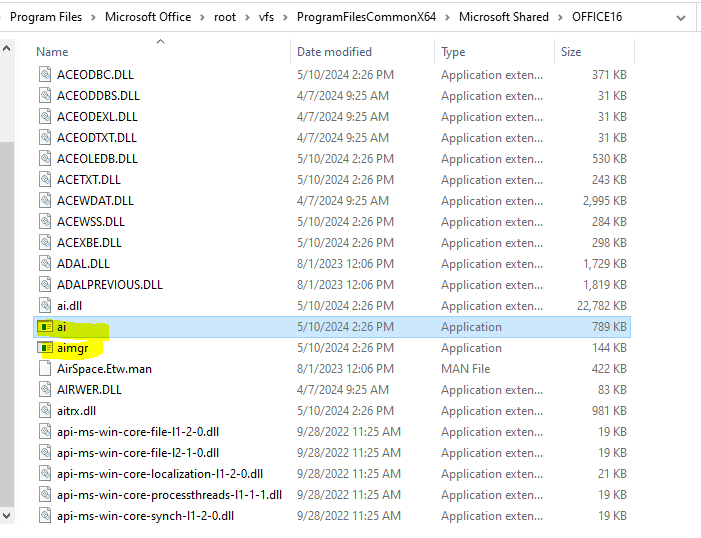
To disable this program, you may try to check the above local drive path and remove them to check if your Outlook issue could be fixed. Please note that you may back up these files first. Since you are facing Outlook freezing cases constantly, it is also recommended that you check this Microsoft article and perform the steps completely:
Outlook not responding, stuck at "Processing," stopped working, or freezes
Please understand that the initial response may not resolve your case directly, but you can try my workaround and provide more useful information for further assistance, please feel free to let me know, and I will keep assisting you.
Your understanding and patience will be appreciated.
Thank you!
Sincerely,
Eleni | Microsoft Community Moderator
' cx='32' cy='32' r='32' /%3E%3Ctext x='50%25' y='55%25' dominant-baseline='middle' text-anchor='middle' fill='%23FFF' %3EA%3C/text%3E%3C/svg%3E)
