Outlook | Windows | New Outlook for Windows | For home
Using New Outlook on Windows for personal email, calendar, and contact management

This browser is no longer supported.
Upgrade to Microsoft Edge to take advantage of the latest features, security updates, and technical support.
' cx='32' cy='32' r='32' /%3E%3Ctext x='50%25' y='55%25' dominant-baseline='middle' text-anchor='middle' fill='%23FFF' %3EA%3C/text%3E%3C/svg%3E)
Hello all,
I'm using the new Outlook on my desktop. I work a three day week but my colleagues work for 5, so I want my calendar to show Monday to Friday even 'though my work week is set to Mon-Wed. Is this possible?
(To be clear, I don't want 'work week' - it doesn't show what I want - or 'week' as I don't want to see the weekend.
I have my work week set in this way so that my colleagues can see the days that I'm available, so don't want to lose that functionality.)
Many thanks.
Using New Outlook on Windows for personal email, calendar, and contact management
Locked Question. This question was migrated from the Microsoft Support Community. You can vote on whether it's helpful, but you can't add comments or replies or follow the question.
Thank you. Now I know I can stop trying to make it work! I'll feed this back to the appropriate team, as per your suggestion.
Many thanks.
Hello again Nazmun,
Thank you. That's certainly closer to what I was looking for but now the five days start from whichever day I'm on; for example, today is Weds so I can see Weds-Sun. Can I lock the five day view to Mon-Fri? (Ie on a Weds I'll see two days before and two after).
Many thanks.
Hello Madame Engineer**,**
Thanks for your response, I am very sorry to see that my answer was not helpful as an answer.
I was answering according to your description "so I want my calendar to show Monday to Friday". Maybe there was a misunderstanding.
After you save the settings as mentioned on my previous thread:
Next you can select from left panel of calendar > View > Day to 3 days.
I hope this helps. Let me know if you have any further questions or concerns.
And if the provided information is helpful and meets your requirement, you can also give Vote on that in order to make this thread a top content and help any other community users who might be facing a similar scenario to easily find this thread/post.
If neither of these step's work, please let me know and we can explore other options.
At this point, I would like to thank you very much for your valuable time and kind cooperation.
Have a great day ahead!
Sincerely
S M Nazmun Nur | Microsoft Community Moderator
Thank you for your reply, however I want my work week to be three days (Mon-Wed) and my view to show five (Mon-Fri). Is this possible?
Hello Madame Engineer**,**
Good day! Thank you for reaching out to Microsoft community.
Yes, it is possible to set your calendar to show Monday to Friday in Outlook. Since you are using New Outlook on your PC, here are the steps:
In Outlook, you have the option to:
Change view | Change to Monday start | Change work week | View two time zones
To set the work Week from Monday to Friday: Change how you view your Outlook calendar - Microsoft Support.
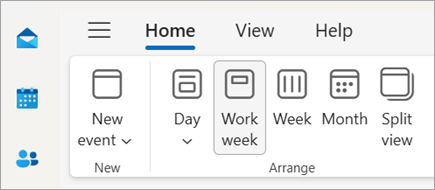
Change the calendar view with a Monday start
Now you have work week from Monday to Friday.
I hope this helps. Let me know if you have any further questions or concerns.
And if the provided information is helpful and meets your requirement, you can also give Vote on that in order to make this thread a top content and help any other community users who might be facing a similar scenario to easily find this thread/post.
If neither of these step's work, please let me know and we can explore other options.
At this point, I would like to thank you very much for your valuable time and kind cooperation.
Have a great day ahead!
Sincerely
S M Nazmun Nur | Microsoft Community Moderator