Share via

How do I change my server settings on the Outlook App on Android Phone?

Anonymous
2024-06-26T01:43:29+00:00

Hi everyone!
How do I change my server settings on the Outlook App on Android Phone? I do not see any options for it, only reset account and delete account available. Is it even possible?

Outlook | Outlook for mobile | Outlook for Android | For business

Locked Question. This question was migrated from the Microsoft Support Community. You can vote on whether it's helpful, but you can't add comments or replies or follow the question.

0 comments No comments

14 answers

Sort by: Most helpful
  1. Anonymous
    2024-08-03T10:07:40+00:00

    This is not the answer. This is how to add an account. If you add an account, there is the advanced settings slider.

    But on an existing account, this option does not exist. Or at least it is not easy to find, as is the problem of the topic-starter.

    So the question still is the same:

    How do you change server settings for an existing e-mail account in outlook for Android?

    30+ people found this answer helpful.
    0 comments No comments
  2. Anonymous
    2024-09-26T20:20:04+00:00

    None of this works. For anyone running into this problem, they didn't create a way to make a settings change LOL! You have to delete the account and create it all over again, NICE!

    20+ people found this answer helpful.
    0 comments No comments
  3. Anonymous
    2024-06-26T09:26:23+00:00

    Thanks for the reply!
    I didn't see advanced settings there, my device Samsung Galaxy A80. Here I provide the screenshot (I erase the mail info for my own privacy):

    10+ people found this answer helpful.
    0 comments No comments
  4. Anonymous
    2024-08-03T20:19:19+00:00

    I'm having the same issue on my wife's android phone. Our provider changed his smtp address and I can't update the account settings on her phone.

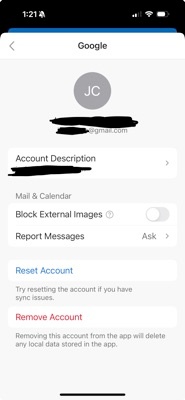
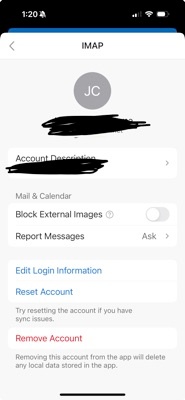
    On my I phone I noticed that for my gmail account (in outlook) I can't change the settings. But on my cox account I can see an "edit login information" option where I can change the SMTP info.

    The difference between the two accounts is that for the google account I let my phone setup the account automatically but for my cox account I changed the SMTP settings manually from the beginning.

    So to me it looks like that if the email account was setup automatically you can't change the info anymore. But if you had setup the account manually to start with, then you can change the settings.

    So I'm afraid I will have to delete the account for my wife and create a new account.
    10+ people found this answer helpful.
    0 comments No comments
  5. Anonymous
    2025-01-09T11:04:54+00:00

    So do I correctly understand:

    1. There is no way to change the server settings in Outlook for Android.
    2. You have to delete and re-add the account.
    3. If you delete the account it irrecoverably deletes all of the emails.

    This cannot be true. No one can be so stupid as to design the system like this.

    It would mean that that you have to throw away the phone itself and buy a new one, if you don't want to lose all your emails. Simply insane. I'm guessing this is not the case and that there is some way to deal with this problem.

    8 people found this answer helpful.
    0 comments No comments