Share via

Unable to access my emails

Anonymous
2024-10-09T11:02:46+00:00

Hi

I have been using my Hotmail address via the app on my iPhone without issue. Until two weeks ago. When I click on the envelope icon I initially got ‘emails could not update’ error. Now I get password not valid. I have re set my password via the Microsoft website, so know this is correct. I was accessing my emails via my Microsoft login but now I can’t get access this was anymore either. I get an error message saying either retry or ‘cannot parse response’

Can anyone help. I’m loosing the will with the help section as it just send me round in circles. I need my emails. Everything I do is set up via them.

Thanks

Rachel

Outlook | Outlook for mobile | Outlook for iOS | For business

Locked Question. This question was migrated from the Microsoft Support Community. You can vote on whether it's helpful, but you can't add comments or replies or follow the question.

0 comments No comments

3 answers

Sort by: Most helpful
  1. Anonymous
    2024-10-11T01:30:13+00:00

    Dear Rachel Sollis

    I'm glad to hear from you and to hear your email is working fine now.

    Please vote Yes or No below the answer to share your feedback, it will help more people who have the same confusion as you to quickly understand these issues.

    Finally, thank you again for choosing Microsoft products and thank you for your understanding and I wish you to stay safe!

    Have a good day!

    Best Regards

    Clara G| Microsoft Community Support Specialist

    0 comments No comments
  2. Anonymous
    2024-10-10T11:06:56+00:00

    H Clara

    Thank you for your reply. I did see some emails on this but thought they were SPAM. I also was struggling to set up multifactor authentication as it seems to always want another email address which I don’t have.

    Anyway, I have downloaded a new outlook app and that seems to have worked for now. Cross fingers!

    Thank you

    Rachel

    0 comments No comments
  3. Anonymous
    2024-10-10T10:11:38+00:00

    Dear Rachel Sollis

    Thanks for your post in Microsoft Community.

    I understand the confusion that you don't have access to your email at the moment.

    According to your description, your current predicament is due to the fact that your current setup doesn't conform to the modern authentication methods that Microsoft has recently rolled out.

    What is modern authentication?

    Modern authentication is a security protocol that provides stronger security protections, including multi-factor authentication (MFA) and conditional access. Microsoft encourages users to migrate from the old Basic Authentication to Modern Authentication to improve the security of their accounts.

    The following is an official description from Microsoft. You can refer to it and confirm if you find yourself in the following situation:

    Modern Authentication Methods now needed to continue syncing Outlook Email in non-Microsoft email apps - Microsoft Support

    Since you are using the Mail app that comes with your iPhone, you can refer to the following steps:
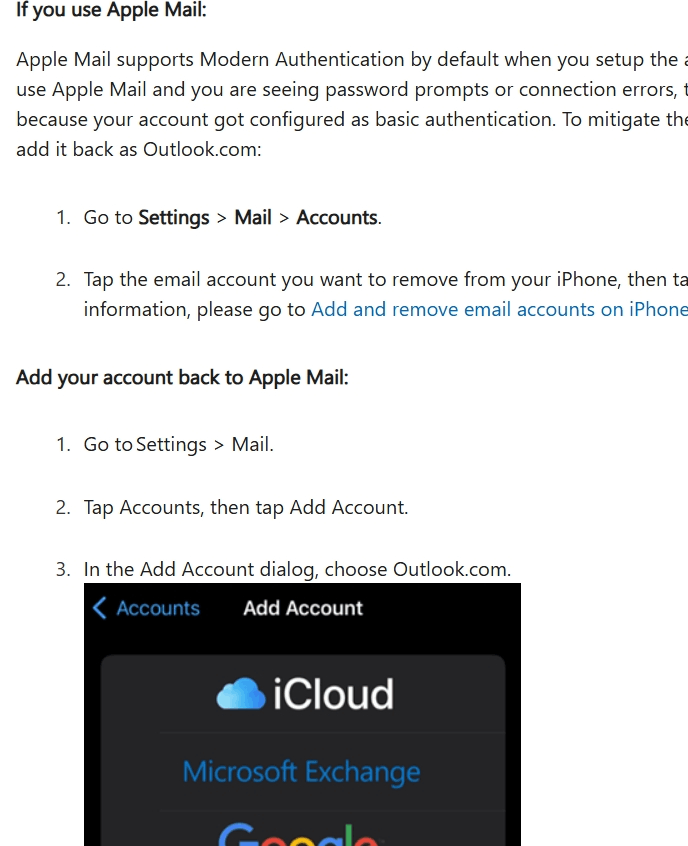
    It is hoped that the above recommendations will provide you with help. Please do not hesitate to contact us if you have any further concerns or questions.

    Best Regards

    Clara G| Microsoft Community Support Specialist

    0 comments No comments