Share via

How do I merge calendars so I only have to look at one with everything on it??

Anonymous
2024-09-26T08:13:40+00:00

This Calendars feature is poxy, I can't add Holidays to my preferred calendar, and to see all the relevant entries, I have to have multiple calendars open...I just want one, with all my items on it, how to please?

Outlook | Windows | Classic Outlook for Windows | For home

Locked Question. This question was migrated from the Microsoft Support Community. You can vote on whether it's helpful, but you can't add comments or replies or follow the question.

0 comments No comments

6 answers

Sort by: Most helpful
  1. Deleted

    This answer has been deleted due to a violation of our Code of Conduct. The answer was manually reported or identified through automated detection before action was taken. Please refer to our Code of Conduct for more information.


    Comments have been turned off. Learn more

  2. Anonymous
    2024-10-09T13:39:24+00:00

    Hello All . Not sure if these question have been answered, exporting is not a solution. Here is a possible solution that worked for us.

    Situation: I have 2 Service companies with 2 separate calendars. plus my own 365 personal calendar. Adding calendars to 365 creates 3 separate calendars of schedules. I want to view all calendars stacked into one calendar.

    Solution: In Outlook 365 (Desktop was tested) Calendar - View - Overlay. This Combined or Stacked all calendars into one view

    10+ people found this answer helpful.
    0 comments No comments
  3. Anonymous
    2024-09-26T09:15:01+00:00

    Hi Samele Haell,

    Have a Good day.

    Thank you for posting to Microsoft Community, we are Happy to assist you.

    First of all, we apologize for the trouble and inconvenience caused to your work!

    To assist better you, could you please provide us with additional details?

    1. May I know your affected account type (such as Microsoft365 business account, Outlook.com/Hotmail.com/live.com account)?
    2. May I know more details regarding your specific Office 365 subscription?

    Are you using Microsoft 365 Business Basic, Standard, Enterprise, or Education? Alternatively, is it Microsoft 365 Family, Personal, Office 365 Home and Business, Office 365 Home and Student, or a Personal Outlook.com subscription?

    1. May I know how account configured in Outlook (such as Exchange, IMAP, POP)?
    2. May I know what version of Outlook do you have? What version of Outlook do I have? - Microsoft Support.
    3. Attaching relevant screenshots for your issues with relevant example would be immensely helpful.

    Please share screenshot with hide personal and sensitive data

    **In the meantime,**until you could provide us with above required information.

    Have you tried to view the multiple calendars at the same time side-by-side or combined into a stacked overlay view?

    You could follow below steps to enable overlay view:

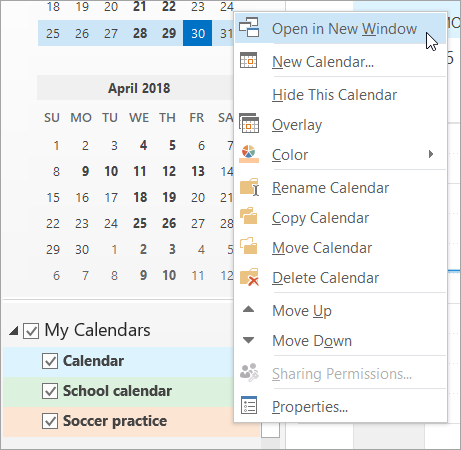
    1. In Calendar, in the Navigation Pane, right-click the name of the calendar that you want to view.
    2. Click Open in New Window.

    Click Open in New Window on the right-click menu

    • In Calendar, in the Navigation Pane, select the check box of another calendar that you want to view.
      The calendar that you selected opens next to the calendar that already appears.
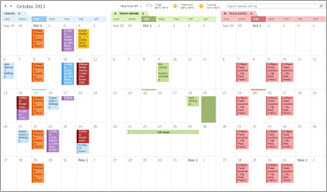
    Example of three calendars side by side

    1. In Calendar, in the Navigation Pane, select the check box of another calendar that you want to view.
      The calendar that you selected opens next to calendar that is already displayed. Each successive calendar opens next to the one most recently opened.
    2. On the calendar tab, click View in Overlay Mode.
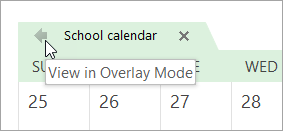
    Click the View in Overlay Mode arrow

    That calendar is now in overlay mode with the one you opened first — usually your default calendar.

    1. To add another calendar to the overlay, repeat step 2.

    Note: Please understand that our initial reply may not always immediately resolve the issue. However, with your help and more detailed information, we can work together to find a solution.

    Best Regards,

    Microsoft Community Moderator

    10+ people found this answer helpful.
    0 comments No comments
  4. Anonymous
    2024-11-16T08:40:05+00:00

    Hi, once you have merged the two calendars, what happens to:

    1. New calendar items that I book or that someone books into either of my 2 calendar accounts? Do they show in the newly merged calendar automatically?
    2. What happens if I delete an appointment originally booked in one of the calendars? Does it automatically get deleted from the new merged calendar?
    3. And same question as #1, what about recurring calendar items from one calendar, will they automatically show on newly merged one?

    Thanks!

    4 people found this answer helpful.
    0 comments No comments
  5. Anonymous
    2024-10-10T03:11:08+00:00

    Hi Kelly, how to do in the web version?

    3 people found this answer helpful.
    0 comments No comments