Outlook | Outlook for mobile | Outlook for iOS | For business
Using Outlook for iOS in business environments for email and scheduling

This browser is no longer supported.
Upgrade to Microsoft Edge to take advantage of the latest features, security updates, and technical support.
' cx='32' cy='32' r='32' /%3E%3Ctext x='50%25' y='55%25' dominant-baseline='middle' text-anchor='middle' fill='%23FFF' %3EA%3C/text%3E%3C/svg%3E)
I can not access my outlook mail on my iphone. I get the error message that the mail server "imap-mail.outlook.com" is not responding. What should I do now? thank you
Using Outlook for iOS in business environments for email and scheduling
Locked Question. This question was migrated from the Microsoft Support Community. You can vote on whether it's helpful, but you can't add comments or replies or follow the question.
' cx='32' cy='32' r='32' /%3E%3Ctext x='50%25' y='55%25' dominant-baseline='middle' text-anchor='middle' fill='%23FFF' %3ER6%3C/text%3E%3C/svg%3E)
This thread started on May 23, 2024 which is then continues on Sep 24. The source of the problem may not be the same.
Those who have problem accessing your mailbox after September 16, follow this instructions:
If you use Apple Mail:
Apple Mail supports Modern Authentication by default when you setup the account as Outlook.com. If you use Apple Mail and you are seeing password prompts or connection errors, this is most likely happening because your account got configured as basic authentication. To mitigate the issue, remove the account and add it back as Outlook.com:
Add your account back to Apple Mail:
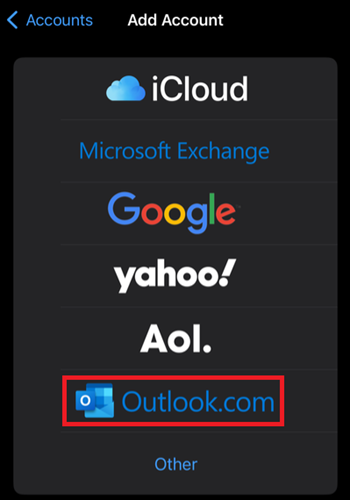
If removing and re-adding the account does not address the issue, do the following:
Have tried the above. Same issue. From what it appears it has something to do with updates specifically for the iphone. The iphone mail app is obsolete basically. Only the outlook app works. I am not sure if its an update issue or apple no long supports outside services?
My email is not coming through on my iPhone
I cannot accept messages only on my iPhone
Hi. I'm Brian and I'll try to help.
Try changing the server name to outlook.office365.com. Make sure the port is 993 and the encryption is TLS. Since this forum covers Outlook for iOS, can I assume that's what you're using?