Share via

How Can I Change the Order of Accounts in the Account Column in Outlook?

Anonymous
2024-03-13T19:50:59+00:00

Hello Outlook Community,

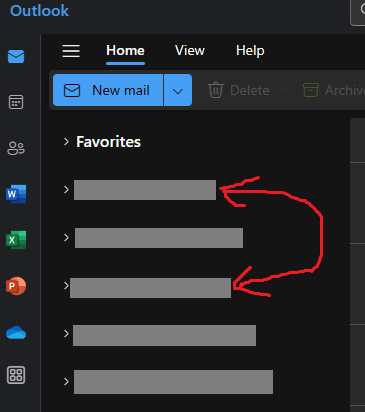
I hope this message finds you well. I'm seeking guidance on customizing the order of my email accounts in the account column within Microsoft Outlook. I frequently use multiple email accounts and find that rearranging their order could significantly improve my workflow and ease of access.

Could anyone please provide detailed steps or guidance on how to adjust the position of these accounts in the account column? I've searched through the settings but haven't found a straightforward way to achieve this. I'm particularly interested in whether this can be done directly within the Outlook application or if it requires any changes through the Control Panel or Outlook settings online.

Any advice or tips from those who have customized their account order would be greatly appreciated. Thank you in advance for your time and assistance.

Best regards,

Nikolai
Outlook | Windows | New Outlook for Windows | For business

Locked Question. This question was migrated from the Microsoft Support Community. You can vote on whether it's helpful, but you can't add comments or replies or follow the question.

0 comments No comments

8 answers

Sort by: Most helpful
  1. Anonymous
    2024-03-13T23:26:29+00:00

    Hello,

    If I understand correctly, you want to rearrange the order of email accounts on Outlook.

    From your screenshot, I can see that you are using the new Outlook. This feature is not available in the new Outlook yet.

    However, you can submit feedback to Microsoft requesting for this feature in their next update.

    Kind Regards, Rita.

    10+ people found this answer helpful.
    0 comments No comments
  2. Anonymous
    2024-09-12T20:58:26+00:00

    To move an account to the top of the list, you can click the three dots next to it, select "Manage Account," and then select "Make account primary." That was good enough for me.

    10+ people found this answer helpful.
    0 comments No comments
  3. Anonymous
    2024-07-15T16:53:56+00:00

    ...This feature is not available in the new Outlook yet...

    As far as I understand this feature has been available on the new Outlook, but has been actively removed by Microsoft. Therefore I would not assume for this to come back in the near future. It seems like the product manager has decided that it's a better user experience to not offer the option to rearrange your email accounts.

    If you desperately want to order your email accounts, you have to remove them all and add them back in the order you want them.

    10+ people found this answer helpful.
    0 comments No comments
  4. Anonymous
    2024-04-26T13:48:45+00:00

    My Outlook has been nudged today to the new one - it seems to have a lot less functionality and ease of use - rearranging the order of accounts in my mailbox is just one, I don't seem to be able to add all the accounts I used to have visible in Mail and I cannot transfer messages between my emails... will this be fixed?

    10+ people found this answer helpful.
    0 comments No comments
  5. Anonymous
    2024-07-19T12:27:58+00:00

    a very very strange decision, I work for myself and have the customer's account first, then 2 private accounts. Now every time I have a new assignment, the customer's account, which is the most important at that time, is the bottom one.

    Turn it on pls!!

    7 people found this answer helpful.
    0 comments No comments