Share via

My PDF Outlook preview is zoomed in too far. How can I adjust this? Ctrl and scroll don't work, and there is no display setting in the lower right corner.

Anonymous
2024-06-11T15:23:17+00:00

My Outlook PDF preview is zoomed in too far. How can I adjust this? Ctrl and scroll don't work, and there is no display setting in the lower right corner.

Outlook | Windows | Classic Outlook for Windows | For business

Locked Question. This question was migrated from the Microsoft Support Community. You can vote on whether it's helpful, but you can't add comments or replies or follow the question.

0 comments No comments

4 answers

Sort by: Most helpful
  1. Anonymous
    2024-11-11T01:46:06+00:00

    I have had the same issue, been driving me nuts

    I fixed it by:

    File

    Options

    Trust centre

    Trust centre settings

    Attachement handling

    I ticked turn "off attachment preview"

    Ok

    Restart outlook

    Then back through all fo the above through to where i turnde off the attachement preview

    Turn it back on (untick the box)

    Resatarted outlook and Wolah it worked :)

    Good luck.

    20+ people found this answer helpful.
    0 comments No comments
  2. Anonymous
    2024-10-07T19:13:56+00:00

    It's not that there is no preview it's that the view has shrunk considerably and is no longer fitting to the body of the email. so there is quite a bit more scrolling to view the pdf without having to open the file completely.

    It used to work fine until I got an update from MS.

    4 people found this answer helpful.
    0 comments No comments
  3. Anonymous
    2024-11-12T19:54:49+00:00

    I have had the same issue, been driving me nuts

    I fixed it by:

    File

    Options

    Trust centre

    Trust centre settings

    Attachement handling

    I ticked turn "off attachment preview"

    Ok

    Restart outlook

    Then back through all fo the above through to where i turnde off the attachement preview

    Turn it back on (untick the box)

    Resatarted outlook and Wolah it worked :)

    Good luck.

    It didn't work in Outlook. I tried that but more importantly and my issue is related more specifically to the File Explorer when trying to preview a PDF it only appears in a much smaller box in the preview screen at the upper left side when the whole preview screen is available. where I would have to scroll not only up and down but side to side!

    0 comments No comments
  4. Anonymous
    2024-06-12T03:27:37+00:00

    Hello JoeyWin

    Welcome to Microsoft Community.

    I understand that you are having trouble on Outlook's pdf preview cannot be adjusted.

    In fact, Outlook itself does not support the preview of PDF files. Check whether your PDF preview tool is working properly through the website below.

    Outlook PDF preview error: This file cannot be previewed because there is no previewer installed for it - Microsoft Support

    I am using the pdf preview of Edge browser, and in my Outlook 2021 Professional Plus, I can find the button in the picture below, which helps us scale the pdf to a suitable size.

    (If your interface is different from mine, then this may be caused by a different previewer, try switching your pdf previewer to Edge.)
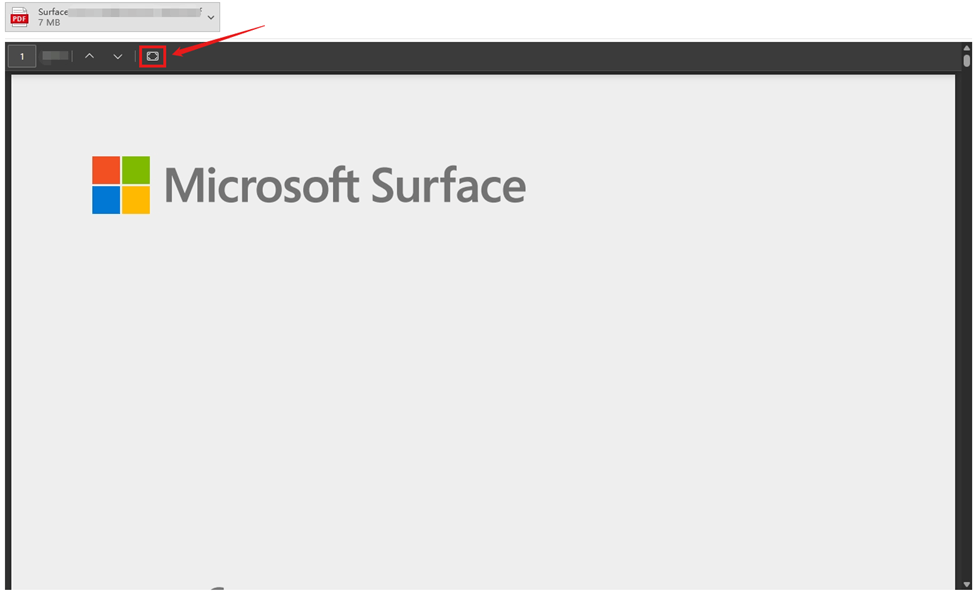
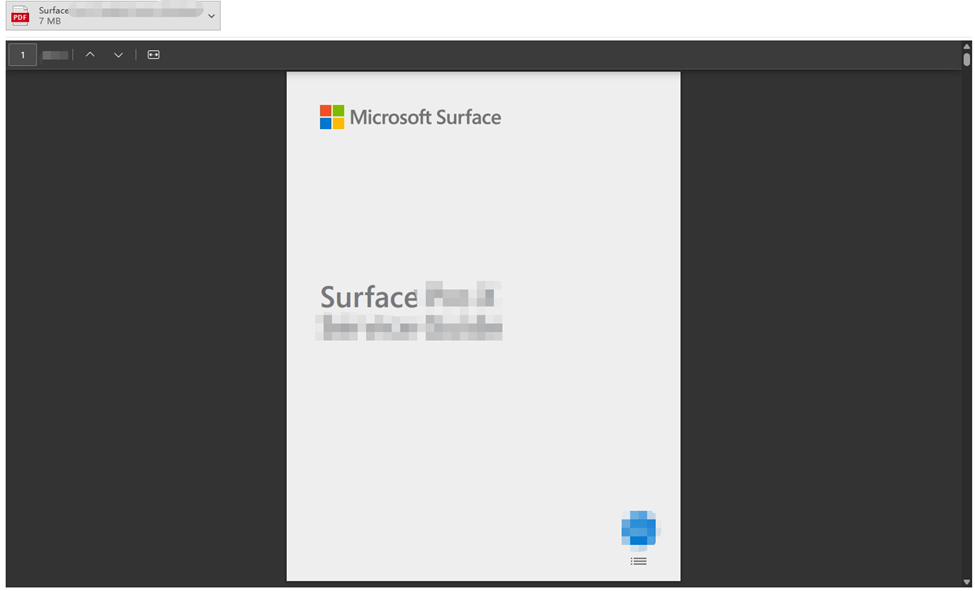
    I hope my steps are helpful to you.

    Feel free to reply if there is any progress on the issue.

    Sincerely,

    Hardyjoe.J|Microsoft Community Support Specialist

    0 comments No comments