Share via

Message Background Dark Mode

Anonymous
2024-01-08T13:49:38+00:00

This morning I came in to work and it looks like Outlook 365 for Windows had an update. All of my messages now appear with a white background instead of in dark mode while my theme is set to black.

How can I get my messages set back to dark mode in this week's update?

Microsoft® Outlook® for Microsoft 365 MSO (Version 2310 Build 16.0.16924.20054) 64-bit

Outlook | Windows | New Outlook for Windows | For home

Locked Question. This question was migrated from the Microsoft Support Community. You can vote on whether it's helpful, but you can't add comments or replies or follow the question.

0 comments No comments

16 answers

Sort by: Most helpful
  1. Anonymous
    2024-09-16T17:48:06+00:00

    In the top right of the message viewer, there is a button that is a sun/moon that will change the background of the message to white or black. This is SEPARATE from Outlook's theme. It is located next to the forward/ reply buttons. I am using a Mac so maybe it is different for Window users but it worked for me!

    8 people found this answer helpful.
    0 comments No comments
  2. Anonymous
    2024-01-08T20:56:26+00:00

    I have office theme already set to black. The problem is that the message body is black text on white background even when set to plain text mode. "Never change the message background color" is unchecked. Last week before the update, message bodies were following my set theme.

    8 people found this answer helpful.
    0 comments No comments
  3. Anonymous
    2024-01-09T16:27:28+00:00

    As per my previous message, this box is unchecked. The problem persists.

    5 people found this answer helpful.
    0 comments No comments
  4. Anonymous
    2024-06-10T14:33:18+00:00

    That doesn't work.. i selected use system settings in outlook > File > office account > Office Theme : Use system setting
    https://learn-attachment.microsoft.com/api/attachments/4a3a5ca5-f87b-44c2-aecb-d19a5a50353f?platform=QnA"https://learn-attachment.microsoft.com/api/attachments/0bee7fa8-68a0-4ca0-9f8c-daecbb512b56?platform=QnA" title="filestore.community.support.microsoft.com" rel="ugc nofollow">Image

    System color / display dark mode on Image

    Now it's working

    Email Message Screenshot:

    3 people found this answer helpful.
    0 comments No comments
  5. Anonymous
    2024-01-08T19:48:05+00:00

    Hello justmere, Good morning!Thank you for publishing in Microsoft Community. We are happy to help you.I'm sorry to hear that you're experiencing issues with the dark mode in Outlook. To enable dark mode for your messages, please follow these steps:

    Based on the version you have shared it seems you are using Classic Outlook.

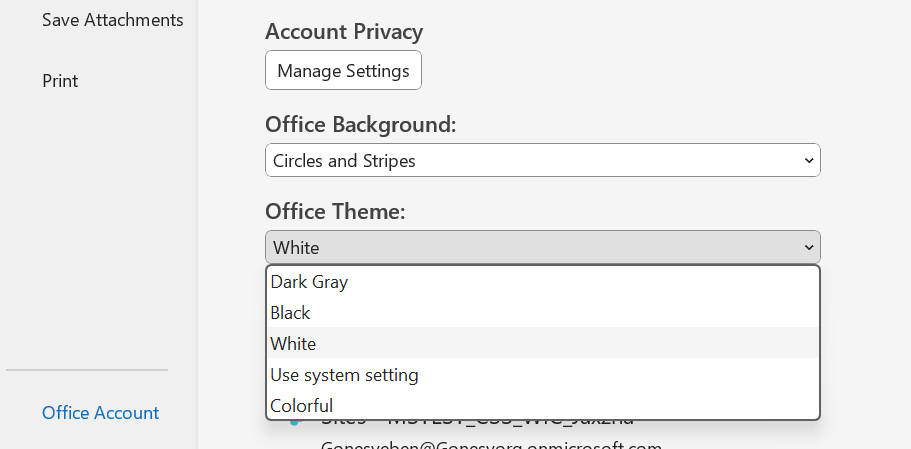
    If it is Outlook Classic go :

    1. select File, then select Office Account.
    2. Under Office Theme, select Black.
    3. Select the back and your outlook background will be in black mode
    If you are using New outlook please

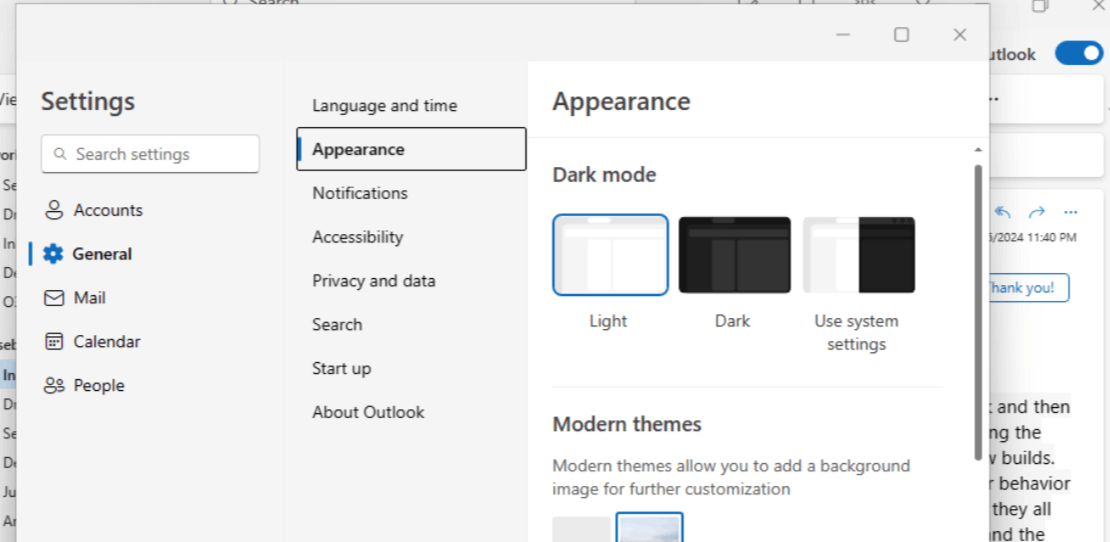
    1-Views setting

    2-General

    3-Appearance and select dark and save

    Please feel free to let us know if there are any questions or if we got you wrong. We will continue to assist you based on the information you provide. We sincerely appreciate your patience and cooperation. SincerelyEben Ezer Tres | Microsoft Community Moderator

    3 people found this answer helpful.
    0 comments No comments