Hi Jorge10_336,
Thank you for responding to let me know more about your situation.😊
I understand that your email is a third party email, is it constantly popping up windows to enter your username and password? Also, I see that the section you have selected is new outlook, the problem may be due to new outlook configuring third party mailboxes with new style authentication. You can reconfigure your comcast.net mailbox, pay attention to make sure the settings such as SMTP server address, port number and whether SSL/TLS encryption is required are correct. Newer authentication may require you to manually enable two-factor authentication and get the application password in third-party emails, etc. If you are unsure of the individual parameters, you can check the instructions for the third-party email.
Here's what you may need to do: Visit your Xfinity My Account website and log in with your Comcast credentials. Click Manage My Account -> Security -> Manage Application Passwords. Click Create Application Password. Assign a descriptive name to your application password and click Create Password. Copy the generated application password and use it in place of your regular password when configuring Outlook.
When configuring mailboxes in new outlook, please select ‘Advanced Options’ and then select ‘IMAP’. Select ‘IMAP’ as the account type. Enter the following information:
Incoming mail server: imap.comcast.net
Port: 993
Encryption: SSL/TLS
Outgoing mail server: smtp.comcast.net
Port: 465
Encryption: SSL/TLS
Enter your full Comcast.net email address and password. Click Next and then Finish to complete the setup.
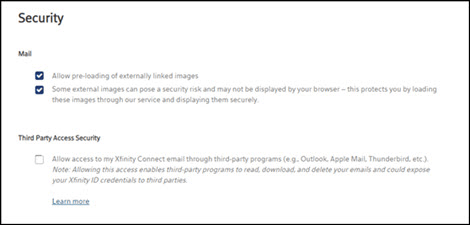
It may also be necessary for you to update your email security settings:
Sign in to Xfinity Email with your Xfinity ID and password.
In the upper right corner, click the pram icon, then select Personal Settings.
Click Security.
Uncheck the box under Third-Party Access Security to prevent third-party programs from accessing your Xfinity Email, or check the box to allow access.
Also, the official article on the new style of authentication you can refer to: Modern Authentication Methods now needed to continue syncing Outlook Email in non-Microsoft email apps - Microsoft Support
Configure it successfully and use it for a while to see if the original situation of always popping up to enter username and password is improved.
Have a nice day.
Best regards
Vivian - MSFT | Microsoft Community Support Specialist
' cx='32' cy='32' r='32' /%3E%3Ctext x='50%25' y='55%25' dominant-baseline='middle' text-anchor='middle' fill='%23FFF' %3EA%3C/text%3E%3C/svg%3E)
