Dear StephanieCD,
Thanks for using Microsoft products and posting in the community.
According to your description, you want to know the information about Two-step verification. I will explain the content of Two-step verification in detail and give you some of my suggestions. I hope my suggestions can help you understand the information about two factor verification and better protect your account security.
First of all, What I want to explain to you is that Two-step verification (sometimes called multi-factor authentication) helps protect you by making it more difficult for someone else to sign in to your Microsoft account. It uses two different forms of identity: your password, and a contact method (also known as security info). Even if someone else finds your password, they'll be stopped if they don't have access to your security info. This is also why it's important to use different passwords for all your accounts.
You can Turn on two-step verification by following the steps in this document How to use two-step verification with your Microsoft account - Microsoft Support, after turning on two-step verification, logging into your account requires you to enter your account password and one of your security information.
Here are some of my suggestions for using two-step validation:
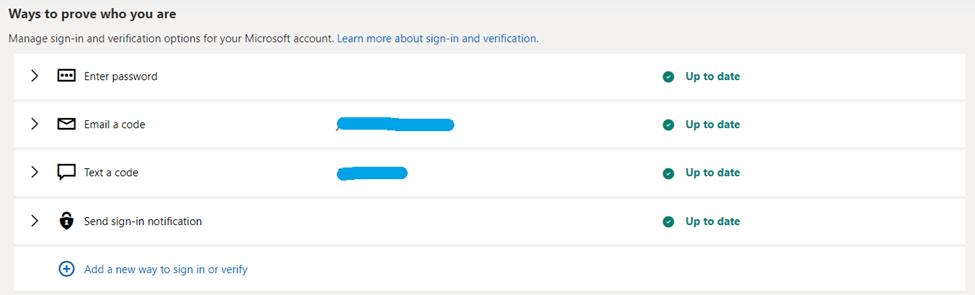
1.After turning on two-step authentication, I recommend that you add three or more sign or verify ways, and if one fails, you can use the other two.
2.we recommend that you save the 25-digit recovery code. The reason for this is that when your account is at dangerous risk and you need to authenticate, and your account does not have a valid security message set up to receive the security code, you can use the 25-digit recovery code to authenticate at that moment, so please be aware of that.

I hope this information was helpful. If you have any questions, please let me know, I will be happy to help you further.
Have a good day.
Best regards
Jim - MSFT | Microsoft Community Support Specialist
' cx='32' cy='32' r='32' /%3E%3Ctext x='50%25' y='55%25' dominant-baseline='middle' text-anchor='middle' fill='%23FFF' %3EA%3C/text%3E%3C/svg%3E)
