Share via

How do I stop Outlook from typing in capital letters, and why is it doing suddenly?

Anonymous
2024-12-16T04:36:45+00:00

Hi,

So in the middle of typing an email it started doing all capitals. Caps lock was off; shift+F3 does nothing but cycle through big capitals and little capitals. I cannot see what setting has miraculously activated to turn it off. How do I fix it? How did it happen in the first place? How do I stop it from ever happening again?

Regards,

Outlook | Windows | Classic Outlook for Windows | For home

Locked Question. This question was migrated from the Microsoft Support Community. You can vote on whether it's helpful, but you can't add comments or replies or follow the question.

0 comments No comments

8 answers

Sort by: Most helpful
  1. Anonymous
    2024-12-24T09:54:12+00:00

    Hello Paint User,

    Thank for your reply!

    I know that SHIFT+F3is the keyboard shortcut which will change the text case as selected. But your case is that there will be showing all capital letters when you keep typing the message. As checked, you may check this article as reference Autocorrect, auto capitalize, and auto format your messages to verify if autocorrect options enabled or not. Generally, if autocorrect options enabled, sometimes this may cause the issue.

    Please also check your keyboard settings or keyboard hardware problem which may cause the case even the caps lock is off. You may also try with different keyboard if there is any difference. If you have any other concerns, please feel free to let me know.

    Again, your understanding and patience will be appreciated.

    Thank you!

    3 people found this answer helpful.
    0 comments No comments
  2. Anonymous
    2024-12-17T03:13:41+00:00

    Hello Paint User,

    Good day! Hope you are doing well!

    Have you seen my last reply? If you have any concerns, please feel free to let me know for further assistance. I am waiting for your next reply posted on this thread.

    Again, your understanding and patience will be appreciated.

    Thank you!

    -

    0 comments No comments
  3. Anonymous
    2024-12-16T09:50:51+00:00

    Hello Paint User,

    Thank for your reply!

    As further research and investigation from my side, SHIFT+F3is the keyboard shortcut which will change the text case in an email message that may cause this issue. You may check this article as reference: Change text case in an email message

    As my knowledge, there will be many factors which may cause this case such as keyboard shortcuts, certain add-ins, client version, Outlook profile, Windows system and etc. For my suggestion, you may keep monitor if this case still persists from your side and perform these basic workaround. If you need further assistance, please feel free to let me know, I will keep assisting you.

    Again, your understanding and patience will be appreciated.

    Thank you!

    0 comments No comments
  4. Anonymous
    2024-12-16T07:39:11+00:00

    Good afternoon,

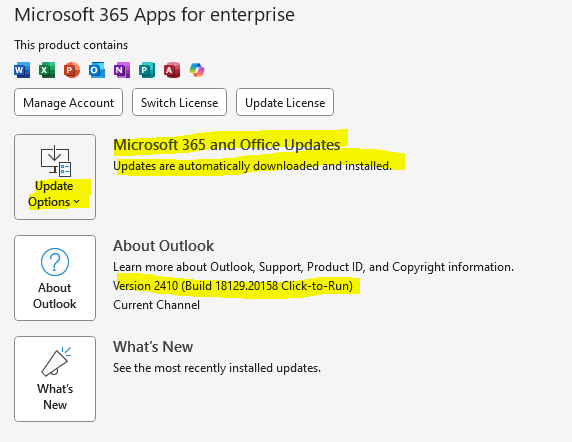
    Firstly, in regards to the details of the usage and version. Please see the picture from this original questions post.

    1. I can't restart as I using my computer and have many things open that I am in the middle of doing. Also I do not use or have access to a web version for this account.
    2. I cycled through the shift+F3 options and it just went to and from little to big capital letters as shown in my original picture. I do not what you mean by different input method. I didn't want to change settings that I am not fully aware of the use of incase it made things worse by affecting other emails as it seemed to be contained to this one at the moment but my concern is that when I save this etc. it will save whatever caused the change. ESPECIALLY as I am not aware of what caused the change.
    3. I do not have access to safe mode etc. as this is a work computer, and I have no add-ins.
    4. As this is a work computer I am unable to create a new account, and would prefer to refrain from randomly changing settings.
    5. Please the below picture.

    I will run updates when I finish my work at the EOD and can close it with fear of loss of data and tracking of tasks. But my question is what caused the change as it is only associated with that one email at the moment but I have no idea why. What other thing can cause this? Are there hotkeys which perform this action etc. as they may have been inadvertently pressed? I don't know as there is no hotkey setting in Outlook as far as I can see otherwise I would have turned it off long ago due the idiocy of the backspace archiving email "feature".

    Regards,

    0 comments No comments
  5. Anonymous
    2024-12-16T07:04:38+00:00

    Hello Paint User,

    Thank you for posting this case in Microsoft Community!

    Based on your description: How to stop Outlook from typing in capital letters, and why is it doing suddenly? I would like to cooperate with you working on this case. To clarify this case, would you please help to collect following information for further investigation:

    • Are you using Microsoft 365 or a Business account(@xxx.onmicrosoft.com/@domain.com)?
    • Or using personal account type such as Outlook.com, Hotmail.com, Live.com and so on? Or using other third-party POP/IMAP account?
    • Have you tried to sign in Outlook Web and check if getting the same case?
    • How about your Outlook version? Please kindly provide us your Outlook version with product details by going to Outlook>File>Office Account and share that entire page screenshot with hide personal information. What version of Outlook do I have?

    For my suggestion, you may try following workaround to narrow down this case step by step:

    1. Firstly, you may try to restart your Outlook and Windows system to check again. If not working, please also sign in Outlook Web and check if there is any difference.
    2. Next, please also try to switch to different input method to type the email message if there is any difference. Please also select Sentence Caseand check if it works.
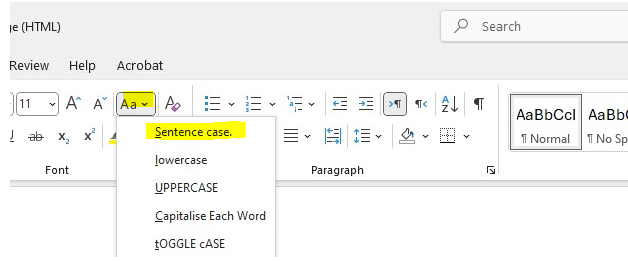
    1. If this case only exists in Outlook client, please try to run Outlook in safe mode and check if it works or not. If working in safe mode, you may try to disable all related add-ins completely and check again. More on starting Outlook in safe mode and disabling add-ins.
    2. Then you may try to re-create another Outlook profile and test it again. Create an Outlook profile - Microsoft Support
    3. Outlook works best when it's up to date. We recommend setting Windows Update to automatically download and install recommended updates. Bug fixes, new features, and performance enhancements are released regularly. To install the latest Windows and Office updates, see Install Office updates. You may go to Outlook>File>Office Account>Update Options>Update Nowand try to update the version to check again.
    6. If this case still persists, finally you may try to re-install the latest version of Office 365 application and check if working or not.

    Download and install or reinstall Microsoft 365 or Office 2021 on a PC or Mac - Microsoft Support

    Please understand that the initial response may not resolve your case directly, but you can try my workaround and provide more useful information for further assistance, please feel free to let me know, I will keep assisting you.

    Your understanding and patience will be appreciated.

    Thank you!

    0 comments No comments