Hi Ryan,
Thank you for posting in the in the Microsoft community. We are happy to assist.
Based on the information you have shared with us; I understand you have a concern regarding mailto: considered an invalid URL when adding a link within the Outlook Android app. To fully understand the scenario, I would like to ask some questions to narrow down the situation work toward the resolution.
May I confirm if the affected account has an Office 365 subscription. Are you using Microsoft 365 Business Basic, Standard, Enterprise, or Education? Alternatively, is it Microsoft 365 Family, Personal, Office 365 Home and Business, Office 365 Home, and Student, or a Personal (Outlook.com, Live.com, Hotmail.com) subscription or any third-party account?
Could you shared with us the screenshot to demonstrate the error? you can also share with us the screenshot of how the working signature in windows device is configured.
May I know if the issue reproduce in multiple android devices, you can share with us the steps used to configure the mailto in the signature for the android app.
Could also verify if the issue happens in the latest outlook for android version?
Please note that my initial response may not address your current situation immediately. However, with your help and more detailed information, we can work together to find a direction specific to your current situation.
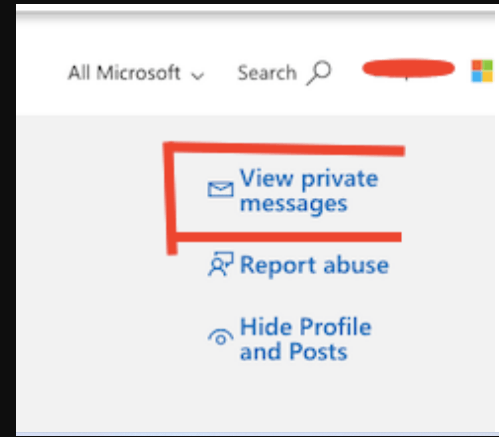
Note: To protect sensitive information, please share with use the above requested screenshot information in "View Private messages".
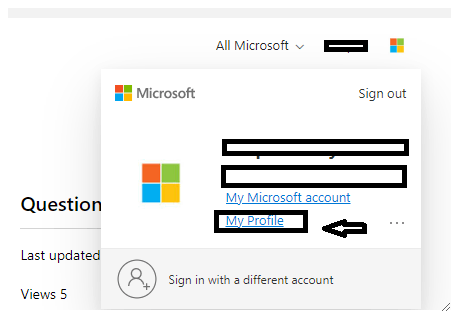
Here are the steps to open "View private messages":
To view private messaging options> Sign in to Microsoft Community, use the email account where you posted this thread information to Microsoft Community, > click your profile picture in the top right, > select the My Profile option.
I look forward to your next update on this in private message. Thank you so much for your precious time. stay safe and healthy.
' cx='32' cy='32' r='32' /%3E%3Ctext x='50%25' y='55%25' dominant-baseline='middle' text-anchor='middle' fill='%23FFF' %3EA%3C/text%3E%3C/svg%3E)
