Share via

Outlook for Web opens SharePoint link as new email address

Anonymous
2025-02-26T00:52:24+00:00

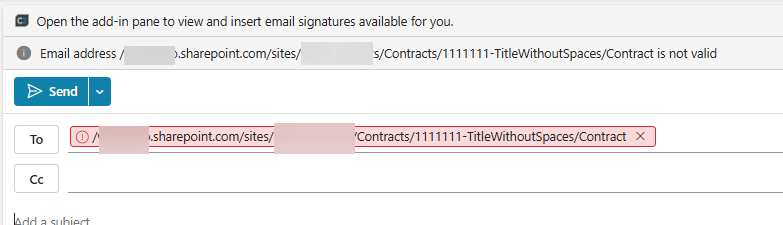
I have a Power Automate workflow that sends approvals with a link to a document library. When the link in the notification email is clicked in Outlook for Desktop, the link is opened in the browser. However, when the email is viewed in Outlook for Web and the link is clicked, it opens a new email and enters the link URL in the "To" field.You can see in the screenshot that the link is not malformed, it uses the http protocol and not the mailto protocol.Why would that link open as a new email with the URL as the recipient?????? Is that an issue for Outlook for Web?

Email gets created when clicking the link

Any ideas? I send other links in regular emails that open just fine from Outlook for web, but the Power Automate Approvals links open this weird way.

Outlook | Web | Outlook on the web for business | Email

Locked Question. This question was migrated from the Microsoft Support Community. You can vote on whether it's helpful, but you can't add comments or replies or follow the question.

0 comments No comments

22 answers

Sort by: Most helpful
  1. Anonymous
    2025-03-01T11:07:43+00:00

    Are you serious? You are a Microsoft agent with "MSFT" in your profile name. Yet you suggest that it is MY job to log this as a bug or raise a support request with Microsoft? As the other posts clearly show, this issue is not limited to just the tenant that I'm experiencing it in, but happens across other tenants as well. Are we now all supposed to start support requests?

    The information in this thread should be sufficient for YOU to ESCALATE this to the relevant team within Microsoft. I am sure you will have more and faster ways of escalation than me starting a support request. It takes them a day to reply, then they reply after my business hours, because New Zealand has just one (in numbers: 1) hour of overlap with the allocated Asia support team business hours. Then, after a few request for more information, which was already provided, they will then request all kinds of system checks and web traffic tracing dumps and other useless nonsense. I don't have time for this.

    This is the support forum for Microsoft Outlook. You have just identified that this issue is a bug.

    It's YOUR responsibility to escalate it, instead of pushing it back to me, the customer.

    2 people found this answer helpful.
    0 comments No comments
  2. Anonymous
    2025-02-27T12:42:32+00:00

    It appears that you did not read my post fully. The suggested solution DOES NOT work for a variety of reasons:

    1. Use the uriComponent() function to encode: this doesn't work as it then makes the link not work in Outlook for desktop and MS Teams as well. Remember, this is with the approvals action where we have little control over the URL.
    2. Use a Descriptive Hyperlink: This is the case already as the screen shot provided shows. In addition, the Approvals action requires descriptive text for the URL.
    3. Right click to open in new tab: it just opens a new Outlook window.
    4. Avoid Spaces in SharePoint Paths: this is not reasonable as we have thousands of SharePoint sites. In addition, the link could be to anything including a document and we have no control over the naming of the SharePoint site, the document library name, the folder name, or the filename, which could all contain spaces. It is highly unreasonable to expect everyone to not use spaces in all of the places since spaces are an acceptable character for all of these names.
    5. Finally, in the test I did, the link did not contain any spaces, and it still opens a new Outlook message when clicked from the approval e-mail. This is the link I tested with, which is not SharePoint, to a document library or a folder, but to a Copilot chat on this topic: https://m365.cloud.microsoft/chat/?fromcode=bingchat&redirectid=75C466817756498D881ECC9A06965021&auth=2

    Encoded in the workflow as suggested:
    Image

    Same result:

    Image

    And now when you click the link, or right-click on the link and open in new window, in Outlook desktop, this happens where before using uriComponent() it opened the link:

    Image

    Note: as suggested, I have opened a ticket with Microsoft support.

    Kind regards,

    David

    2 people found this answer helpful.
    0 comments No comments
  3. Anonymous
    2025-02-26T21:01:29+00:00

    Hi teylyn,

    Good day! Thank you for posting in Microsoft community.

    First and foremost, we sincerely apologize for the inconvenience this issue has caused. We understand how disruptive it can be when links don’t behave as expected, especially in critical workflows like approvals. Thank you for sharing the screenshot and detailed description—it’s incredibly helpful for us to diagnose the problem!

    What We’ve Observed

    From your screenshot, we can see that clicking the SharePoint link in Outlook for Web (OWA) is populating the URL (sharepoint.com/sites/HWAACC123-foo bar/Contract) into the “To:” field instead of opening it in the browser. The error message HWAAACC123-foo bar/Contract is not valid confirms that OWA is misinterpreting the link as an email address due to the spaces in the URL path.

    Why This Happens

    Outlook for Web uses strict parsing logic for links. When it encounters unencoded spaces (like foo bar), it may split the URL into segments and mistakenly treat parts of it as email addresses. In your case:

    • The space in HWAACC123-foo bar causes OWA to parse bar/Contract as an invalid recipient.
    • Desktop Outlook handles this gracefully, but OWA requires URLs to follow strict encoding standards.

    How We’ll Fix This Together

    1. Encode the SharePoint Link
      • Action: In your Power Automate workflow, use the uriComponent() function to encode spaces as %20.
        • Example:
          sharepoint.com/sites/HWAACC123-foo%20bar/Contract
      • Why: Encoding ensures OWA recognizes the link as a URL, not an email address.
    2. Use a Descriptive Hyperlink
      • Action: Replace the raw URL with a clickable text link in the email body:
      • Why: Friendly text links are less prone to parsing issues.
    3. Test with Right-Click → “Open in New Tab”
      • Action: As a temporary workaround, right-click the link in OWA and select Open in new tab.
      • Why: This bypasses OWA’s default parsing and confirms the link itself is valid.
    4. Avoid Spaces in SharePoint Paths
      • Suggestion: Rename folders/files to use hyphens (e.g., HWAACC123-foo-bar) to prevent future issues.

    Next Steps

    If you need assistance implementing uriComponent() in your Power Automate workflow or if the issue persists after encoding the URL, please contact our Microsoft Online Technical Support team directly. They can provide real-time guidance and escalate the case to our engineering team if needed. Here’s how to reach them:

    • Portal: A global admin can visit Microsoft Support Contact Page Sign in to your account
    • Option: Select Workflow and Automation > Power Automate for quicker routing.

    If you are not an admin user, please kindly post your query in Power Automate community for further assistance: Microsoft Power Platform Community Forum Thread


    Your patience and feedback are valuable to us. We’re committed to ensuring a seamless experience across all Outlook platforms, and we appreciate your partnership in resolving this.

    Thank you again for reaching out, and please don’t hesitate to ask for further assistance.

    Warm regards,

    Luckie Shi

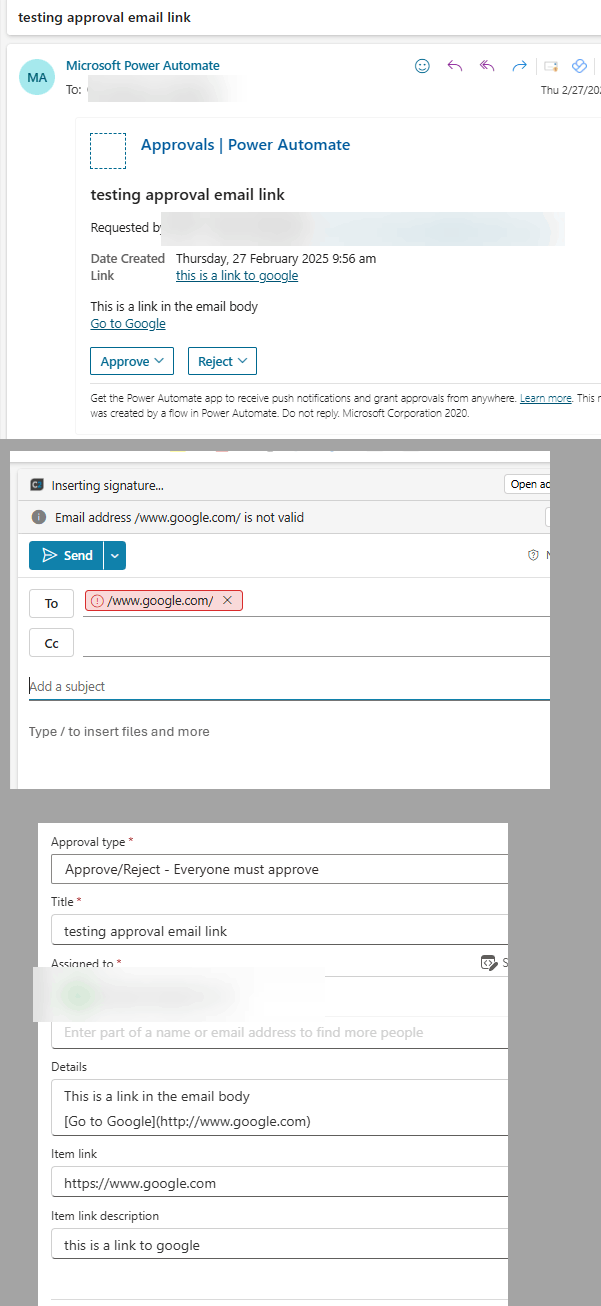
    Thanks for the reply. I don't think the spaces in the URL make a difference. I constructed a URL without a space, and it also triggers an email instead of opening the link.

    Further testing with the URL for Google also confirms that it's not about invalid characters in the URL at all. (see screenthots below)

    Since the same URL works fine when I stick it in a regular Outlook email sent from Power Automate, my suspicion is that there is something going on in the email that is generated by the Power Automate Approval process.
    2 people found this answer helpful.
    0 comments No comments
  4. Anonymous
    2025-02-27T11:26:51+00:00

    Hi teylyn,

    Thank you for the additional details and screenshots. Your thorough testing clarifies that the issue is specific to Power Automate’s approval emails and not related to URL formatting, invalid characters, or general OWA behavior. Since the same URL works correctly in regular Power Automate emails but triggers an email draft in approval notifications, this strongly suggests a unique interaction between Power Automate’s approval system and Outlook for Web.

    Why This Requires Microsoft Support

    1. Complexity of Approval Emails:
      Approval emails generated by Power Automate have a distinct structure (e.g., embedded metadata for approval actions, headers, or authentication tokens) that might inadvertently alter how OWA parses links. These elements are not user-configurable and likely require internal diagnostics.
    2. System-Level Behavior:
      The discrepancy between approval emails and regular emails points to a potential bug or compatibility issue in Power Automate’s approval workflow engine. Microsoft’s engineers can analyze backend logs, OWA’s URI handling for approval links, and SharePoint integration nuances.
    3. Limited External Troubleshooting:
      Without access to Microsoft’s internal telemetry or code-level details, further debugging would be speculative.

    To resolve this effectively, I strongly recommend contacting Microsoft Online Technical Support directly and escalating this as a potential bug. A global admin can visit Microsoft 365 Admin Center Sign in to your account > Support > Help & Support section to create a ticket.

    We appreciate your kind patience and cooperation so far. Stay safe and healthy.

    Best Regards,

    Luckie Shi

    1 person found this answer helpful.
    0 comments No comments
  5. Anonymous
    2025-02-26T15:50:31+00:00

    I have tried using the uriComponent expression on the URL to this thread: uriComponent('https://answers.microsoft.com/en-us/outlook_com/forum/all/outlook-for-web-opens-sharepoint-link-as-new-email/057aa6e9-7fa0-46a2-adba-1de1a168623f')

    In the new Outlook, even with this it still creates a new e-mail message when you click on the link:

    Worse yet, this also breaks the link in the approval in Teams as well:

    And the old Outlook desktop client:

    1 person found this answer helpful.
    0 comments No comments