When I search for instructions, nearly all documentation from Microsoft (I can find), and other sources, mention a file option. I even have a video showing Outlook 2025 and this menu option. I am finding numerous responses from Microsoft "experts" saying it doesn't exist, this was done on purpose to make it easier etc.
I found this (link below), but it doesn't work. The instructions are not clear... if followed explicitly, they do not work. If followed exercising some logic, I can almost get there, but then I get an error saying the message is too large. The message is 127 words/856 characters including spaces
https://support.microsoft.com/en-us/office/create-an-email-message-template-43ec7142-4dd0-4351-8727-bd0977b6b2d1
Here is my version of outlook:
Microsoft Outlook Version: 1.2025.404.500 (Production)
Client Version: 20250404005.11
WebView2 Version: 135.0.3179.73 (Stable)
Session ID: a7cadbaf-069f-ed4d-9192-321b913c4828
And what it looks like

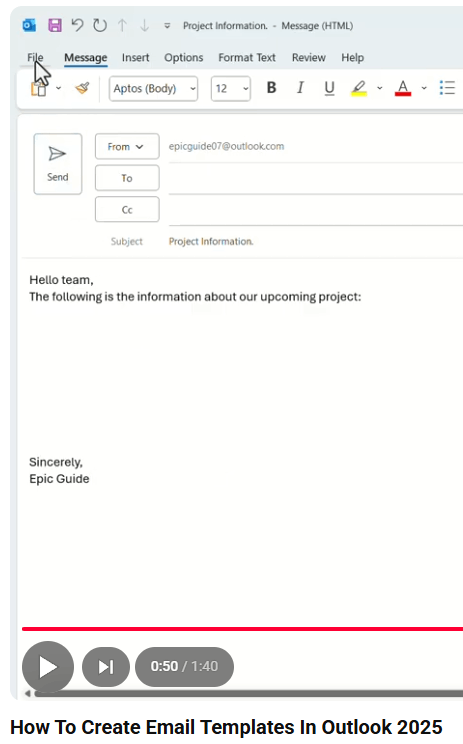
And here's a screenshot from a video of how to do this in 2025... looks like a file button to me.
But here is what I see:

I just want to create a template.
And whoever has responsibility for approving processes needs a serious performance review. Not a "Hey you're doing great." kind of review. What you are putting out is really substandard. This is not the only MS product that has procedures that simply do not work.
' cx='32' cy='32' r='32' /%3E%3Ctext x='50%25' y='55%25' dominant-baseline='middle' text-anchor='middle' fill='%23FFF' %3EA%3C/text%3E%3C/svg%3E)
