Hi Paloma,
Thank you for reaching out to us regarding the issue you're experiencing with the Microsoft Teams add-in for Outlook (Classic). I understand how frustrating it can be when things don't work as expected, and we are here to assist you.
Based on your description, it seems that the add-in was uninstalled and now you're unable to reinstall it. For me to get a clear picture of the situation could you kindly confirm if :
Microsoft Teams client is installed on your computer and that you are signed in. The add-in requires the Teams client to be running.
Check for teams add in Outlook Add-ins:
To do this:
- Open Outlook > File
- Select Options and then Add-ins.
- In the "Manage" dropdown, select "COM Add-ins" and click Go.
- Check if Microsoft Teams Meeting Add-in for Microsoft Office is listed.
- If it is, make sure it is checked and click OK.
- Repair Office Installation: Go to Settings > Apps > Apps & features.
- Find Microsoft Office in the list, select it, and click Modify.
- Choose Quick Repair or Online Repair and follow the prompts.
- Reinstall Teams Add-in:
- If the add-in is not listed in the COM Add-ins, you may need to reinstall it.
- Open the Teams client, go to Settings > General and ensure that "Register Teams as the chat app for Office" is checked.

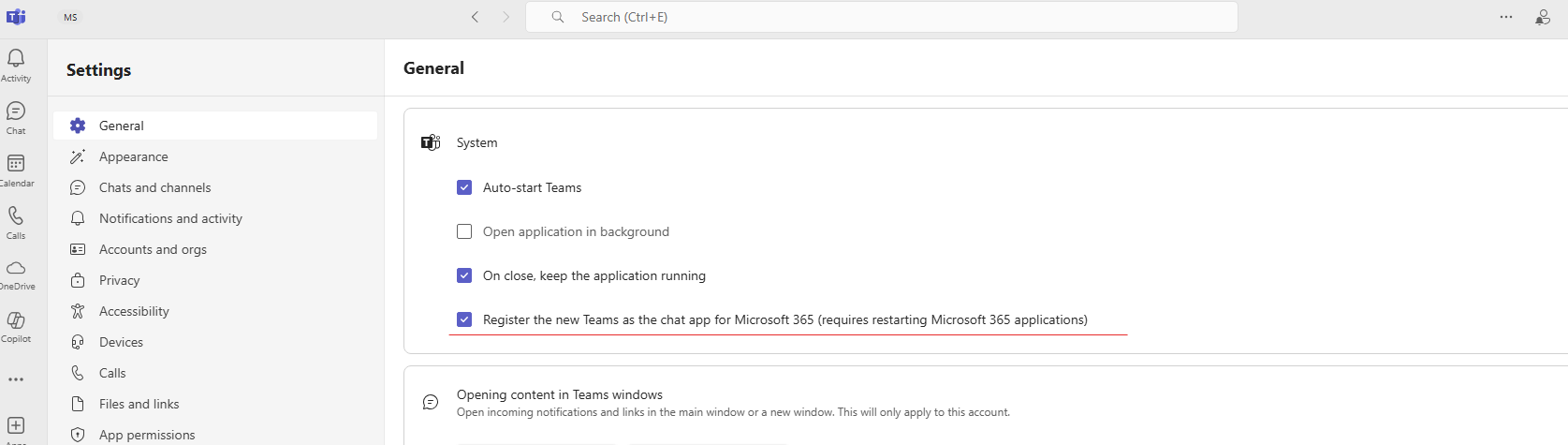
- Restart both Teams and Outlook.
Could you please try the above steps. This will assist me in pinpointing the cause of the problem and offering a tailored solution.
Please note that our initial response might not resolve the issue right away. However, with your cooperation and more detailed information, we can work together to find a solution.
Sincerely
Albert |Community Moderator
' cx='32' cy='32' r='32' /%3E%3Ctext x='50%25' y='55%25' dominant-baseline='middle' text-anchor='middle' fill='%23FFF' %3EA%3C/text%3E%3C/svg%3E)
